The Android Debloater is an Android Bloatware Remover Tool developed by oop7, a GitHub developer. This tool will remove unwanted Android apps that are pre-installed with every Android smartphone that are not required by you. If you bought a cheap Android smartphone, you may see many pre-installed Android apps that are pre-installed o n your smartphone. These apps may show many Ads and encourage you to use your smartphone; you may not remove the apps by default, but you can uninstall or remove them with your pc or laptop by using Android Debloater – All-In-One Tool.
With this tool, you can find any unwanted Android apps and pre-installed stock apps that you want to remove from your device without rooting the device. The Android Debloater tool will use the adb shell method to find and create a list of apps that are pre-installed on your device, then you can select the apps and remove all the Bloatware in one click from your device. In this post we have shared the latest version of Android Debloater setup for Windows from the official GitHub page, if they remove the link the you can download from here.
Android Debloater – All-In-One Tool Features
- Device Discovery – Automatically detect and connect to Android devices.
- Package Scanning – Scan installed packages with live search and filtering.
- Batch Uninstall – Uninstall multiple apps at once with confirmation.
- Automatic Backups – Create APK backups before every uninstall.
- One-Click Restore – Restore apps from backups with a modal picker.
- Web Search – Right-click any package to search for information online.
- Update Checker – Check for app updates from GitHub releases.
- Cross-Platform Support – Windows, macOS, and Linux support.
- Support the latest Android 15, Android 16
Download for Windows, Linux/Mac
In this download section, we have shared the latest Android Debloater v2.5.3 for Windows in MSI and EXE setups. The tool is available for macOS/Linux: you can download the macOS/Linux version from the GitHub page for free.
Download Windows –
Download EXE Version – Android.Debloater_0.1.0_x64-setup.zip | GitHub page
How to Remove Bloatware using Android Debloater Tool
1 First, download and install the MSI or EXE version of Android Debloater.
2 Enable Developer Options and USB Debugging on your Android phone. Follow the guide to Enable Developer Options and USB Debugging, and connect the USB cable to your Phone.
3. Open the tool from the desktop and click Refresh Device, then Allow ADB connection on your Phone.
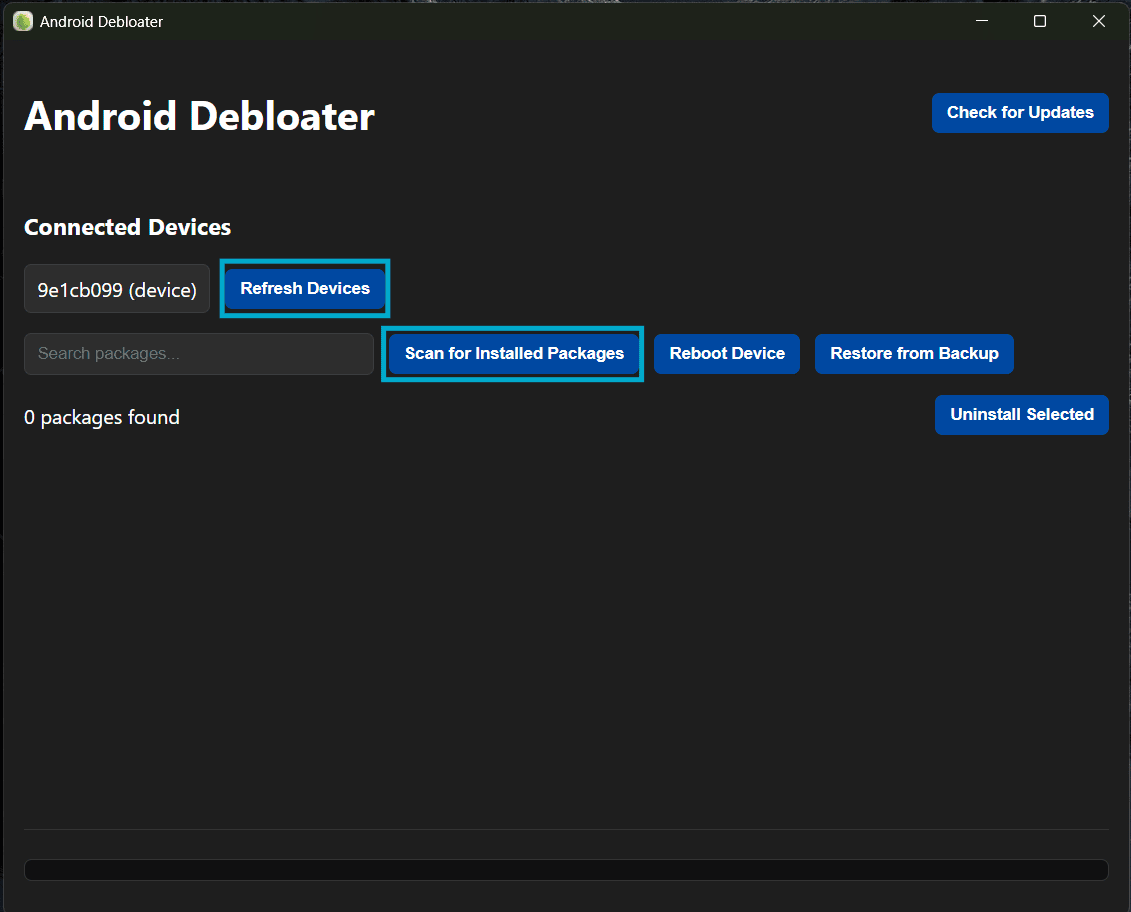
4. Once the device is connected to the tool, click on Scan for Installed Packages, and select the apps or Bloatware you want to remove. Click Uninstall Selected.
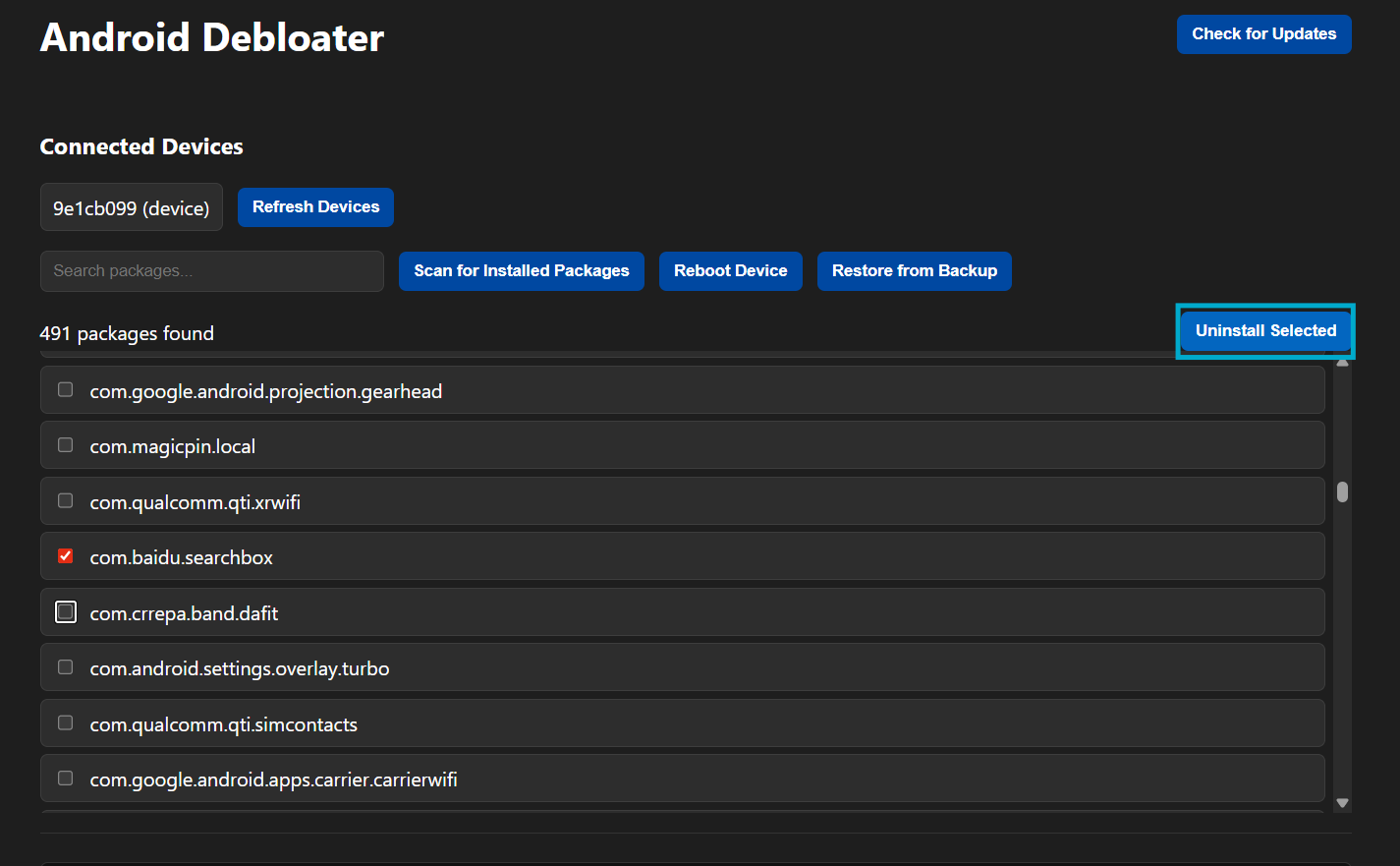
5. Confirm the Bloatware App by right-clicking on the package. It will search on Google after confirming the app. Click on Uninstall Selected.
6. Once the Bloatware is removed from the Android device, reboot the device.
Final Thought
The user-friendly design of Android Debloater is the key reason why users can remove bloatware from their Android device. Users are able to use the Android Debloater application to remove bloatware and other unwanted applications on your device. This is especially beneficial if you don’t have a rooted device.
There are many benefits to using this app including freeing space that was previously used by bloatware, removing unwanted apps that were installed on your device, and improving performance. Because of the automatic backup feature built into the app, you will be able to safely restore your device back to its previous state in the event something goes wrong.