

Are you looking for the Latest and Old versions of Magisk Build? On this page, you will get the Latest and old APKs. Here is the Latest Magisk Manager Version 8.0.7 – installer Magisk 30.7 and Beta v30 supported Android 16 and fixed several implementation bugs, and supports installing Magisk into the vendor_boot partition. The Manager 8+ now supports Samsung AP firmware on Android P, the new UI. The v30 + supports both HyperOS 3.0 and Samsung ONE UI 8 devices, and Magisk 30.7 supports Android 16 QPR2 Pixel 10 and 10 Pro 5G Version. We have shared the latest Magisk Manager and the flashable zip file in this post.
If you are new to Magisk, it is a powerful rooting tool for Android devices, allowing you to continue using some applications that usually block access to rooted environments. The recent releases have improved stability and performance between versions of the app so that you have the best experience across all versions of Android. All links for downloading any version of Magisk or for installation directions may be found in this post. If you would like to read about the features from previous versions, there are extensive logs of all changes and improvements so that you can choose which build would be best for you.
What is Magisk?
Magisk is the best alternative to Chainfire’s SuperSU phh’s SuperUser for rooting Android devices. Topjohnwu is the best developer who developed this app. If you have installed SuperSU on your device, then you might have seen the issue that you can’t run the banking Apps on your phone because of rooting. The app will also hide the rooting on a specific app you want, and then you can run the restricted root apps. You can also install Modules that will modify your Android device in the same way as Xposed Framework.
Features:-
- Mount
- Manager
- Resetprop
- Multiple entries, Point, fully open source
- Fully open-source
- Standard stuff like DRM-verity checks and much more
- SU
- Systemless Root
- Hide Root with Root Hide
- Modules
latest Magisk Manager Changelogs:-
Magisk v30.7
[MagiskInit] Support Android 16 QPR2 sepolicy format
[MagiskInit] Support using klogdump partition as pre-init storage
[Zygisk] Support Android 16 QPR2, Android XR, and Nubia devices
[MagiskSU] Do not drop capabilities by default when switching to non-root UIDs
[MagiskSU] Use --drop-cap explicitly to drop capabilities
[MagiskBoot] Better lzma format detection
[MagiskBoot] Fixed commandline argument parsing bugs
Magisk v30.6
[General] Migrate a significant portion of the codebase to Rust
[General] Various minor bug fixes
[General] Support installing Magisk into vendor_boot partition
[Core] Improve Magisk specific files injection logic
[MagiskSU] Add ability to restrict Linux capabilities even if running as root (uid=0)
[MagiskSU] Fallback to older implementation when the kernel doesn't support zero userspace copy APIs
[MagiskPolicy] Support new sepolicy binary format introduced in Android 16 QPR2
[resetprop] Reduce property modification traces
[resetprop] Properly support Android versions with property overrides
Download Latest Magisk
In the download section, you can find the new version of Magisk 30.7, as well as the old version v14 and the beta version 30. The manager version ranges from v8.0.7 to v6.1.0, accompanied by an Uninstaller, allowing you to try it on your old Android device as well.
Stable
| Version | Download Link |
|---|---|
| New Magisk v30.7 | Magisk-v30.7.apk |
| Magisk v30.6 | Magisk-v30.6.apk |
| Magisk v29 | Magisk-v29.0.apk |
| Magisk v28.1 | Magisk-v28.1.apk |
| Magisk v28 | Magisk-v28.0.apk |
| Magisk v27 | Magisk-v27.0.apk |
| Magisk v26.3 | Magisk-v26.3.apk |
| Magisk v26.2 | Magisk-v26.2.apk |
| Magisk v26.1 | Magisk-v26.1.apk |
| Magisk v26 | Magisk-v26.0.apk |
| Magisk v25.1 | Magisk-v25.1.apk |
| Magisk v25.0 | Magisk-v25.0.apk |
| Magisk v24.1 | Magisk-v24.1.apk |
| Magisk v21.4 | Magisk-v21.4.zip |
| Magisk v20.1 | Magisk-v20.1.zip |
| Magisk v20.0 | Magisk-v20.0.zip |
| Magisk v19.4 | Magisk-v19.4.zip |
| Magisk v19.3 | Magisk-v19.3.zip |
| Magisk v17.1 | Magisk-v17.1.zip |
| Magisk v16.0 | Magisk-v16.0.zip |
Beta
| Version | Download Link |
|---|---|
| Magisk v30.4 (Pre-release) | Magisk-v30.4.apk |
| Magisk-v21.1 | Magisk-v21.1.zip |
| Magisk-v21.0 | Magisk-v21.0zip |
| v19.0 | Magisk-v19.0.zip |
| v15.3 | Magisk-v15.3.zip |
| v15.4 | Magisk-v15.4.zip |
| v16.1 | Magisk-v16.1.zip |
| v16.2 | Magisk-v16.2.zip |
| v16.3 | Magisk-v16.3.zip |
| v16.4 | Magisk-v16.4.zip |
| v16.6 | Magisk-v16.6.zip |
Magisk Manager Latest To Old
| Version | Download Link |
|---|---|
| v23.0 | Magisk-v23.0.apk |
| v8.0.7 | MagiskManager-v8.0.7.apk |
| v8.0.3 | MagiskManager-v8.0.3.apk |
| v7.5.1 | MagiskManager-v7.5.1.apk |
| v7.4.0 | MagiskManager-v7.4.0.apk |
| v7.3.5 | MagiskManager-v7.3.5.apk |
| v7.3.4 | MagiskManager-v7.3.4.apk |
| v7.3.2 | MagiskManager-v7.3.2.apk |
| v7.2.0 | MagiskManager-v7.2.0.apk |
| v7.0.0 | MagiskManager-v7.0.0.apk |
| v6.1.0 | MagiskManager-v6.1.0.apk |
Latest Uninstaller ⇒ uninstaller-20210117.zip
How to install
You can install the Manager simply by installing the APK. You can install Magisk 30.7 Zip in two ways: first, you can do it directly by patching the boot image file. The second one is with TWRP recovery (no root required), and the other method is with Flashify App (Root Required).
Prerequisite:-
- First backup Phone Apps and Internal Storage Files.
- Make sure your device is Bootloader unlocked.
- Install TWRP Recovery On Your device to flash a Zip file.
- Maintain 30-40% battery.
- Delete some data if no space in internal storage.
Install Magisk by patching the Boot image file
1. Download the latest Magsik Copy files to internal storage or SD Card and install on your device.
2. Extract the boot file from your device’s latest firmware or download boot or init_boot.img or vendor_boot.img file from the latest firmware for your device.
New Android 14 - Android 17 Firmwere may ony have boot.img or vendor_boot.img. So extract boot.img or vendor_boot.img from the firmware.
3. Copy the boot or init_boot.img to your device download folder and open the Magisk app or KernelSU, any of the rooting apps.
4. Tap on the Install button at the top, select boot.img or init_boot.img, and the app will patch and enable SU on the boot file.
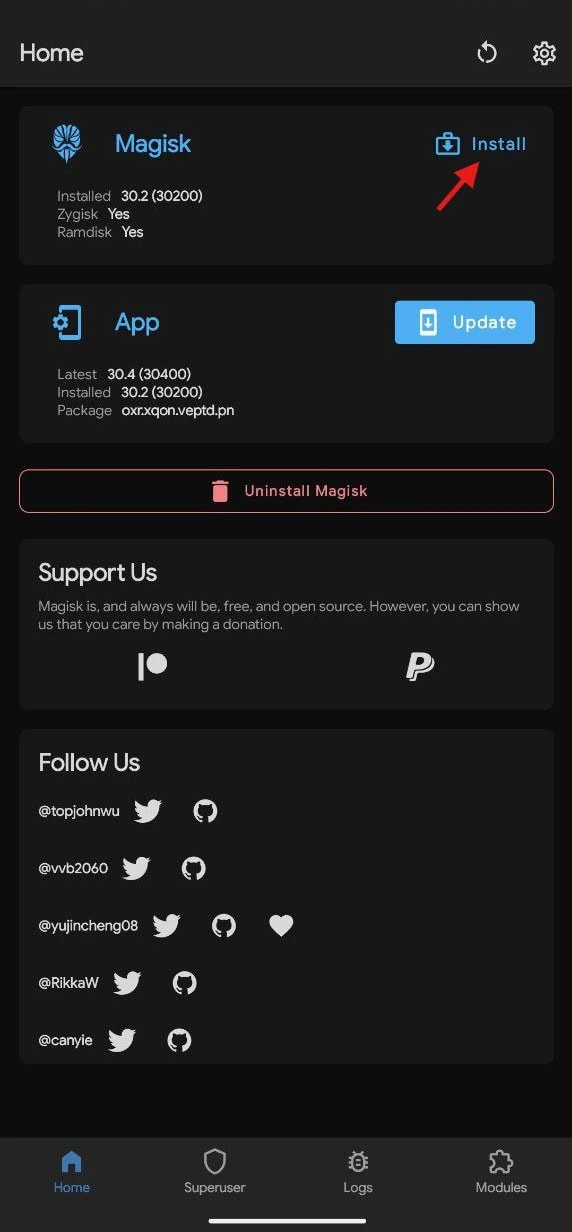
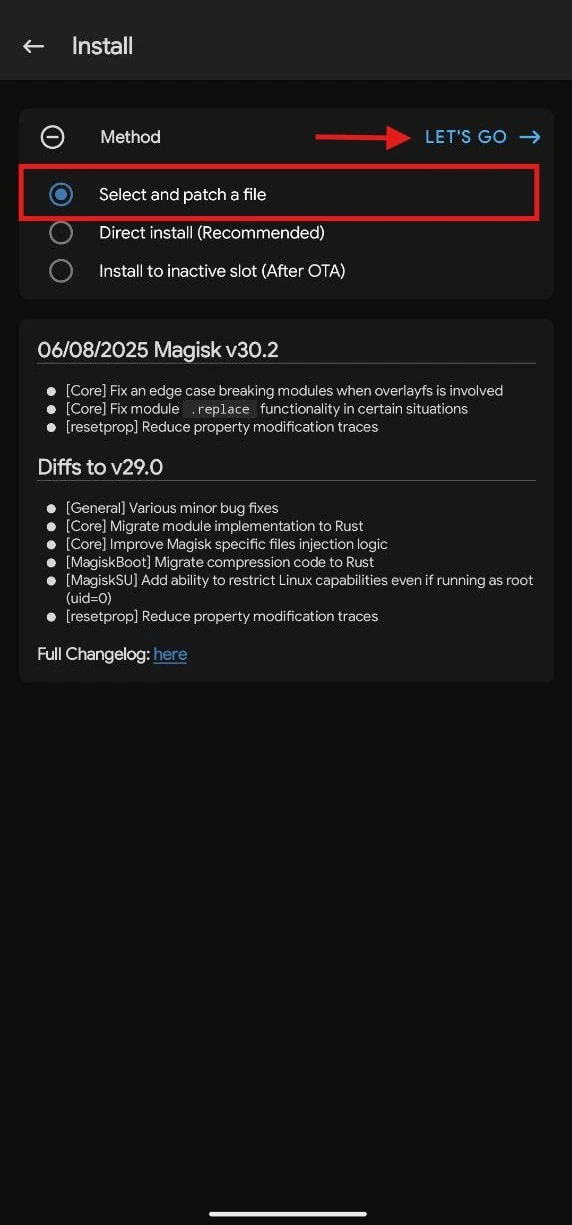
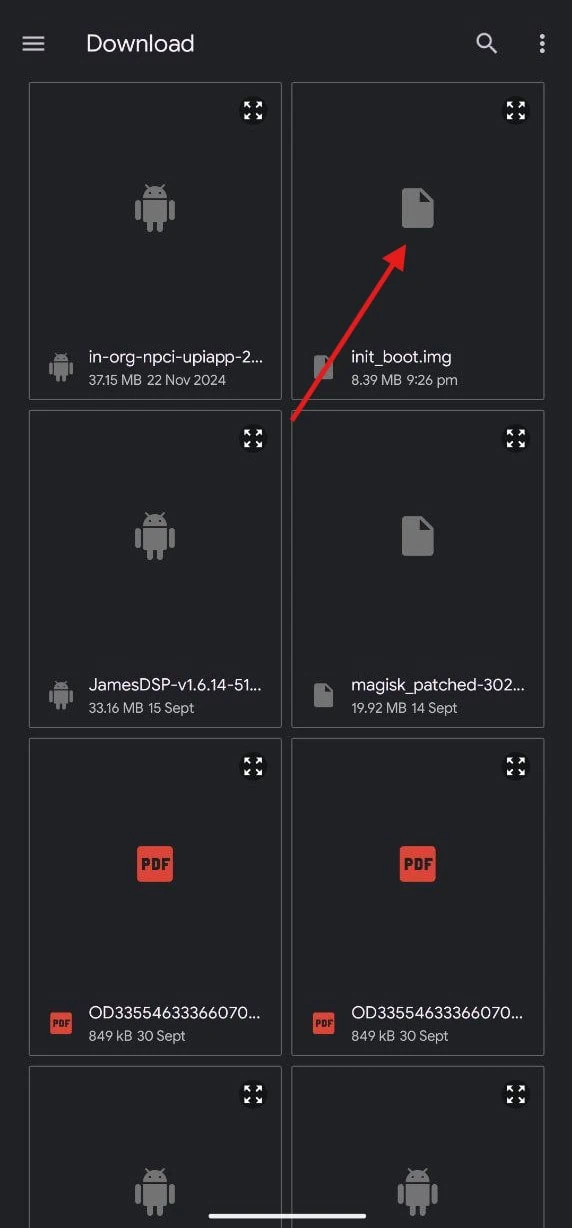
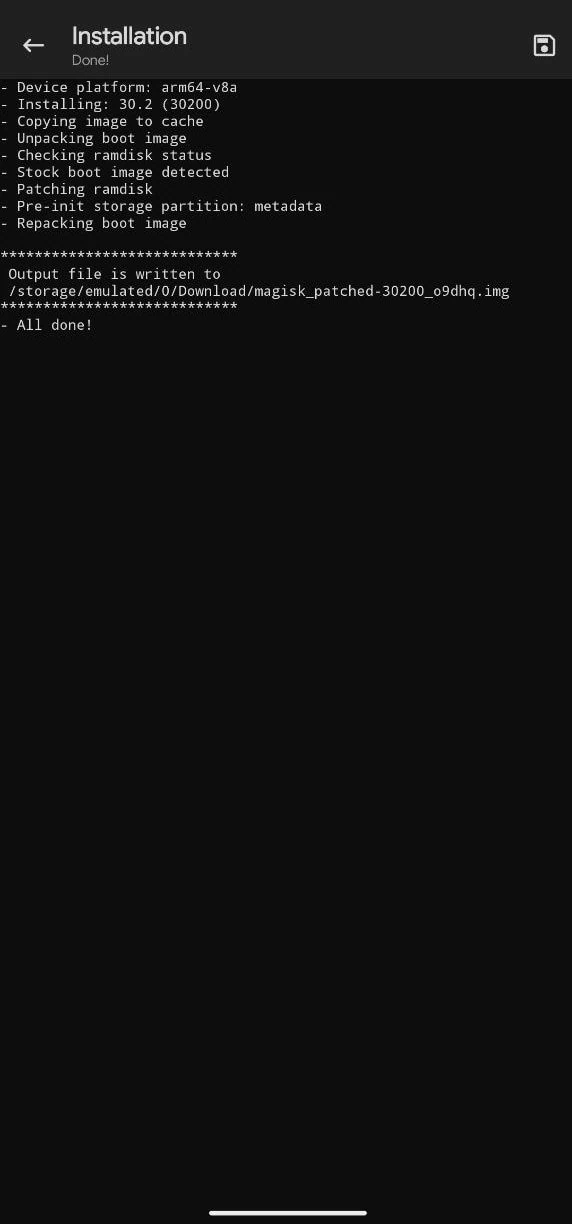
5. Rename the patched image to magisk_patched.img file.
The patched boot will be located at /storage/emulated/0/Download/magisk_patched.img.6. Download the latest ADB & fastboot tool and unzip it on your PC C:\ Drive.
7. Copy the magisk_patched.img to your pc platform-tools folder
8. Open CMD on your PC and type cd C:\platform-tools and hit enter.
9. Flash the patched boot image by using the command
fastboot flash init_boot magisk_patched.imgNew Android 14 – Android 17 Firmwere may ony have init_boot.img or vendor_boot.img. So for non init_boot firmwere use this command.
fastboot flash boot magisk_patched.imgfastboot flash vendor_boot magisk_patched.img10. Reboot the device manually or type “fastboot reboot” to reboot the device.
11. Open the Magisk app and verify root access and safety net check.
How to Install Magisk With TWRP Recovery (Old Methods)
1. Download the latest APK and the latest Magisk Stable Zip or Beta Zip if you want to use the latest features.
2. Copy the Manager APK and flashable Zip to internal storage or SD card (Don’t Extract).
3. The Install Manager APK doesn’t open, and switch off your phone.
4. Turn your phone into Recovery Mode by Volume Navigation key + Power Button.
5. Go to Install ⇒ Navigate to the Zip file ⇒ Swipe to install.
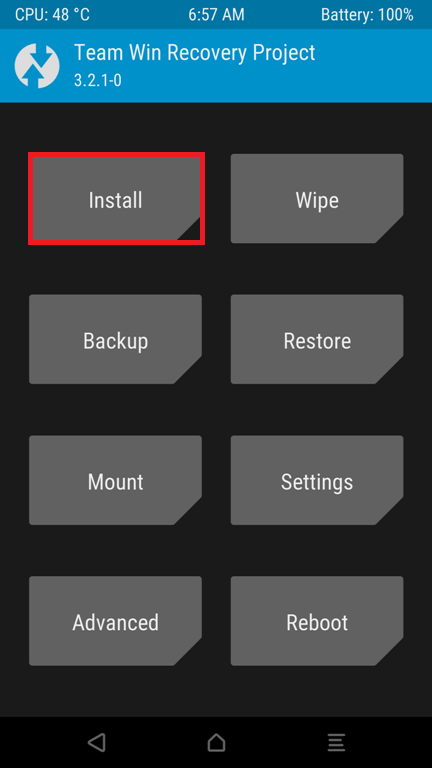
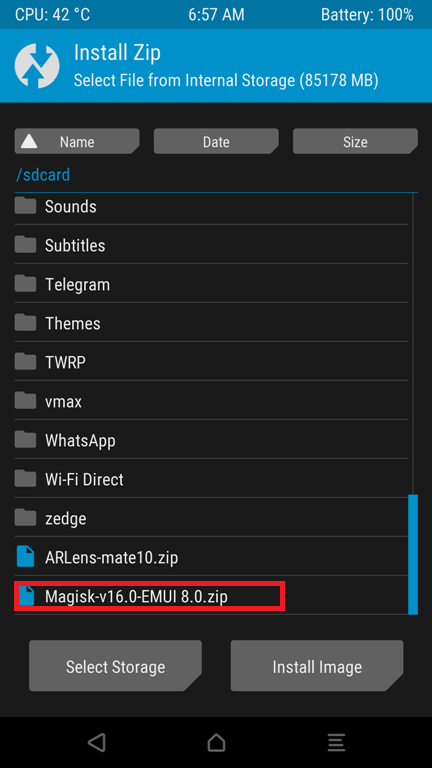
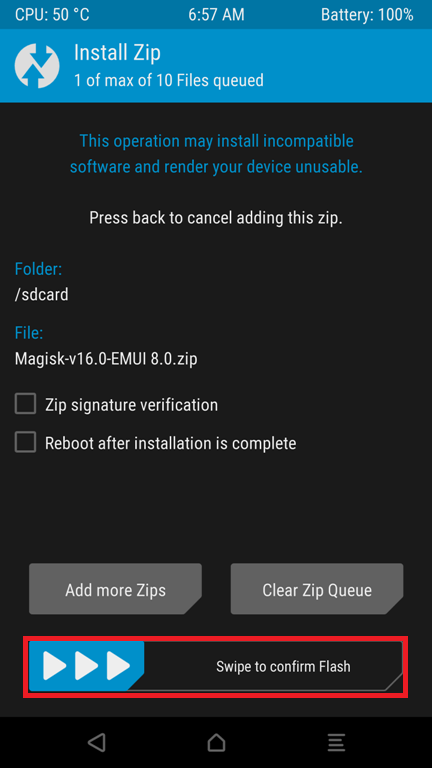
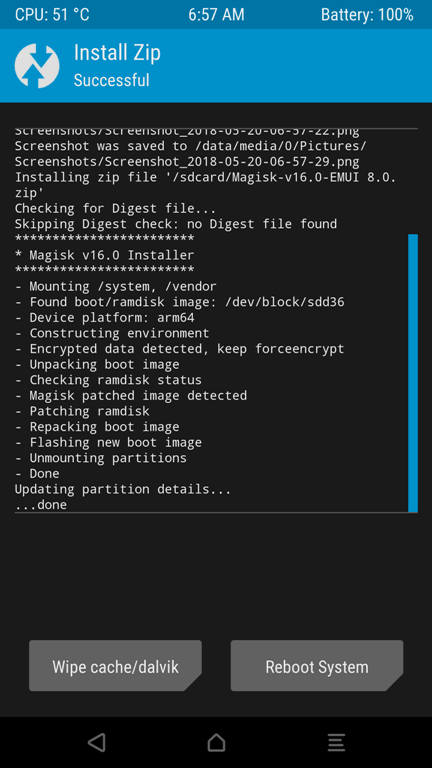
6. Back and reboot your device.
Video Guide
Verify Installation and Play Integrity PASS on Magisk:-
After rooting the device, some banking and payments apps may not work with The Magisk root system. To pass the Play Integrity with Magisk you need some moduls and setup to get Full Play Integrity PASS Here comeple Guide : – Play Integrity PASS on Magisk: Fix Banking App Root Detection.
If your device boot looped after installing or updating modules, then read this guide on How to Uninstall Magisk Module Using TWRP Recovery
Magisk Related –
- Top 10 Modules For Android 7.0, Xposed Framework Alternative
- How To Install Xposed Framework On Android Nougat 7.0 And 7.1
- Guide to Play Pokemon Go On Rooted Device






I just want to say thank You for your work. You’ve done a great job hear.
There is a lot of confusion over the word firmware. What I wanted to know is like on a PC you have device drivers called firmware including the bios. On an Android is there a separate set of device drivers that access the physical hardware like the mic and speakers, buttons and the like? Maybe it is all in the Rom you load like Oxygen OS? Can you explain how the Operating system accesses the hardware, and if there is drivers, do they get updated?