
We have already covered root solutions such as KernelSU, KernelSU Next and Magisk. But apps have gotten smarter in detecting root access; rooting your phone no longer suffices. Now apps like banking apps and streaming platforms check at the system level for root access. That is why the SUSFS module comes in. It hides inside kernel code to block detection attempts. This post will show you how to install and set up SUSFS module on KernelSU rooted device.
Root hiding has become one of the most requested features among Android power users who rely on KernelSU. KernelSU takes care of basic root management but apps like Google Wallet and enterprise software use advanced checks. They look at verified boot hashes, scan partitions and detect namespaces to find devices with root access. SUSFS closes this gap by adding hiding at kernel level which is much harder to bypass compared to previous user space hiding methods.
What is SUSFS Module?
SUSFS module is a root hiding service developed for KernelSU that operates directly at the kernel level. The module installs a userspace helper tool called ksu_susfs along with sus_su binaries into /data/adb/ksu on your device. These tools communicate with the SUSFS kernel patches that must already be present in your device kernel to enable root hiding features that banking and detection apps cannot easily bypass.
SUSFS was created by simonpunk with the module maintained separately by sidex15 to provide a complete root hiding ecosystem for KernelSU users. The module works by intercepting the signals that apps use to detect root access, modifying the responses at the kernel level before apps can read them. This includes hiding su binary presence, blocking partition modification detection, spoofing kernel information, and managing verified boot hash values. Adding the SUSFS module gives you the Root hiding feature you need to pass detection checks on most modern apps.
Features:-
- Kernel-level root hiding that blocks app detection at the source.
- SUSFS userspace helper tools (ksu_susfs and sus_su) for managing hiding rules.
- Verified boot hash management to prevent partition modified detection.
- Kernel uname spoofing to mask custom kernel information from apps.
- WebUI interface for managing SUSFS settings directly from the module.
- Compatible with Shamiko, HideMyApplist, and ReVanced root module setups.
- Automatic verified boot hash file generation for devices missing ro.boot.vbmeta.digest.
Download SUSFS Module
In this section, you will find the download links for the latest SUSFS module for KernelSU. We have also shared the AnyKernel3 patched KernelSU Kernel with SUSFS binary that will install SUSFS binary to your kernel boot image easily.
| SUSFS Module | AnyKernel3 Kernels |
|---|---|
| SUSFS Module v1.5.2+ R27 | AnyKernel3 Wild Kernels (Universal ) |
| SUSFS Module v1.5.2+ R26 | AnyKernel3 OnePlus Kernels |
| SUSFS Module v1.5.2+ R25 | AnyKernel3 Sultan Kernels |
The SUSFS module works on both GKI and non-GKI devices as long as the kernel has been compiled with SUSFS patches. Android versions 12 through 16 are supported. Make sure to check your Android kernel version and download the correct AnyKernel3 Patched Kernels. Android Version may be lower or higher, but the AnyKernel3 kernel version must match your current Android kernel version.
AnyKernel3 Wild Kernels For All Android devices, OnePlus Kernels specially designed for OnePlus devices, and Sultan Kernels come with some extra features like Mountify Support, BBR TCP Congestion Control and IPSet Support. Go to the AnyKernel3 Kernels Link – Assets Section and find the kernel that matches the Current Android kernel version, then download it.
How To Install SUSFS Module on KernelSU, KernelSU, SukiSU-Ultra
In this guide section, we will teach you First How to flash AnyKernel3 SUSFS patches kernel on your Android Device, and then the SUSFS Module Installation and Configure guide.
How to Flash AnyKernel3 SUSFS-patched Kernel
- First, back up your apps and internal storage. Make sure to maintain 30-40% battery before starting the process.
- Take a boot.img, init_boot.img backup from your device, Current Firmware, in case of bootloop ➞ Extract Payload.bin From OTA, Firmware ZIP.
- Root your device with KernelSU, SukiSU-Ultra, or ReSukiSU. Skip this step if you have already rooted.
- Download AnyKernel3 SUSFS-patched Kernel from the Download section.
Kernel Version must match the current firmware Kernel. First, check the Kernel Version in Settings ➡ About Phone ➡ Android Version. The Android Version may be lower, but the kernel version must match the KMI.

For example, I am using a custom kernel - My phone Android Version is 16, but Kernel Version is "5.10.246-gki", which is Android 12, so I will select Android 12-5.10 from the KMI List.- You can simply flash AnyKernel3 with TWRP or Orange Recovery, or download and install KernelFlasher APK on your device.
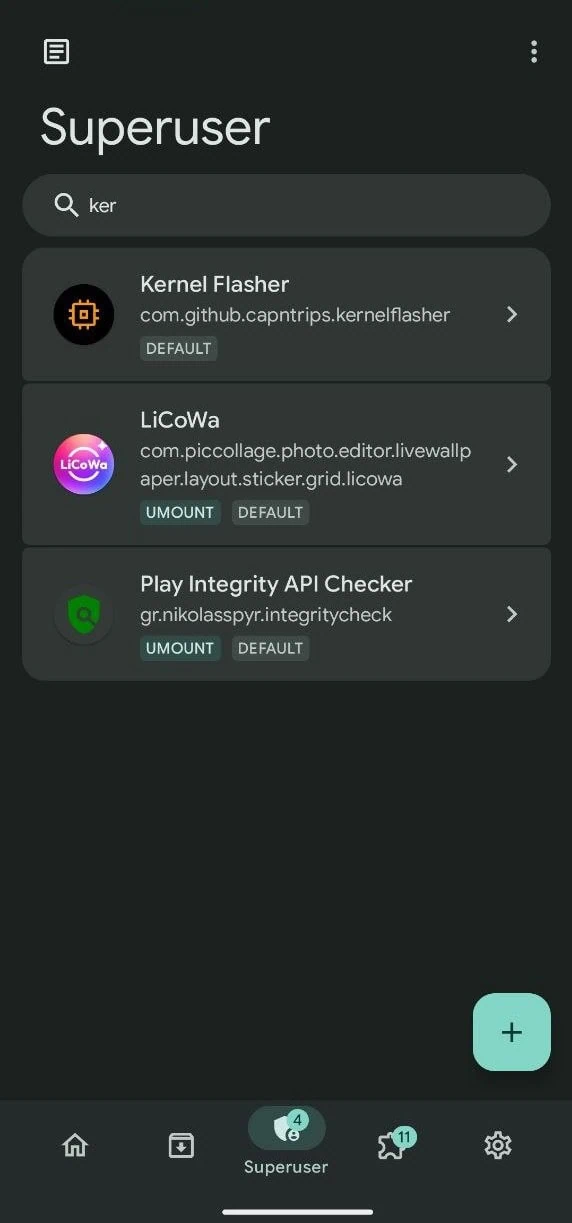
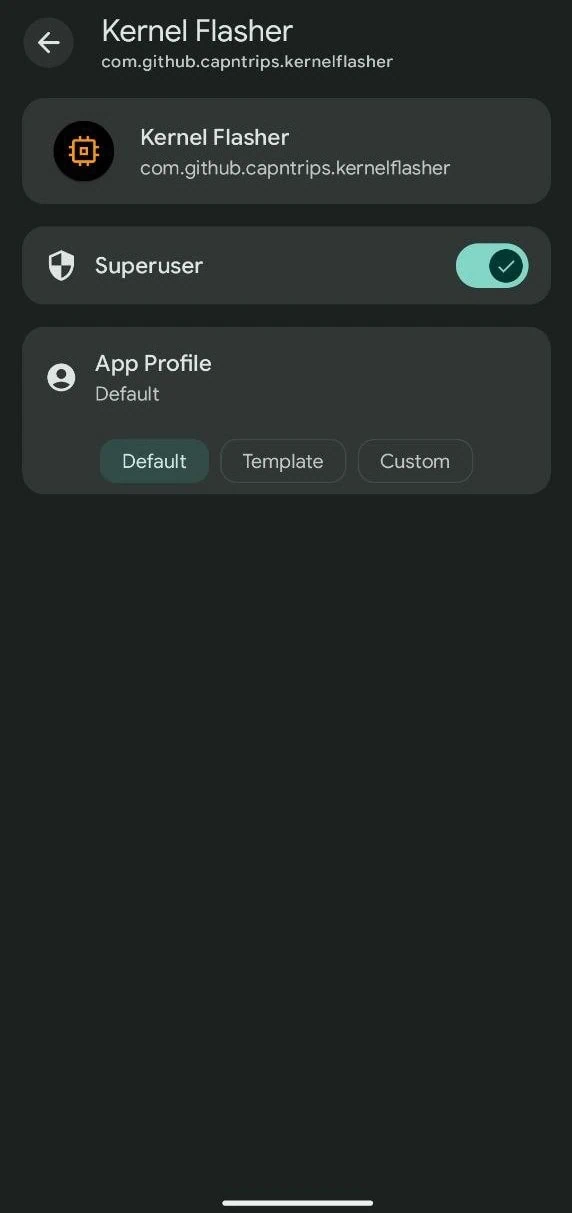
- Open KernelSU, go to Superuser Tab – Find KernelFlasher and enable Superuser by turning on the Toggle.
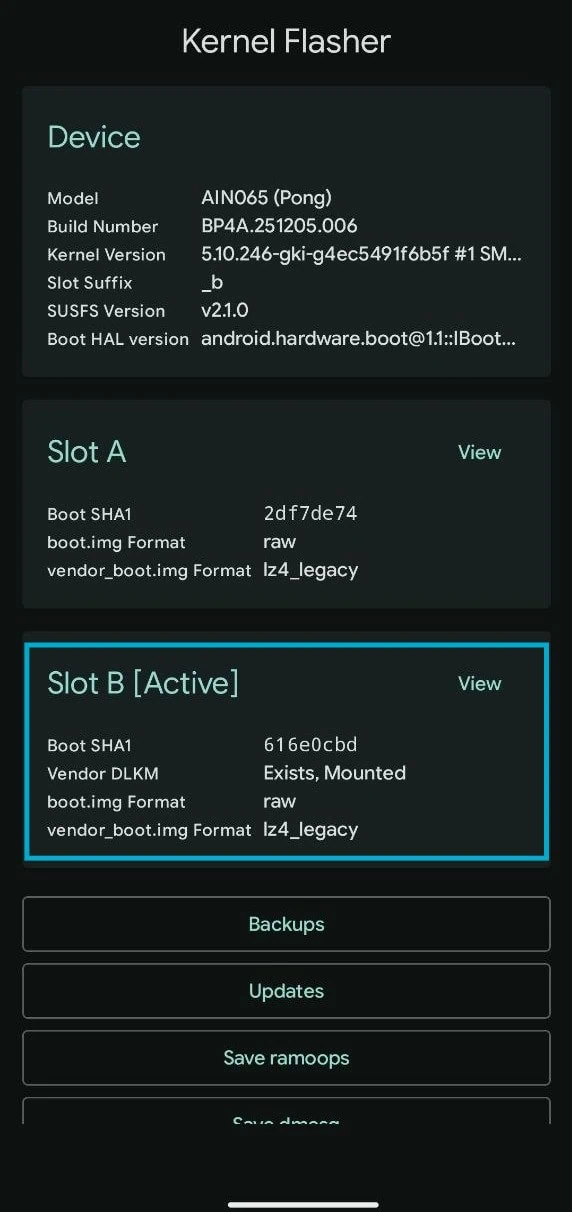
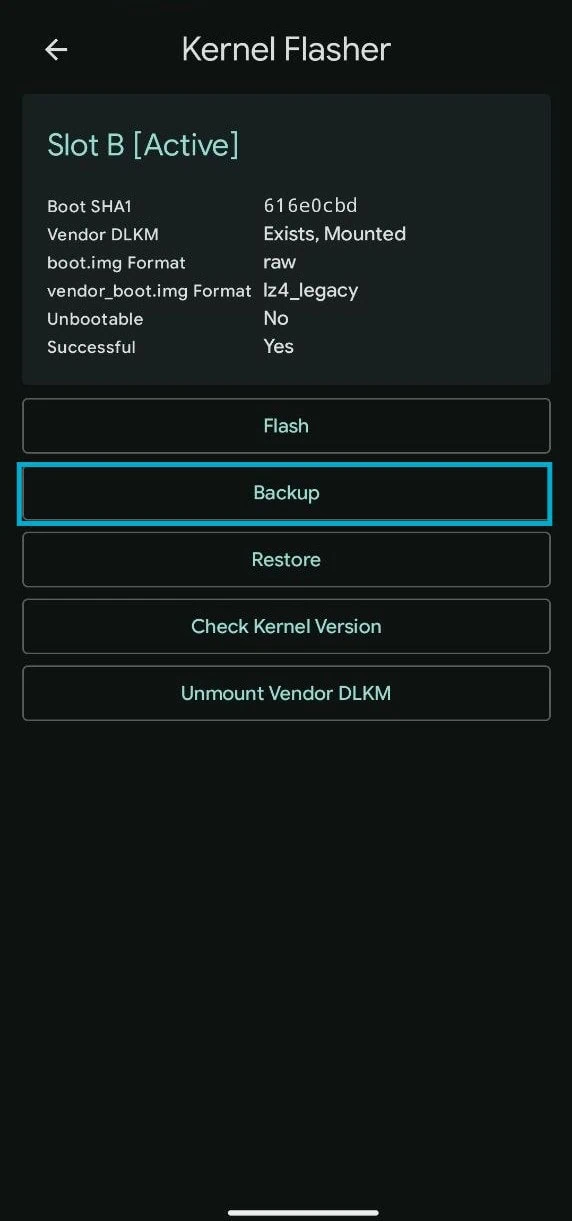
- Backup current Boot image – Open KernelFlasher APP and tap View on the “Active” Slot Tab, tap on Backup and select boot.img, init_boot.img and vendor_boot.img and then Backup Selected Partitions.
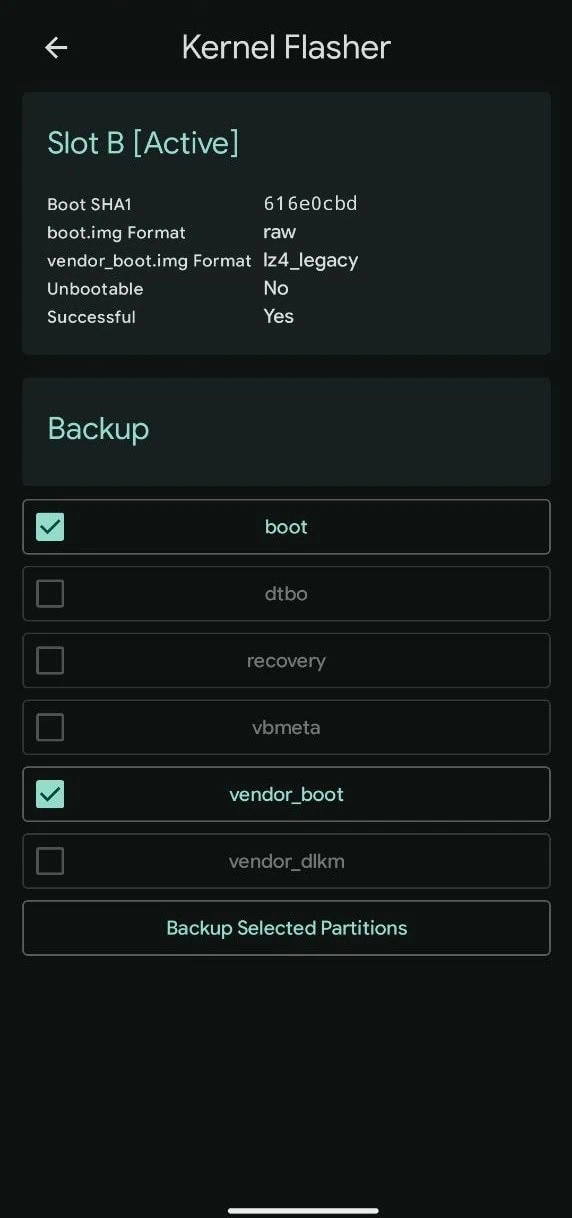
- Backup will be stored in Internal Storage ➡ KernelFlasher ➡ Backup Folder. Copy the boot files to a safe location before flashing.
- Now, back to the active Slot and tap on “Flash” then tap “Flash AK3 ZIP” and browse the AnyKernel3 SUSFS-patched Kernel zip file.
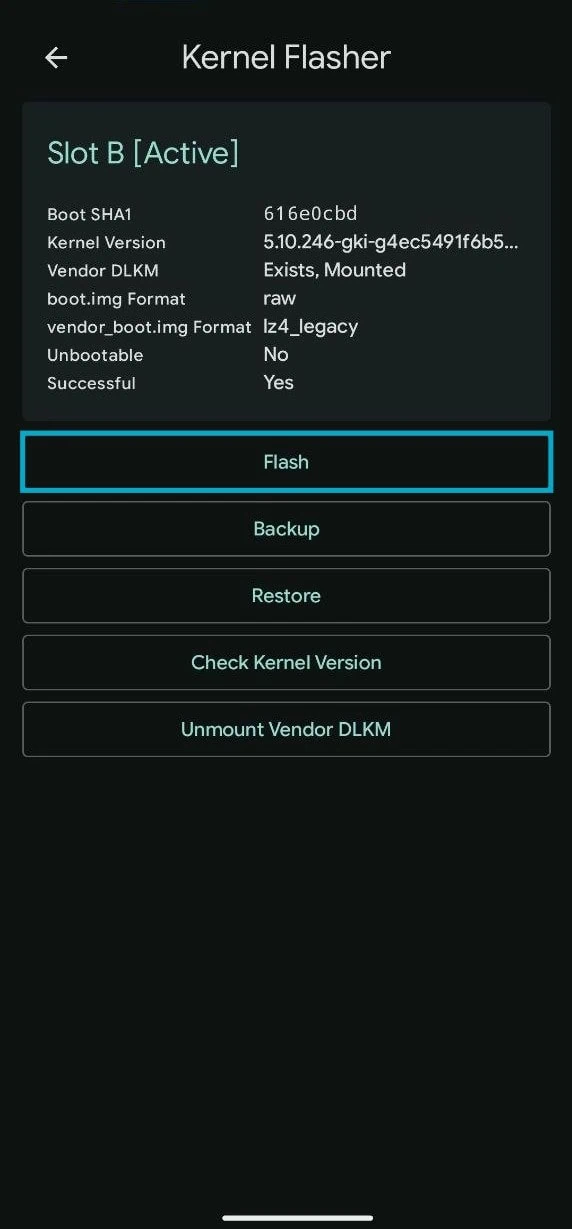
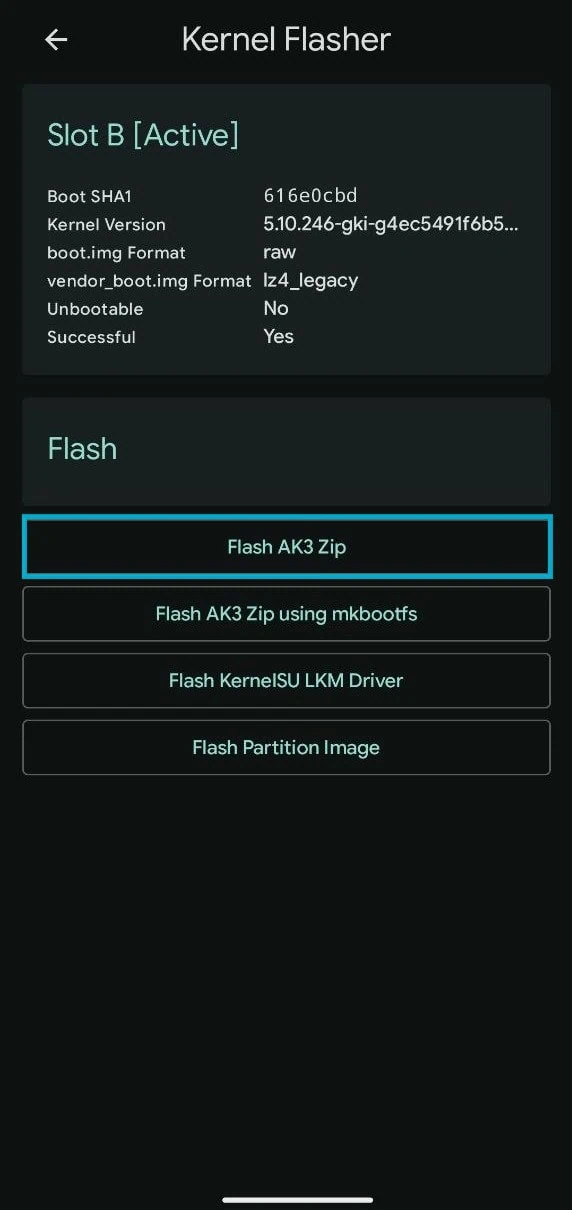
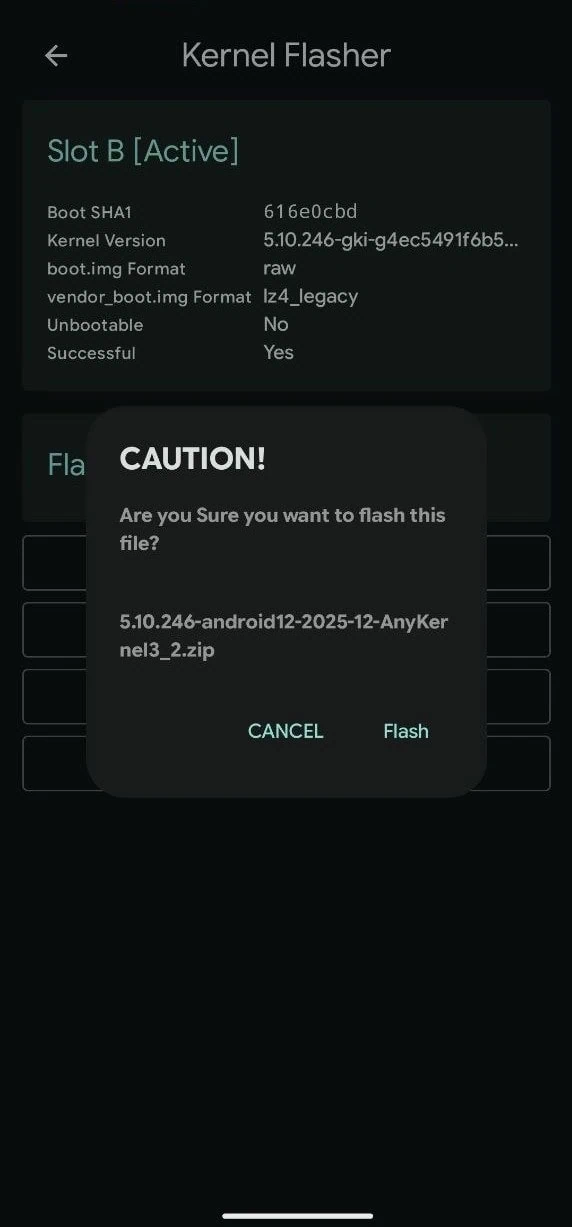
- Confirm the AnyKernel3 and tap Flash, the phone will auto reboot after flashing.
- If the kernel does not match your device or your phone is bricked, simply flash the old boot img file using this command to restore stock kernel and un-brick your device.
fastboo flash boot boot.img
or
fastboo flash init_boot init_boot.img.img
How to Install SUSFS Module
- Make sure your device has an AnyKernel3 custom kernel with SUSFS patches.
- Download the latest SUSFS module zip file from the download section above. Copy the file to your device’s internal storage or SD card.
- Open the KernelSU, KernelSU Next or SukiSU-Ultra app on your device. Go to the Modules section by tapping on the module icon at the bottom of the screen.
- Tap on the Install from storage button at the top right corner. Browse and select the SUSFS module zip file you downloaded earlier.
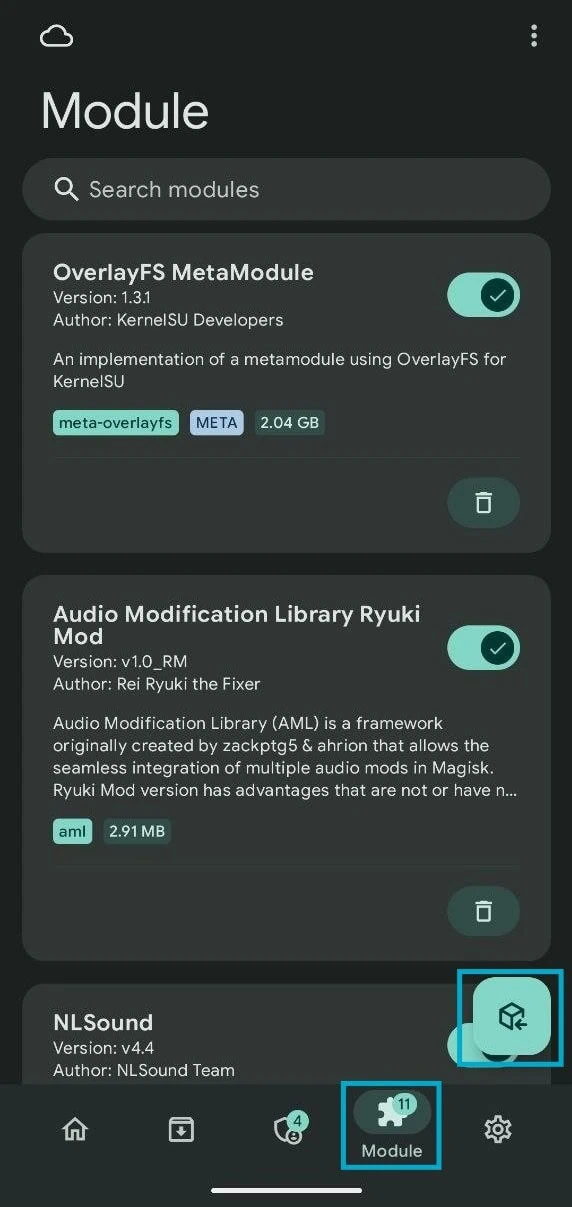
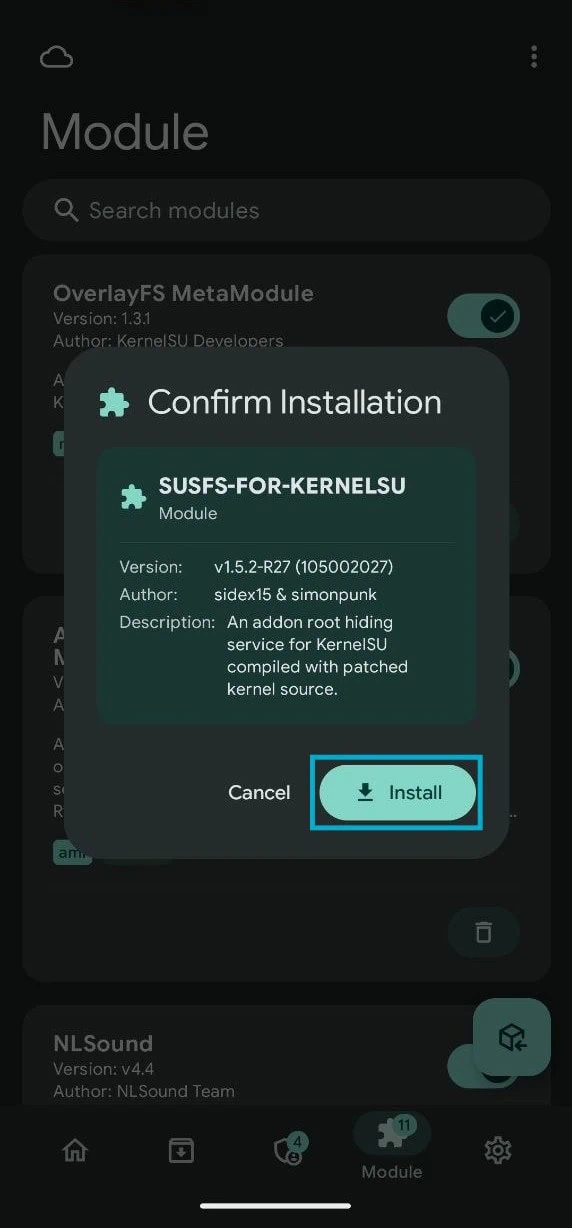
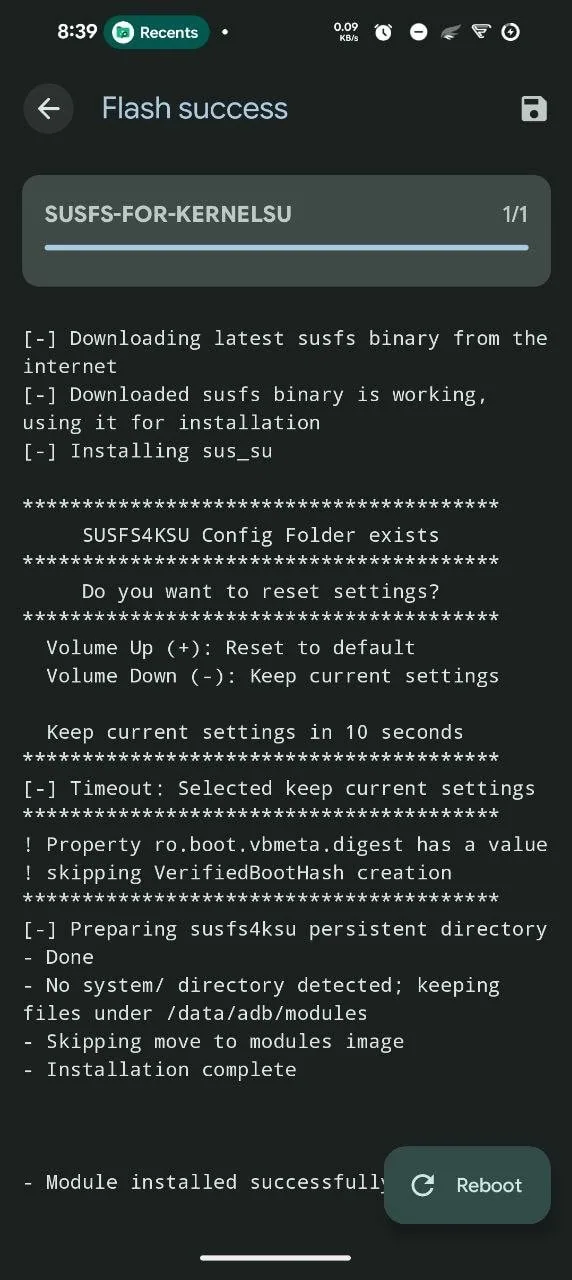
- The module will start installing. Wait for the installation to complete. You will see a success message once the module is flashed properly.
- After installation, reboot your device manually by tapping the reboot button in KernelSU.
- Once your device boots up, open the KernelSU app and go to the Modules section again. Verify that the SUSFS module shows as active with a green checkmark.
Configure SUSFS Root Hiding for Apps
- Open the SUSFS module WebUI by going to the KernelSU app Modules section and tapping on the Play Icon, then the WebUI icon next to the SUSFS module name.
- Enable the SUSFS toggle at the top of the WebUI to activate the root hiding service. This will apply all default hiding rules to your system.
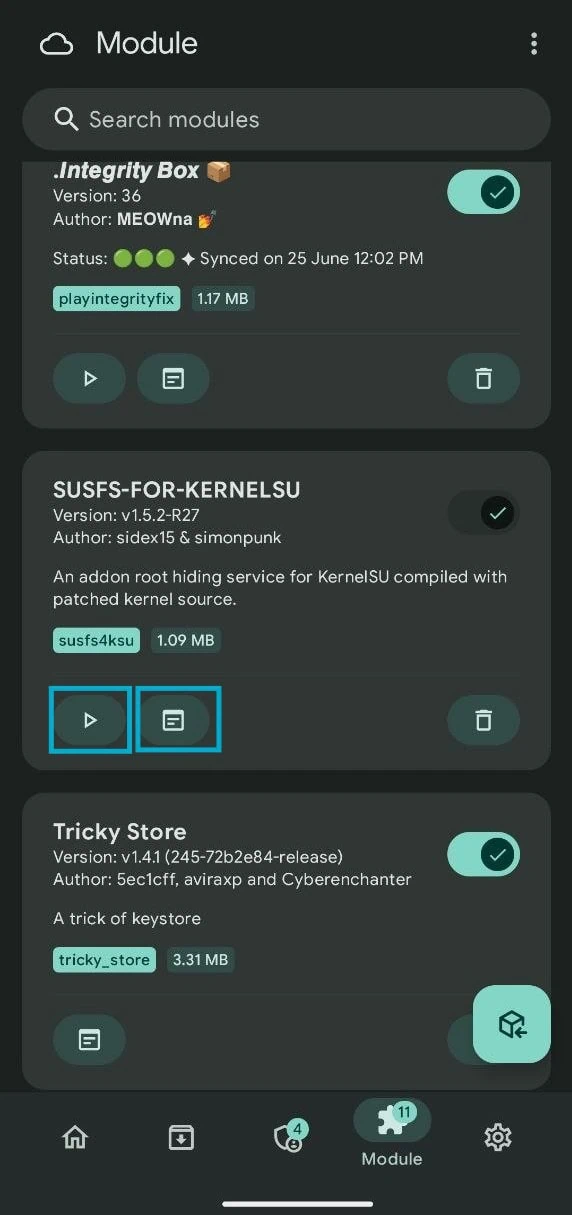
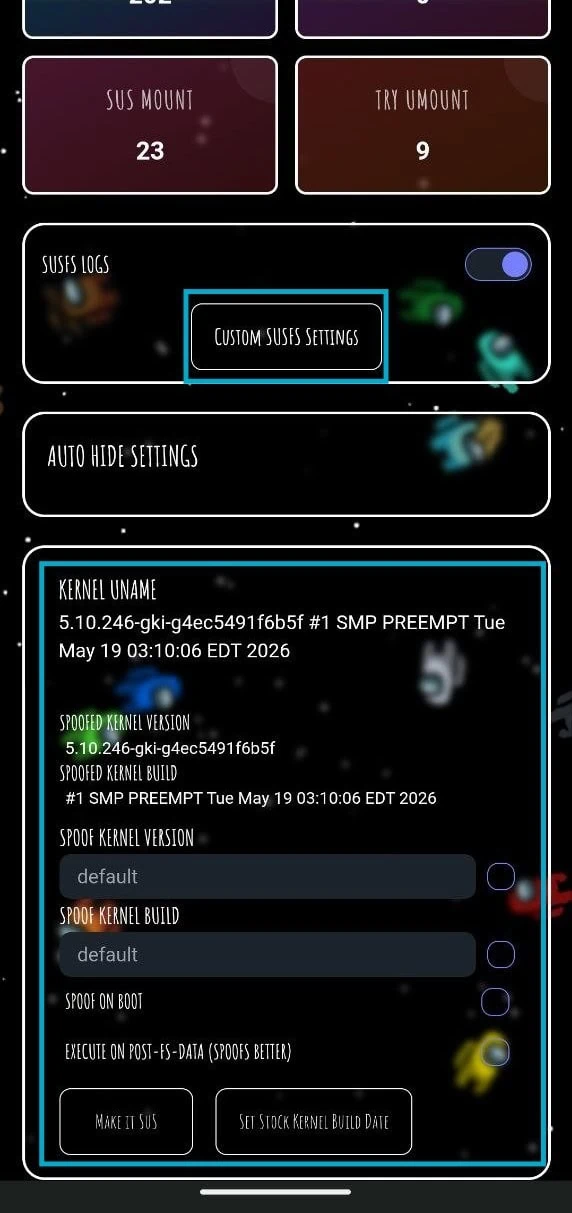
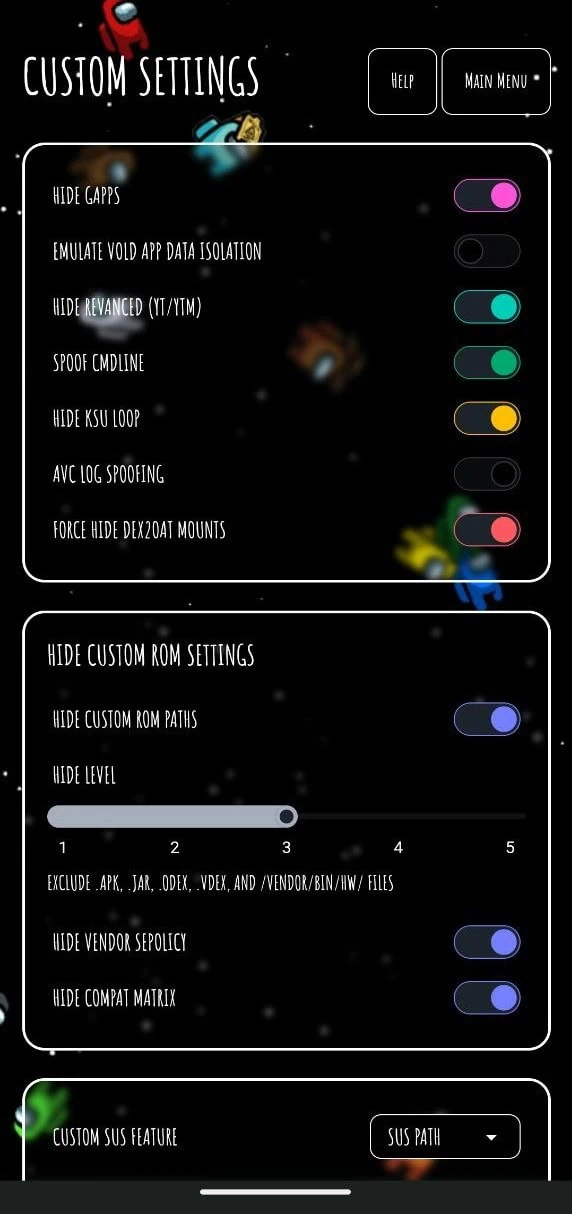
- Tap on Custom “SUSFS SETTING” and turn on these settings.
Hide Gapps (If you are using Custom Rom's)
Hide Revanced (YT/YTM) (If you are using Revanced or Revanced Extend
Spoof CMDLINE
Hide KSU LOOP
Force Hide DEX2OAT MOUNTS
#Enable These settings if you are using Cusom Rom's
HIDE Custom ROM Paths (Hide Level 2-4)
Hide Vendor Sepolicy
Hide Compat MATRIX- Return to the SUSFS WebUI and enable the spoof kernel uname option if you are using a custom kernel. This will mask the custom kernel version string and show the stock kernel information instead.
- Optional Setup
- Go to the Verified Boot Hash section. Open the Key Attestation Demo app from the Play Store and copy the verified boot hash value shown in the app.
- Navigate to /data/adb/VerifiedBootHash/VerifiedBootHash.txt on your device using a root file explorer. Paste the copied boot hash string into this text file and save it.
- Add your banking apps and detection-sensitive apps to the hide list by tapping Add App and selecting them from the list. This tells SUSFS to apply root hiding rules specifically when these apps are running.
- For advanced users, enable the umount modules option to unmount KernelSU module files from the target app mount namespace, making it appear as if no modules are installed.
- Once you have configured all settings, reboot your device one more time to apply the changes properly.
- If some apps still detect root, return to the SUSFS WebUI and enable the additional hiding options such as block partition detection and hide su binary. Then reboot again and test until all target apps work properly.
After configuring SUSFS, some banking apps may still require additional steps. The device must pass full Play Integrity checks for banking apps to function correctly. To get full Play Integrity, read this article on – Play Integrity PASS on KernelSU.
Patched Kernel Request: If you can’t find SUSFS Patched Kernel or device keep getting bricked by flashing AnyKernel3, then comment below or join our Telegram group. I will patch and provide a custom kernel For You.
Conclusion
If you use KernelSU and need banking apps and other apps that detect rooting, you need SUSFS module to hide rooting and spoofing. It conceals rooting at kernel level which is much more effective compared to older user-level approaches. SUSFS protects you against very tough detection of rooting. It handles verified boot hashes and spoofs uname of kernel and lets you set hiding rules for individual apps separately.
You like custom ROMs but still need banking apps to work. Or perhaps you are a power user who wants to control apps without compromising compatibility. Either way, SUSFS module delivers reliable hiding of rooting for KernelSU. It is easy to install through module manager of KernelSU. The Web User Interface makes configuration simple even if you are new to hiding at kernel level.