Nothing Phone Android device comes with a locked bootloader. You can’t flash recoveries like orangefox or other .img files until you unlock the bootloader. However, after unlocking the Android bootloader, you can flash any recovery image, modified image file, and even root the device. The brand has not released an official bootloader unlock guide, but there is a way to still unlock the bootloader of Nothing Phones. In this guide.
Unlocking the bootloader is a straightforward process that any Android user can do, including Nothing Phone users. However, not all Android phones support unlocking directly via fastboot. Many Android vendors, including Huawei, LG, HTC, Motorola, and Sony, don’t support direct bootloader unlocking. Instead, you must request the unlock code through their official website. You can, however, unlock your Nothing Phone’s bootloader following our Unlock Bootloader Nothing Phone steps via fastboot method completely free.
Benefits of Unlocking Nothing Phone Bootloader:-
After unlocking the Bootloader, you will be able to install TWRP Recovery, root the device, install a custom ROM and customise the device. Also, you can unbrick the device with the flash boot.img, system.img, recovery.img, userdata.img. You can flash a full ROM after you unlock the Bootloader.
There are particular disadvantages also. The most critical function of the simple fact that your cellphone becomes marginally less protected. If you are not careful, a hacker can compromise your mobile device by installing malicious programs. Some programs, typically from banks, also limit certain features on unlocked devices.
Note: Unlocking the bootloader will completely reset your device. First, back up your apps, Contacts, and Messages before starting the process.Pre-requisites:
- Before starting the Nothing Phone Bootloader Unlock process, complete a full backup of your device, including apps, Contacts, Messages, Gallery files, and Internal Storage.
- Charge the device for the installation of the interrupt.
- Install Google Android Driver – Latest Google USB Drivers for Windows
- Enable Developer Options, USB Debugging, and OEM Unlock to connect your device in ADB and fastboot mode.
- Download fastboot Tool ⇒ ADBfastboot Tool
How To Unlock Nothing Phone via Fastboot Method
1. First, read the Prerequisites and Enable Developer Options, USB Debugging, and OEM Unlock. This is the first step if you want to unlock the Nothing Phone bootloader.
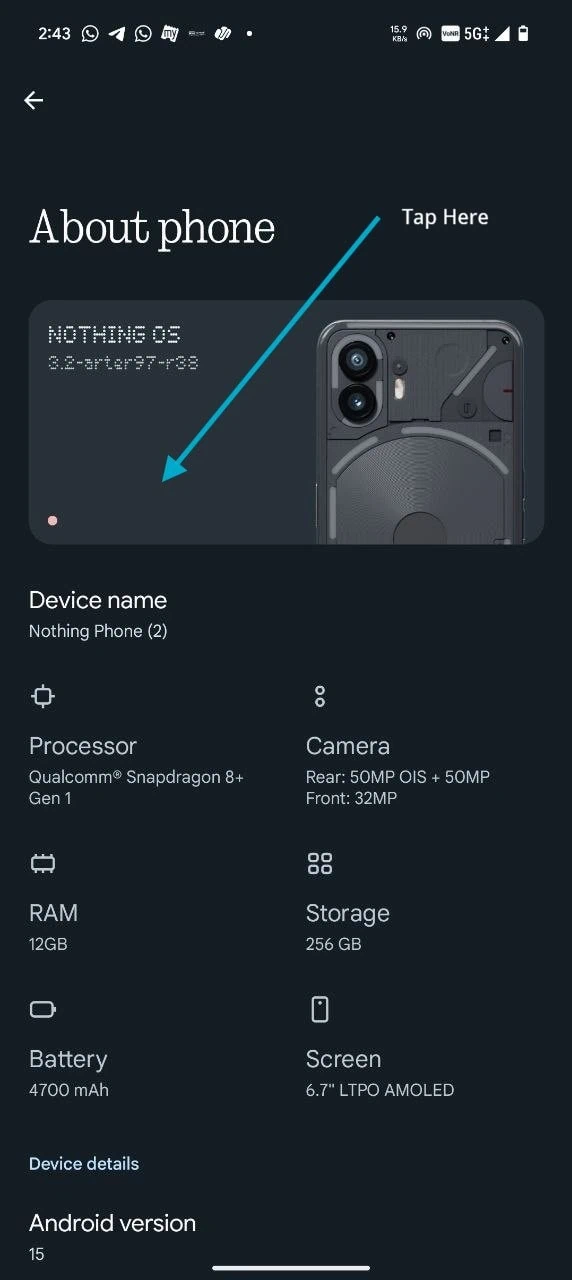
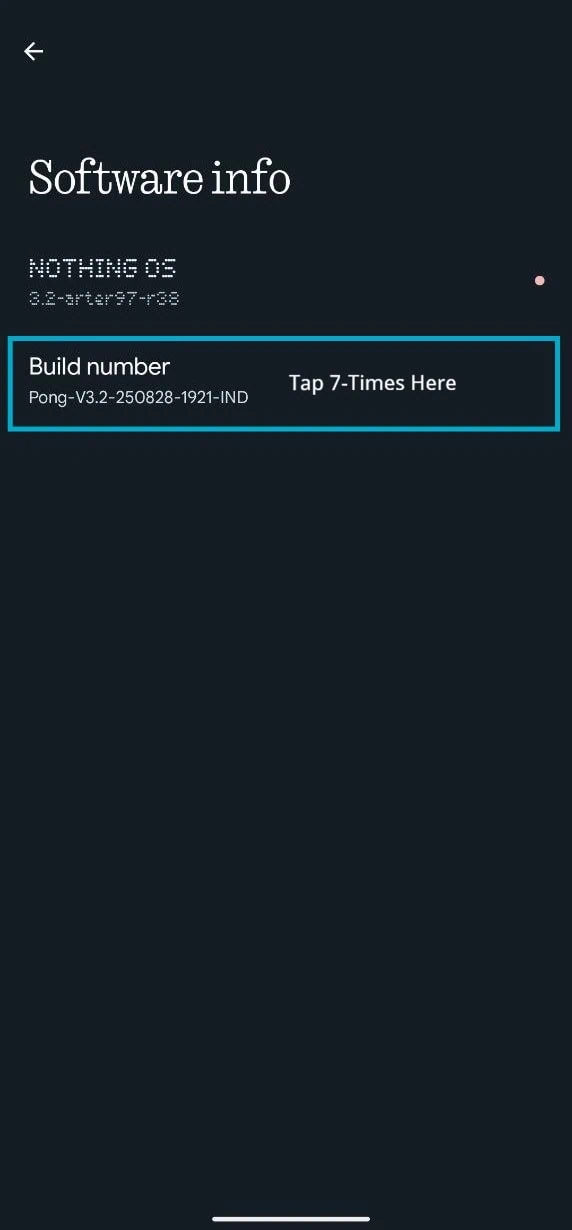
2. Download and unzip the ADB fastboot Tool.
3. Connect your device to the PC and go to the platform tools folder.
4. Now open the command prompt to the ADB & fastboot folder by holding Shift + Mouse Right Click and typing the command one by one to begin Unlock Nothing Phone bootloader process.
adb reboot bootloaderIf you see the "Allow USB Debugging" prompt on your phone, Then Enable the "Always allow from this computer" and tap OK.
This command will reboot your device into fastboot mode. Alternatively, you can manually enter fastboot mode by holding the Volume UP and Power keys together.- 5. Use this command to unlock the Bootloader.
fastboot flashing unlockor
fastboot oem unlockor
fastboot oem unlock-go
6. Press Volume Up or Down key on your phone to confirm unlocking.
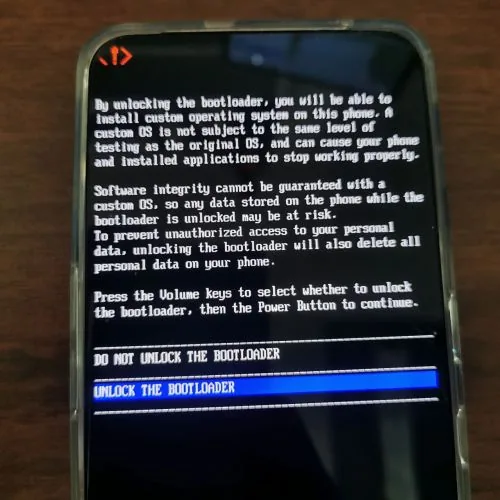
- Once you confirm the unlocking, your phone will be reset, and all data will be erased during the Unlock Bootloader operation.
7. Use fastboot OEM lock to relock the bootloader.
FAQ ON BOOTLOADER UNLOCK
Generally it is safe as long as you are careful with the procedure; however, unlocking may void your warranty and wipe all of the data.
Yes, in order to perform the standard fastboot flashing unlock procedure, all user data will be wiped clean and you will need to set up the phone again from scratch.
Yes, you will have to have the ADB and fastboot tool installed on a computer in order to send the unlock command to your phone.
OTA updates usually continue to work for most users, although, any custom modifications or root access may result in OTA update failures or require you to manually flash the updates.
A majority of Smartphones can be locked back via fastboot by putting them back into full stock firmware, but you may run into bootloop issues if you attempt to lock while running a modified system.