Magisk Alpha is a modified version of Magisk, a root solution by an Android developer from China. The root tool is similar to Official Magsik with new untested features, which is why the name is alpha. The developer added many new features that have not been tested on the official Magisk version and can pass Strong Play Integrity. The app will patch boot.img or init_boot.img kernel and root the device for you. Here in this post, we will share the latest version of Magisk Alpha that supports up to Android 16.
We have already shared other root solutions like Magisk and KernelSU, but you know, Magisk may stop developing in the future because of a lack of developers and slow development. SuperSU has already stopped developing the app; now, only old Android versions are supported. Magisk Alpha is a new root solution in the market . It can pass Strong Play Integrity, and many banking payment apps work if you root your device with the app. The app currently supports arm64-v8a and x86_64 architectures. In this post, we not only share the latest version, but also we will guide you to install Magisk Alpha on your device by patching the boot image.
What is Magisk Alpha?
Magisk Alpha is a community-driven, unofficial version of the original Magisk Project. The primary focus of the app is to provide the most robust form of root access possible while maintaining compatibility with newer Android Security implementations Play Integrity. As a result, this project is completely independent from topjohnwu and is primarily distributed through the Telegram Channel.
Although many of the same core functionalities exist within the Magisk Alpha Build as the Official Magisk Build (i.e., ability to bypass Play Integrity), the primary difference lies in the level of customization available for advanced users (e.g., low-level tweaks, per-app root control). Due to the experimental nature of many of these features, the Magisk Alpha Fork is classified as “Alpha” which typically means the builds may be unstable/untested compared to the official Magisk Builds.
Features:-
- Mount
- Manager
- Resetprop
- Multiple entries, Point, fully open source
- Fully open-source
- Standard stuff like DRM-verity checks and much more
- SU
- zygisk
- Systemless Root
- Systemless Host
- Hide Root with Root Hide
- Modules
Magisk Alpha Changelogs:-
version – e8a58776-alpha 30700
Download Magisk Alpha
In this Download section, you can download the Latest Magisk Alpha e8a58776-alpha 30700 that supports old Android versions 10 to 16.
Download –
Install Magisk Alpha by patching the Boot image file
1. First backup Phone Apps and Internal Storage. Make sure your device is Bootloader unlocked. Install TWRP Recovery (Optional). Maintain 30-40% battery.
2. Download the latest Magisk Alpha APK. Copy files to internal storage or SD Card and install on your device.
3. Extract the boot file from your device’s latest firmware or download boot or init_boot.img file from the latest firmware for your device.
New Android 14 - Android 17 Firmwere may only have boot.img or vendor_boot.img. So extract boot.img or vendor_boot.img from the firmware.
4. Copy the boot or init_boot.img to your device download folder and open the Magisk app.
5. Tap on the Install button at the top, select boot.img orinit_boot.img, and the app will patch and enable SU on the boot file.
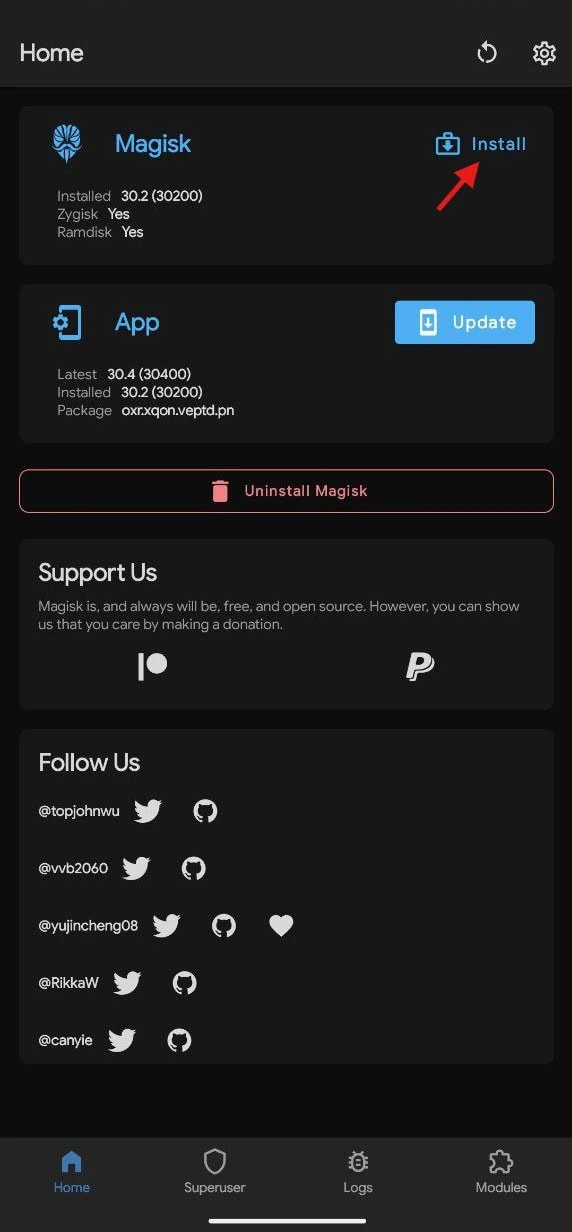
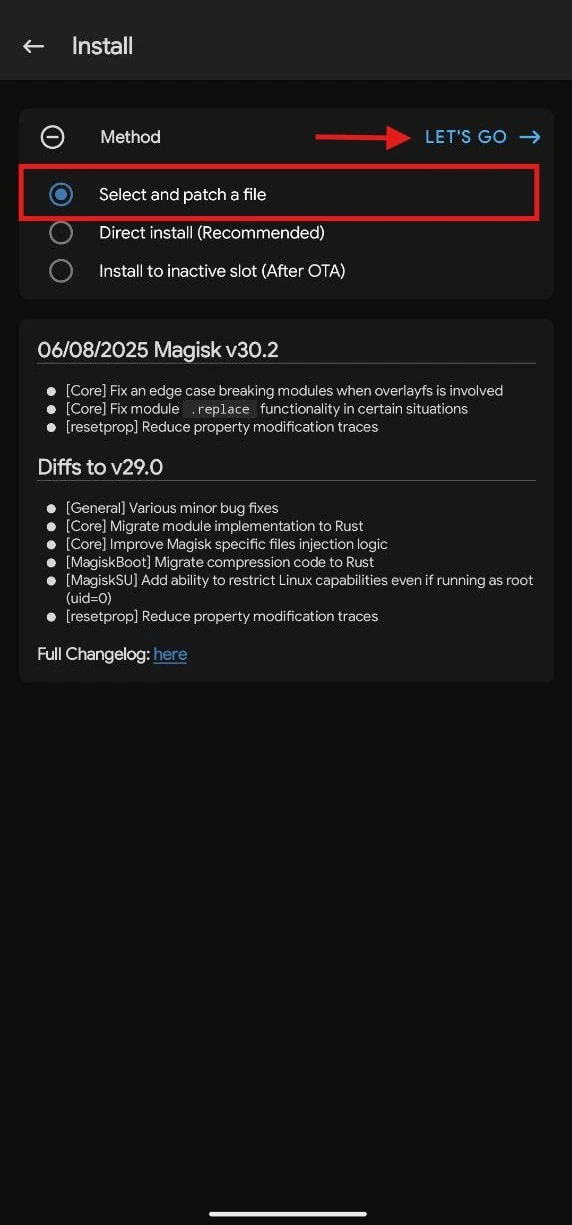
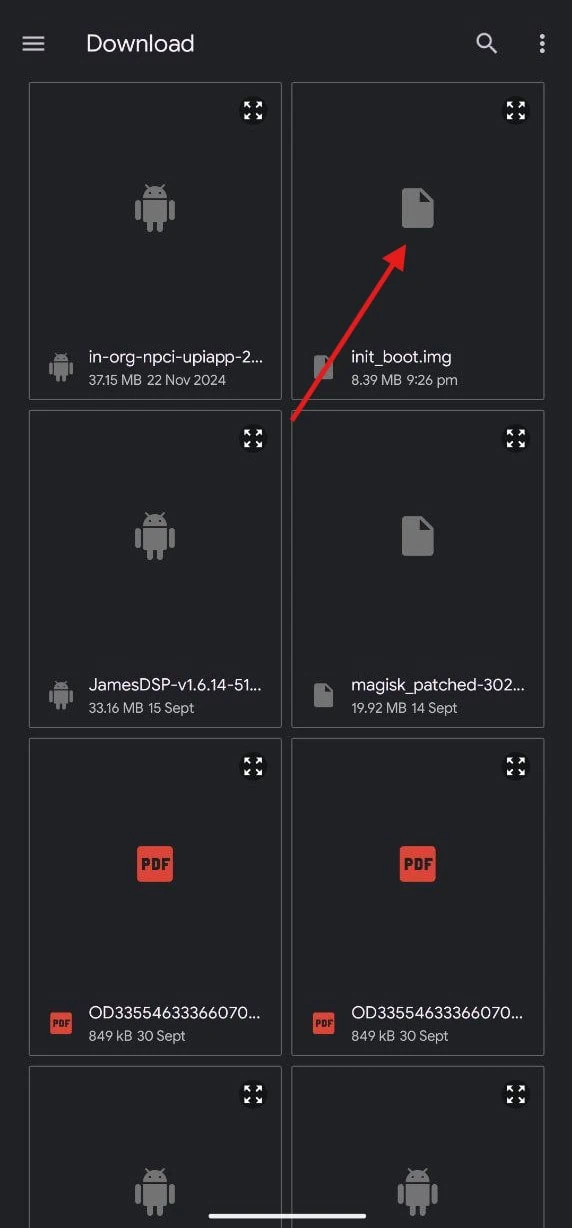
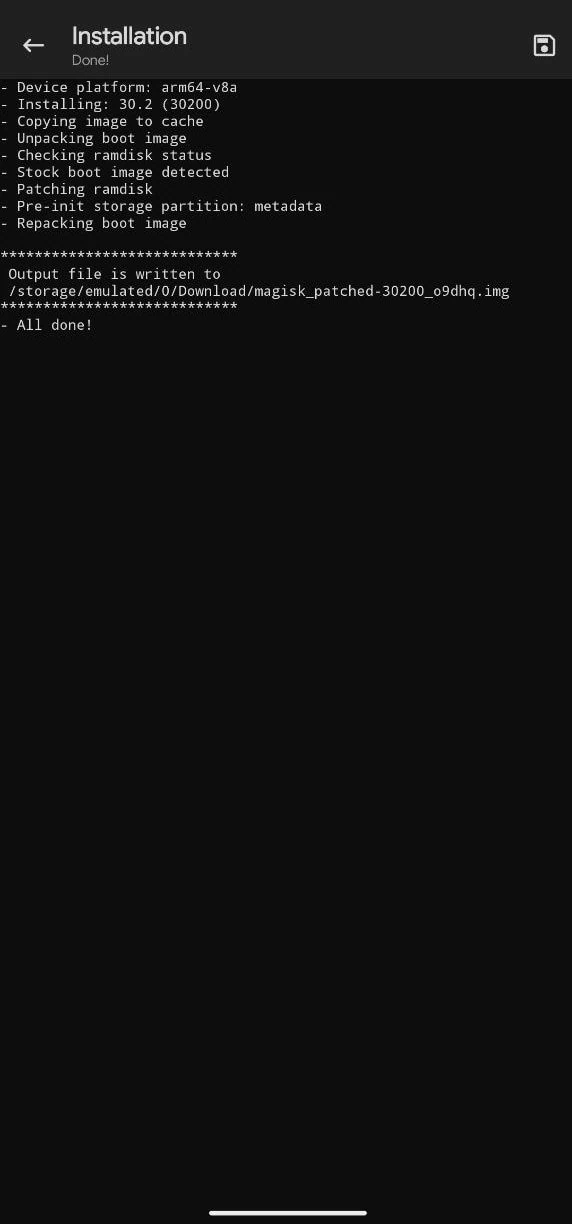
6. Rename the patched image to patched_boot.img or patched_init_boot.img file.
The patched boot will be located at /storage/emulated/0/Download/patched_boot.img or patched_init_boot.img7. Download the latest ADB & fastboot tool and unzip it on your PC C:\ Drive.
8. Copy the magisk_patched.img to your pc platform-tools folder
9. Open CMD on your PC and type cd C:\platform-tools and hit enter.
10. Flash the patched boot image by using the command
fastboot flash boot patched_boot.img
fastboot flash init_boot patched_init_boot.img
11. Reboot the device manually or type “fastboot reboot” to reboot the device.
12. Then Open Magisk Alpha App, and if it asks for Additional Setup, then do a Direct Install [Recommended] and Reboot.
13. Open the Magisk app and verify root access and safety net check.
14. Finally, restart and hide banking apps using the Hide MY AppList and Tricky Store module.
How to Uninstall Magisk Alpha and Unroot the Device
- Open Magisk Alpha -> Go to Modules -> Uninstall all the modules.
- Remove all the third-party rooting apps from your device.
- Then re-open the App, tap on Uninstall Magisk > Complete Uninstall.
- The device will auto-reboot once it’s done, or reboot manually.
Conclusion
In conclusion, Magisk Alpha steps forward on the way to being able to maintain strong root access on modern Android devices with the correct steps performed to patch the boot image and using the app’s advanced functions to improve speed, customisation, and maintain reliability and security for your device.
This root tool will work satisfactorily for custom ROM fans, and for the automatic functions such as debugging. The App will work for many Android versions, so this will work for knowledgeable users and developers as well. Enjoy the future of the correct management of root for Android with Magisk Alpha.