Guide To Fix Hanging And Heating Problem On Xiaomi Note 4G

Guide To Fix Hanging And Heating Problem On Xiaomi Note 4G

666_1419445420

Preparation

  • A Device.
  • Need Root.
  • Need To Disable Thermal Config First ⇒ HERE. [Credits “zmuhammx” Senior Member]

Download

  • No Frills CPU Control Applications From Googleplay.

Installation:-

  • After Installation No Frills Application.
  • Open The Application.
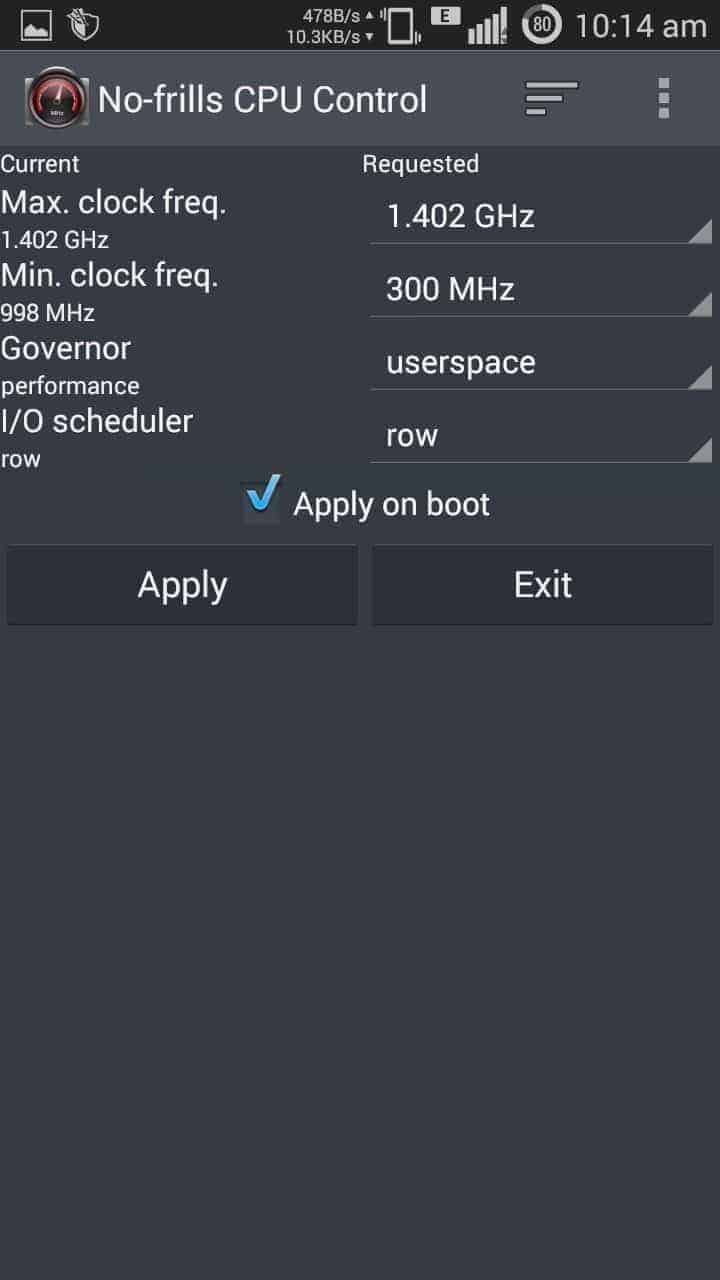
  • Set The Maximum Clock Frequency Of 1402 GHz.
  • Set The Minimum Clock Frequency Of 300 MHz.
  • Set Governor To User Space.
  • Set I / O Scheduling Row.

1425530755237 (1)

  • Enjoy….. :-):-):-)


Related Posts

Xiaomi Note 4G Guides – Guide To Fix Hanging And Heating Problem On Xiaomi Note 4G

akash

akash

Akash is an Android enthusiast. He is a tech-blogger by passion. He loves to help other people with his experience. He also likes installing ROM's, root's experiment on many Android devices and he learned a lot of things from this. Current Devices: Honor 8, Honor 6, ZTE Axon 7, Huawei P9

Related Posts

Leave a Reply

Your email address will not be published. Required fields are marked *

This site uses Akismet to reduce spam. Learn how your comment data is processed.

LATEST ON GIZDEV