gizdevlogo
  • NEWS
  • DEALS
  • TECH
    • HOW TO
  • DOWNLOADS
    • Stock Wallpapers
    • Stock Ringtones
    • THEMES
    • Firmwares
  • ANDROID
    • Rooting
    • TWRP Recovery
    • Unlock Bootloader
    • Custom Roms
    • Google Camera
No Result
View All Result
gizdevlogo
No Result
View All Result

Turn Redmi Note 7 Pro Notch into a Battery Indicator

by akash
April 4, 2019
in How To
Turn Redmi Note 7 Pro Notch into a Battery Indicator

The Xiaomi Redmi Note 7 and Note 7 Pro comes with a water drop notch. Now, this is the most selling devices in India. If you want to customize your device to look at your device more beautiful then this guide is for you. Today we share a guide to turn Redmi Note 7 Pro Notch into a Battery Indicator using Notch Pie app.

Content List
  • Turn Redmi Note 7 Pro Notch into a Battery Indicator
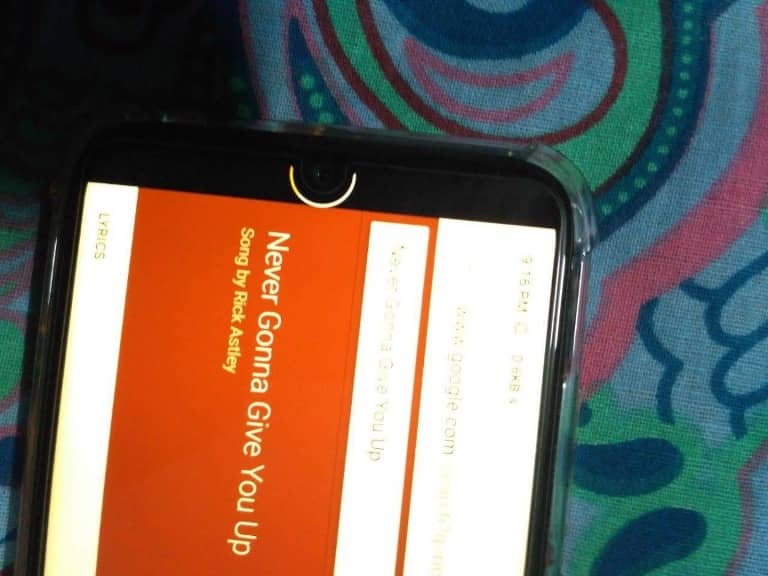
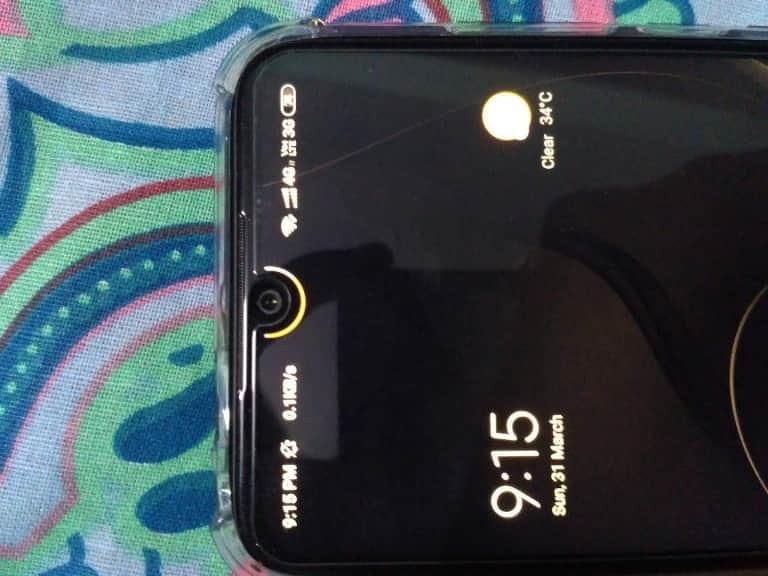
      • Here is a screenshot of Battery Indicator:
    • Download Notch Pie App
      • Step1: Install Notch Pie
      • Step2: Setup Notch Pie

Turn Redmi Note 7 Pro Notch into a Battery Indicator

Notch Pie animates the display area around the notch to replace the battery indicator. This app overlays a battery status around the notch cut out on the Note 7 and Note 7 Pro for a unique and colourful appearance that sure to grab some attention. You can change the indicator colour to be better suit your style.

Here is a screenshot of Battery Indicator:
 

1 of 2
- +

Thanks to XDA Junior Member ‘oddlyspaced’ to creates an overlay on the status bar around the teardrop notch in order to show the battery status. This app is fully free and without ads. The app is in beta stage and things might not work as intended. Developer oddlyspaced is exploring solutions to fix some bugs. You have to wait for some time, so be patient.

Download Notch Pie App

Notch-pie.apk

Step1: Install Notch Pie

  • Download the Notch Pie.apk file.
  • Then Copy the downloaded file to your mobile or tablets in internal or external storage.
  • Now enable Unknown Sources options from Settings > Security or Settings > Additional settings > Privacy.
  • And Install Notch Pie.apk.

Step2: Setup Notch Pie

  • Open the app.
  • Now Adjust position under the notch area.
  • Then Adjust Rotation so that it lies just at the physical boundary of the notch.
  • Next set the Thickness level and give accessibility permission.
  • Enjoy !!!

That’s it now you can see beautiful Ring Battery Indicator around the Notch on Redmi Note 7 and Note 7 Pro.


Summarize With AI:
chatgptChatGPTgoogleaiGoogle AIgrokGrokperplexityPerplexity
akash

akash

Akash is an Android enthusiast. He is a tech-blogger by passion. He loves to help other people with his experience. He also likes installing ROM's, root's experiment on many Android devices and he learned a lot of things from this. Current Devices: Honor 8, Honor 6, ZTE Axon 7, Huawei P9

Related Posts

Xiaomi 17 Max Stock Wallpapers & Live Wallpapers

Xiaomi 17 Max Stock Wallpapers & Live Wallpapers Collection

Official Xiaomi 17T Wallpapers download

Official Xiaomi 17T Stock Wallpapers from Xiaomi

Leave a Reply Cancel reply

Your email address will not be published. Required fields are marked *

This site uses Akismet to reduce spam. Learn how your comment data is processed.

LATEST ON GIZDEV

Official Vivo X300 FE Stock Wallpapers Download in FHD

Download Latest SukiSU-Ultra v4.1.3 Kernel-based Root Solution

How to Convert Huawei Smartphones to CN Region For Free

Official VIVO S60 Stock Wallpapers & Live Wallpapers Collection

Fix Paytm Warning [61009] Malicious Application Detected

Download Microsoft Surface and Surface Pro Wallpapers for Desktop and Laptop

Grand Theft Auto VI (GTA 6) Wallpapers For Mobile and PC

How To Unblock Telegram Without VPN Using MTProto Proxy

  • About Us
  • Contact Us
  • Privacy Policy
  • Editorial Policy
© 2026 GizDev. Made with ❤️ in India
chatgptChatGPTgoogleaiGoogle AIgrokGrokperplexityPerplexity
No Result
View All Result
  • NEWS
  • DEALS
  • APPS
  • THEMES
  • WALLPAPERS
  • STOCK RINGTONES
  • GOOGLE CAMERA

© 2026 GizDev. Made with ❤️ in India