![How To Completely Disable Ads On Realme Devices [Color OS Ads]](https://www.gizdev.com/wp-content/uploads/2020/01/How-To-Completely-Disable-Ads-On-Realme-Devices-Color-OS-Ads-e1577990764515.png.webp)
Nowadays at least in India, there is serious competition in smartphone segments. The main players which are having constant fights over their employee’s twitter handle and in the launches too are Xiaomi and Realme. It’s good for consumers which will get benefitted from their fights. But what if one brand copies the same feature that another brand is mostly criticized :D. Xiaomi which is hated for giving the ads in their MIUI interface is the most criticized thing for Xiaomi in earlier years. So the Realme is now following up the same introducing the ads in their UI. Reportedly, Color OS 7 is having ads in the security apps and app install, etc. So if you want to Completely Disable Ads On Realme Devices [Color OS Ads] follow the steps below.
Realme adds Ads in Color OS, Why the Ads?
Xiaomi already giving loads of ads in its budget to mid-range devices. They only skip the ads in their flagship devices such as K20 Pro and MI 9T series. But the one thing is good about Xiaomi that they have an immense amount of developer support. Anyone can flash the EU ROM or any custom ROM so they can get rid of ads once and for all. But in the case of Realme is not the same they don’t release the sources so they don’t have any kind of developer support besides their Color OS UI is pretty shitty.
So, recently lots of Realme users seen the ads on their security app and sometimes during the app installations. Realme’s CEO Madhav Seth boasted a lot about their Ads-free UI and now it’s all falling into the same place. Thankfully, no user reported the full-screen ads as in the case of Xiaomi Redmi’s budget phones that shit is too ugly and annoying. So let’s know Disable Ads On Realme Devices [Color OS Ads]. Besides ads Checkout Color OS 7 features.
How To Disable Color OS Ads:
1.) To disable Color OS Ads, Go to Settings.
2.) Then in the Settings, look for Additional Settings option and tap on it.
3.) Now in the options, you will see Get Recommendations tap on it.
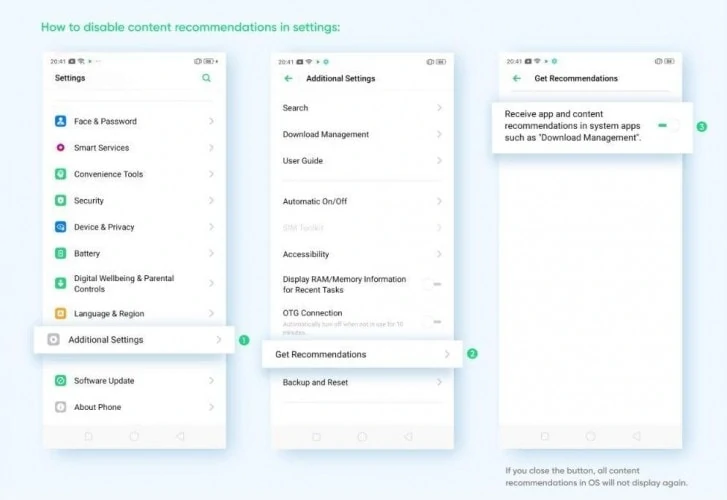
4.) Now you’ll see the Receive App And Content Recommendations option turn it OFF.
Done, that’ the way to disable Color OS ads. If you like the post, don’t forget to share it also, like our official Facebook page for more updates. Join our telegram channel for more instant updates directly to your phone!!