

The most popular YouTube-modded apps were discontinued recently due to a notice from Google. Vanced was one of those YouTube-modded apps that was discontinued. On March 13th, 2025, Vanced posted on their Telegram channel about the official discontinuation. Although the older version of Vanced may still be working without issue, there will be no future versions of Vanced. Following the discontinuation of Vanced, there are many users who are searching for an alternative, and within a short time frame of each other, several GitHub developers created an alternative version of Vanced and named it ReVanced. ReVanced is currently being developed in Beta Mode and it can be downloaded as a modded app by applying the ReVanced Manager Patch to the YouTube App.
Due to potential copyright infringement issues, the ReVanced Team cannot distribute any proprietary files to download the current version of YouTube with one click. Instead, the ReVanced Team distributes the necessary open source patches and you will need to apply them and create the app yourself. Patches can be applied to the YouTube app from a PC by using the Azul Zulu Java Tool and Repositories, or patches to the YouTube app and the Reddit app can be applied from your Android Phone via the ReVanced Manager. This post will provide links to the current version of the ReVanced Manager and a guide on how to patch or create a patched version of both the YouTube and Reddit Apps.
What Is App ReVanced?
ReVanced is a patcher that enables premium features in apps like YouTube. This project was created by GitHub members following the discontinuation of Vanced. The Project is still in development mode, and you can learn more about it from ReVanced’s GitHub page.
ReVanced Manager YouTube Features:-
- Play YouTube videos
- Play YouTube Videos in the background
- Popup mode (floating player)
- Block Sponsor Part
- Google account sign-in
- Return YouTube Dislike
- Google account sign-in
- All YouTube Premium features
- Disable Reddit Ads
- Enable Premium Reddit Icon
ReVanced App Changelogs:-
v2.7.0-dev.7
Add Android TV support (#3389) (3a23a30)
v2.6.0
Bug Fixes
Adjust font size and fix letter spacing in announcements (e1660a7)
BusError when running 32b binary on armv8 with compatibility (#3279) (c1e1a82)
Dashboard padding (5f757b6)
Don't hide PatchOptions behind keyboard (dd3d474)
handle errors while loading sources (b64dae2)
Ignore RichTap vibrator hardware crash (7856652)
Missing database migration file [no ci] (df9b44c)
Paddings for AppScreen and PatchesScreen (af3d0d7)
Preserve applied patches on patched apps when source patches is deleted (#3227) (4884fdb)
Updater: Handle session death (#3249) (f1c56aa)
UpdateScreen padding (e3c6d57)
Features
Better styling for announcements (4f88357)
enable Ackpine logging (7cf28c0)
Improve AppsScreen design, add app pinning and jump to top (#3240) (46720a4)
Improve patch options (#3213) (90667c8)
Performance Improvements
patcher: Silence trace logs to fix GC thrashing and OOM (#3287) (ab4bdd3)
Requirements:-
- Android 10 + Running Device.
Download All patch files & repositories
- Revanced Manager Apk – Revanced-manager-2.6.0.apk | v2.7.0-dev.7 | GitHub Link
- New Microg – 6.1.4.apk
- Old Vanced microG APK – Vanced_microG.apk | Apkmirror Link
- YouTube – YouTube 20.14.43 | Apkmirror
How to patch and build YouTube APK using ReVanced Manager
In this guide, we will show you how to patch the YouTube app and enable premium features on the YouTube app, so let’s begin.
1. First, uninstall stock YouTube app updates and install the YouTube app that is shown on Revanced Manager that supports your device.
2. Now download and install YouTube, then Vanced microG and the Revanced Manager Apk on your device.
3. Open the Revanced Manager app and go to the Patcher Tab.
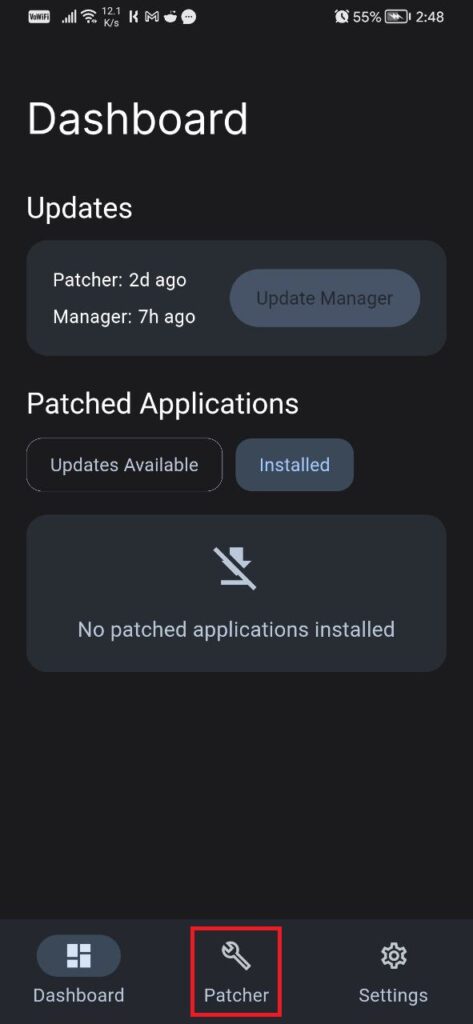
4. In the Patcher tab, select the application you want to patch and then tap on Select Patches. Then Select the patches you want on your YouTube app and then tap on Patch and wait.
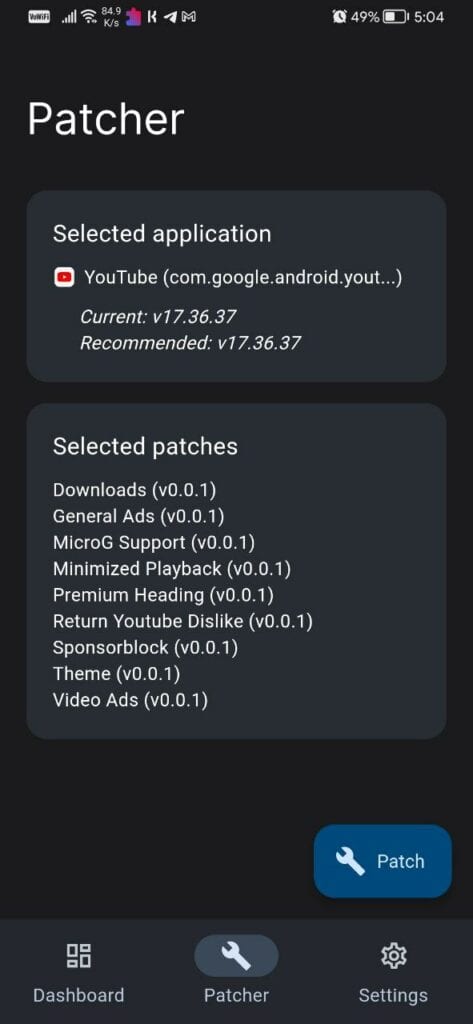
5. Now tap on install and install the patched YouTube APK.

6. Open the patched YouTube app, sign in with your Google account, and enjoy the premium YouTube features.







Serious lag and buffering on videos
What happens when YouTube auto updates? Should we disable it?