


Xiaomi Redmi Note 3 top sold phone in India and most loved by fans it also has some fault. Many Redmi Note 3 users faced network issue because of IMEI corrupt, or IMEI went after installing OTA updates or custom ROM’s. IMEI International Mobile Equipment Identity all phones need to register the device with Service provider to active data, SMS, call service. Without IMEI can’t possibly register your device to Service Provider if on your device no IMEI or invalid IMEI then no signal will come. Mtk device easy way can change the IMEI by rooting or others tool available on The Internet but Qualcomm Snapdragon device very hard to repair. We already posted a guide for Qualcomm Snapdragon Device’s now this guide for Redmi Note 3, How To Repair Xiaomi Redmi Note 3 IMEI.
Supported Devices:-
Xiaomi Qualcomm Snapdragon device, Like Redmi Note 3, Redmi Note 3 Pro Redmi 3s, Redmi 3s Pro, And Others Xiaomi Qualcomm Based Phones. This Guide will help you to change repair IMEI of Redmi Note 3, Redmi 3s IMEI, and others Xiaomi Qualcomm bases phones.
Preparation:-
- Enable USB Debugging.
- Required unlocked bootloader Here Guide.
- Required Rooted Device Root Guide From Here.
- Install ADB Driver From Here.
- Install Mi Flash Tool to Install Qualcomm Driver Link.
- Download Required tools.
- Read Instructions.
⇓⇓ Download Required tools ⇓⇓
Guide To Repair Xiaomi Redmi Note 3 IMEI
1.) Read Preparation Root the device and unlocked bootloader, Install ADB driver and Qualcomm Driver.
2.) Note Down The IMEI number in Notepad.
3.) Download “adb-fastboot-tool-2016.zip” and “WriteDualIMEI_W_G_eMMC.rar” and unzip it.
4.) Connect your phone to PC.
5.) Go to adb-fastboot-tool-2016 folder and run command prompt by Shift + Mouse Right – > Open Cmd Here.
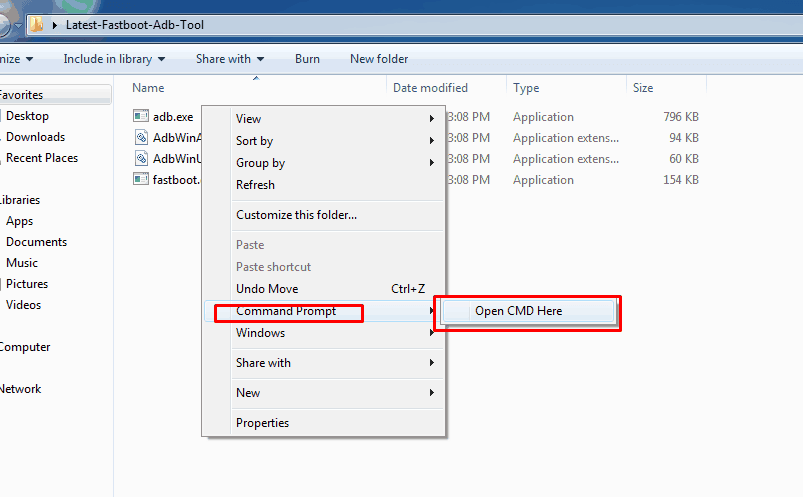
- Now Type This Commands
adb shell
- Then
su
- Give Root Permission On Your Device.
setprop sys.usb.config diag,adb
- This Comand Will Open DIAG COM Port.
6.) Now Open Install Qualcomm COM Port Driver Manually Via Device Manager.
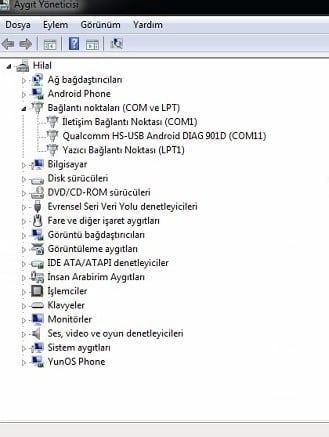
7.) Go To WriteDualIMEI_W_G_eMMC and Run WriteDualIMEI(W+G_eMMC).exe .
8.) Select Com Port and paste the IMEI from Notepad Then Click Start.
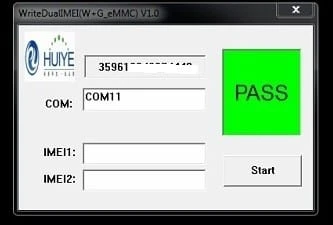
9.) Reboot and check IMEI By *#06#.
- Change Repair IMEI of Redmi Note 3
- Repair IMEI of Redmi 3s
- Change Repair IMEI of Mi4 I
- Repair IMEI of Snapdragon
- Change Repair IMEI of Redmi 3s Pro
More Guide:-
- Guide To Fix No Network Issue On Redmi Note 3 and Xiaomi Phones
- How To Install Xposed Framework On MIUI 8 and MIUI 7 + WSM TOOLS
- Install Snapdragon Camera on Redmi Note 3 [Non-rooted]
- Guide to Change DPI of Coolpad Note 3
Like Share, if you are facing problem during this guide comment here 🙂






I can’t give root access as it won’t let me unlock bootloader …any method to do it without unlocked bootloader