Officially you can’t download YouTube videos from YouTube site and YouTube app, you need to such programs like youtube downloader, internet download manager for desktop and tubmate app for android, But this simple tutorial will teach you how to download youtube videos without programs app’s on your smartphone or tablet, so let’s begin.
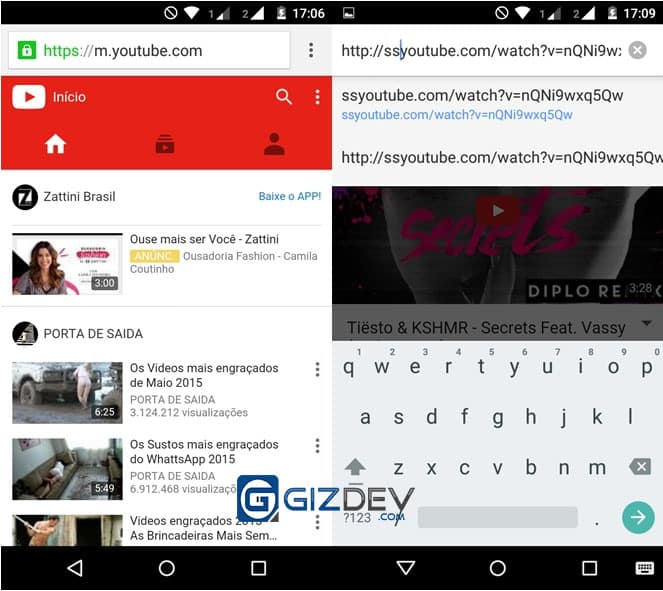
Go to YouTube from your standard internet browser like chrome, Uc Browser, Dolphin Browser then searches the video in which you want to download, just add the term ” ss ” before the youtube link after ” HTTP: // “; in your browser address bar.
Then you will be rededicated to that site ” savefrom.net ” now and only choose the desired video size by tapping ” mp4 ” and then to download and just click on ” download “, save from also support audio formatsave from will directly convert YouTube video into audio just chose “Audio Mp4“.
Ready now you can download videos on android sue without having to install applications with malware or weighing your smartphone. 🙂
Also Read –
Nitya is a co-founder of gizdev.com, who really wants to help people. Learned almost everything by himself, started blogging at an early age. He likes to try out every Custom ROM, Mods On His Device

 Ready now you can download videos on android sue without having to install applications with malware or weighing your smartphone. 🙂
Also Read –
Best Android Phones Music and Video Players Of 2020
Ready now you can download videos on android sue without having to install applications with malware or weighing your smartphone. 🙂
Also Read –
Best Android Phones Music and Video Players Of 2020