

With AGC GCAM, users will enjoy premium mobile photography capabilities on their Android smartphone. This is a well-known Google Camera MOD that unlocks the high-end capabilities of the Google Camera app. These features are not accessible through standard Pixel smartphone configurations. In fact, it can be run on most non-Pixel Android smartphones. AGC by BigKaka has released multiple versions of Google Camera APK, including recent updates such as AGC 9.6. He has also included some of the latest image capture technologies. For example, this includes HDR+ (High Dynamic Range), Night Sight, Super Res Zoom, and Motion mode.
As such, the ability to take professional-quality images and video is now available on the majority of Samsung, Xiaomi, OnePlus, and many other smartphones. No matter if you are looking to upgrade your smartphone’s camera to include new features found in the Pixel 10 series. Alternatively, you may simply want to optimize the performance of your older model Android smartphone’s camera. Using AGC GCAM by BigKaka offers a straightforward solution. It comes complete with numerous configuration options and ongoing support for the modern-day mobile photographer.
Google Camera Mod Features:-
Google has expanded the capabilities of smartphone photography through the new Pixel 9 & 9 Pro phones. The new version of the Google Camera app (GCam) that comes with the new Pixel 9 Pro, contains many new exciting features. It also has bug fixes from previous versions of GCam. You can also install the latest version of the Google Camera app on most older models of the Pixel smartphones. In doing so, it gives users access to even more new possibilities.
The whole of the Android community are waiting with anticipation for the release of a Google Camera APK MOD for the Pixel 10. Well they don’t need to wait anymore. For the first time ever, the developer AGC has released the Google Camera 9.6 (Gcam 9.6 APK). He also released AGC Google Camera 9.2 APK and AGC Gcam 8.5 APK for public download. Below in this article, I have included the links to download the older AGC 8.5 to the newer AGC 9.6 APK for all Android devices.
About AGC GCAM
BigKaka AGC (GCAM) is a very popular Google Camera MOD produced by BigKaka, that enables users of non-Pixel Android phones to use some of the high-end camera options offered in the original Google Camera app. The big advantage of this MOD is that it offers many of the same advanced picture-taking tools that were previously only available on the Google Pixel line of phones. Now, these tools are available to almost all phones from other manufacturers. For instance, Samsung, Xiaomi, and OnePlus phones can now enjoy these features.
More AGC Features
- HDR+ with Exposure and White Balance Controls – Take pictures using HDR+ to capture fantastic photos, especially in low-light or backlit scenes.
- Top Shot – Pick the best moment with Top Shot. It automatically recommends the best pics, where no one is blinking and everything looks just right.
- Night Sight – You’ll never want to use your flash again. Night Sight brings out all the details and colours that get lost in the dark.
- Super Res Zoom – Super Res Zoom makes your pictures sharper when you zoom in.
- Motion Mode – Capture life in motion. Take professional-quality Long Exposure and Action Pan photos.
- Long Shot – Take casual, quick videos by simply long-pressing the shutter key in the default camera mode.
- Comprehensive Options for Developers: Many options in developer settings. There are also more advanced options for preferences, watermarks, log details, and compatibility with all newer versions of Android (11+), etc.
- Constantly Updated – Each release includes the most recent image processing techniques and bug fixes. This ensures compatibility with all versions of the Google Pixel 9, Google Pixel 10 Series, and other older devices.
- User Customizable Watermarks – An option for users to customize the size of the watermark card within the settings.
- Compatibility with Devices – Compatible with older Pixel or non-Pixel Android-based smartphones. This allows you to have the best Google Camera functions available across many Android-based smartphones.
AGC GCAM Screenshot
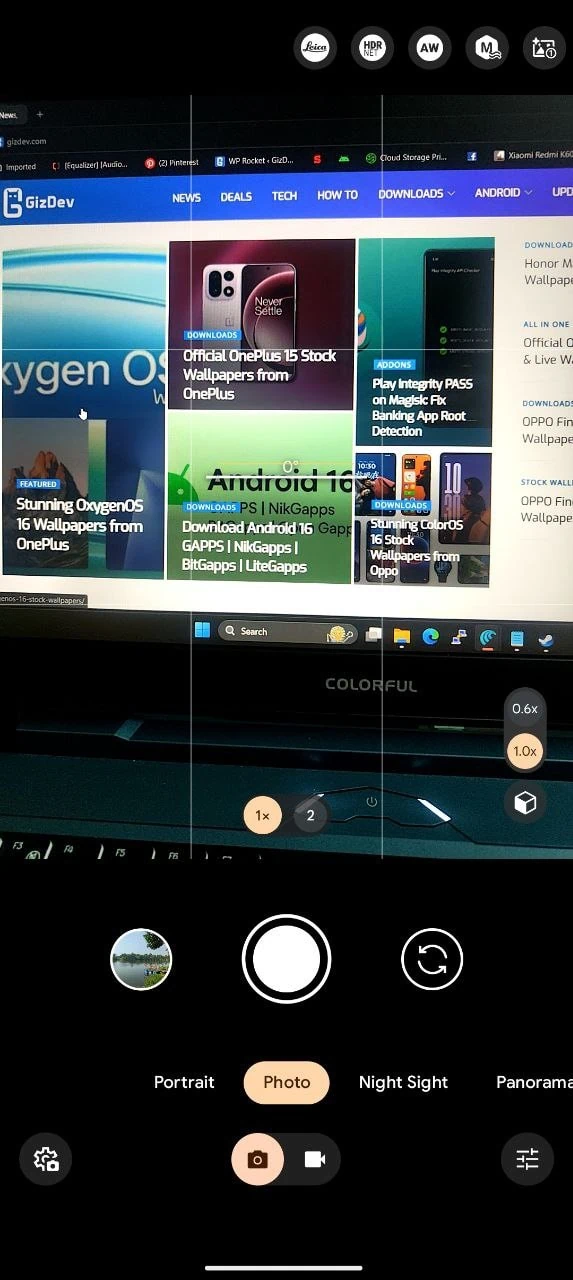
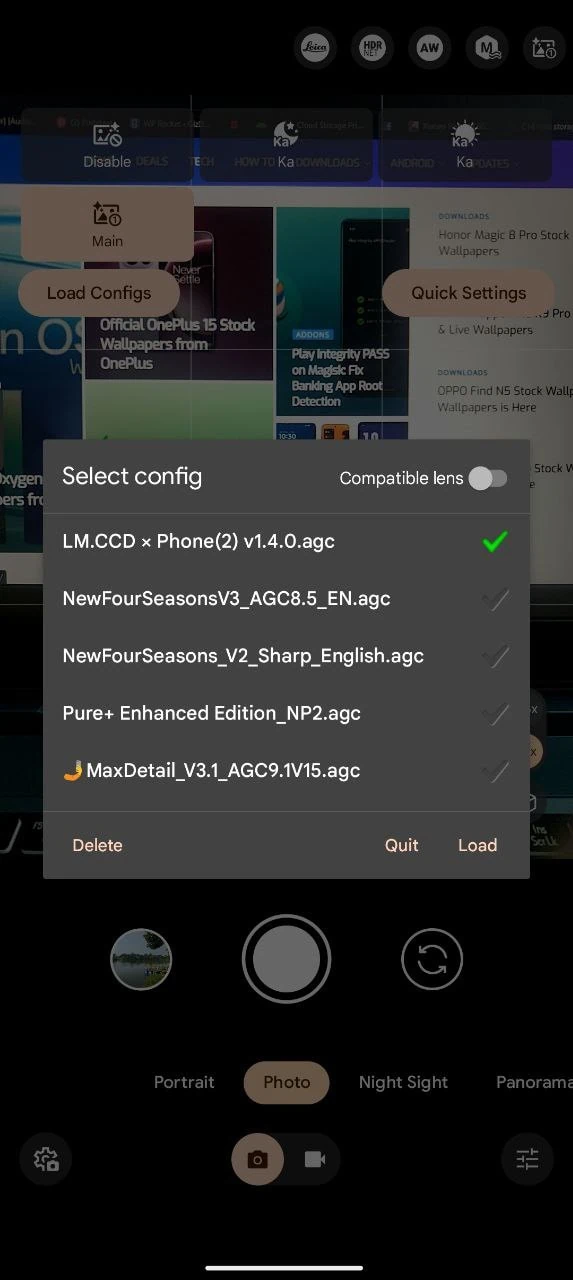
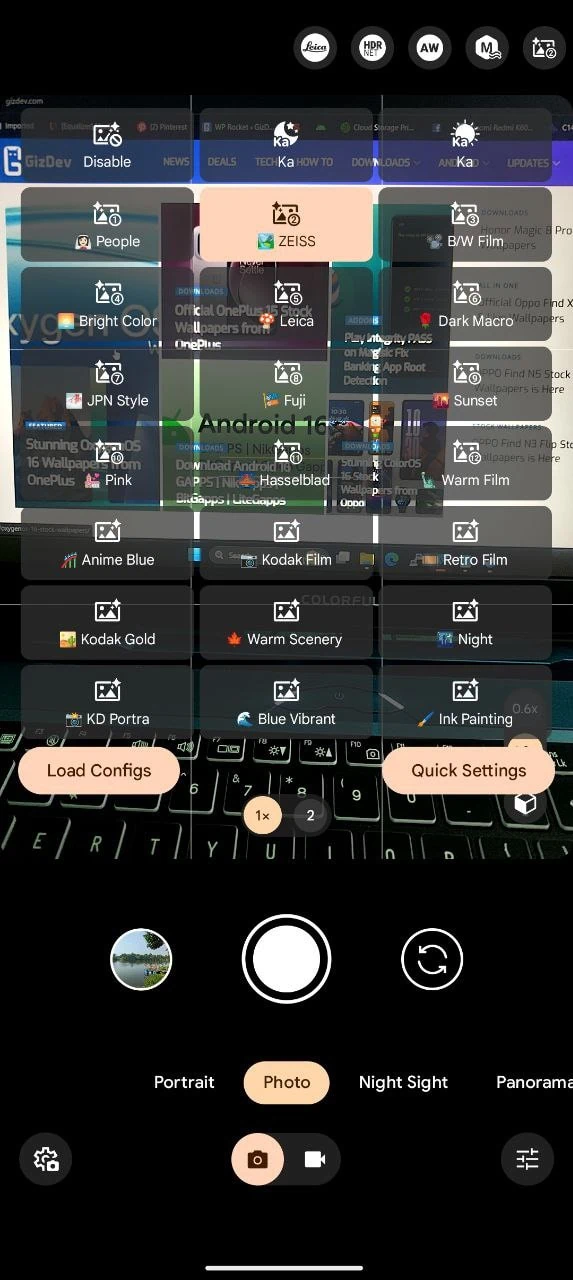
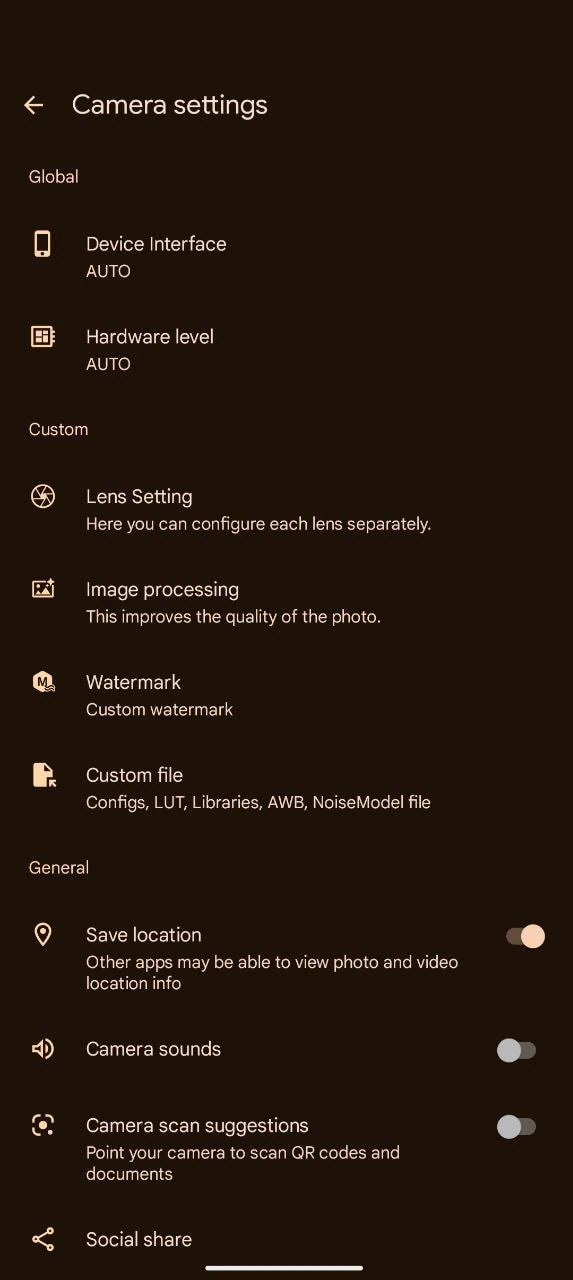
Changelogs:-
AGC9.6.19_V7.0
What's new!!
AGC 9.6 v7.0 Update:
- Fixed Android 12
- Fixed Pixel Devices Portrait
AGC 8.8 V12.0:_STABLE
AGC 8.8 V12.0:
- Added DSP tone and gamma
- Added K78 tone and gamma
- Added white_point and black_point
- Added noise models op12_imx586_wide_nm, op12_imx615_front_nm, op12_lyt808_main_nm, op12_ov64b_tele_nm, RedmiNote11_spes_s5kjn1_0_PazhamDoubeX_v2_main
- Added Off (as in library) support for Russian, Ukrainian, Spanish, French, German, and Italian
- Fixed Face detection autofocus marker (circle), improve autofocus mark speed
- Fixed the issue of global patch count not updating in real time in the UI
- Fixed VF noise reduction mode
- Fixed two pck_large_yuv issues, enabled by default
- Fixed Black contrast a and b are reverserd in profile
- Fixed Shadows Compensation normally went to 9, but now max is 5
Latest AGC APK Download Links
In this post, we have shared AGC Google Camera apk download links, all the APK files from stock to the Modded Version. You can download them directly from here. The latest BigKaka AGC Apk 9.6 is available as well. You can download the update from old GCAM 8.5 to AGC 9.6 in the download section.
Download Stable AGC GCAM Release for Snapdragon device – AGC9.2.14_V14.0 | AGC8.7.250_V9.0
More Modded Camera App for Android – Blackmagic Camera APK
| Version | Download Link |
|---|---|
| (New) AGC9.6.19_V7.0 | AGC9.6.19_V7.0.apk |
| AGC9.6.19_V6.0 | AGC9.6.19_V6.0 |
| AGC9.6.19_V5.0 | AGC9.6.19_V5.0_SNAP_samsung |
| AGC9.4.24_V2.0 | AGC9.4.24_V2.0_SNAP_SAMSUNG |
| AGC9.2.14_V14.0 | AGC9.2.14_V14.0_snap_samsung |
| AGC9.1.24_V15.0 | AGC9.1.24_V15.0_snap_samsung |
| AGC8.8.224_V12.0 | AGC8.8.224_V12.0 |
| AGC8.7.250_V10.0 | AGC8.7.250_V10.0 |
| AGC8.5.08_V8.0 | AGC8.5.08_V8.0 |
| AGC8.4.300_V15.1 | AGC8.4.300_V15.1 |
AGC XML FILES – > 9.6 | 9.2 | 9.1| 8.8 | 8.7 | 8.5
How to Install AGC APK on Your Android
- Download the latest Google Camera AGC APK MOD file.
- Then, copy the downloaded file to your mobile or tablet in internal or external storage.
- Now enable Unknown Sources options from Settings > Security or Settings > Additional settings > Privacy.
- Install AGC.apk, open the camera app on your device, and give all the permissions.
- Now enjoy.
Install and Configure XML, LIB, and LOT files
- After installing the AGC APK, download agc XML files .agc for your device from our GCAM section.
- Navigate to Internal Storage /Download/AGC.9.*/configs/ folder, paste the .agc file here.
- Paste the LUT file into the LIB folder of the modded Google Camera folder. Then go to Camera App> Settings > Custom File > Libraries > Copy third-party lib to app.
- Now open the Camera App, tap on the profile icon, Load Config and select the config and profile.
Finally, all the Google Camera functions should work. Here are some settings you can check if the XML files don’t work for your device.
Fix Google Camera GREEN PHOTOS
- Set Camera Photo Resolution To Max from – More Settings -> Camera Photo Resolution -> Max Resolution
- Go to settings – Advanced, choose the Device Interface – pixel 7 Pro, hardware level – To Fix Everything works
- Fix Google Camera GREEN PHOTOS – Turn on AWB (auto white balance) or Enable auto CT Colour correction from Settings. Go to Processing Function -> Colour Correction. Then select Auto CT colour correction. Enable all the functions for all the Sensors one by one.





Camera v9 ki file