Guide To Install TWRP Recovery And Root Honor 8 EMUI 5.0
Huawei Honor’s new 2016 flagships phone honor 8 launched this month this phone is the most loved designed phone and this time Honor also enter our market with this device here is some specification. The smartphone comes with 5.2 inches with Resolution of FHD 1920 x 1080 pixels, The Honor 8 is powered by HiSilicon Kirin 950 1.8 GHz octa-core processor with 3GB-4GB of RAM. 32 GB-64 of internal storage which can be expanded up to 128GB. 8 comes with Back camera an 12MP dual rear and a front shooter of 8 megapixels for Selfie. The Honor 8 runs in Android 6.0 EMUI 4.1 and is powered by a 3000mAh non-removable battery.
Preparation:-
- Take apps, contacts backup.
- You Need Unlock Bootloader to Install Twrp Here Guide -> Link
- Enable developer options.
Go To Settings -> About Phone -> Tap On “Build Number” 7 Times To Enable Developer Options
- Enable USB Debugging.
Go To Your Settings -> Developer Options -> Tick The “Usb Debugging” Checkbox
- Install Huawei driver Hisuite Link.
- Download ADB TOOL, Twrp, and SuperSu.
- Read Guide.
You Might Also Like ->
⇓⇓ Download Honor 8 Twrp Tool ⇓⇓
gapps-601-20160709_signed(Android 6.0).zip
Guide To Install Twrp 3.0 In Honor 8:-
1.) First Read Preparation Unlock Bootloader Download Required Files.
2.) Download “adb-fastboot-tool-2016.zip” unzip it Download TWRP recovery for your phone.
3.) Rename TWRP recovery IMG file “twrp.img” to “recovery.img” and copy to adb-fastboot-tool-2016 Folder.
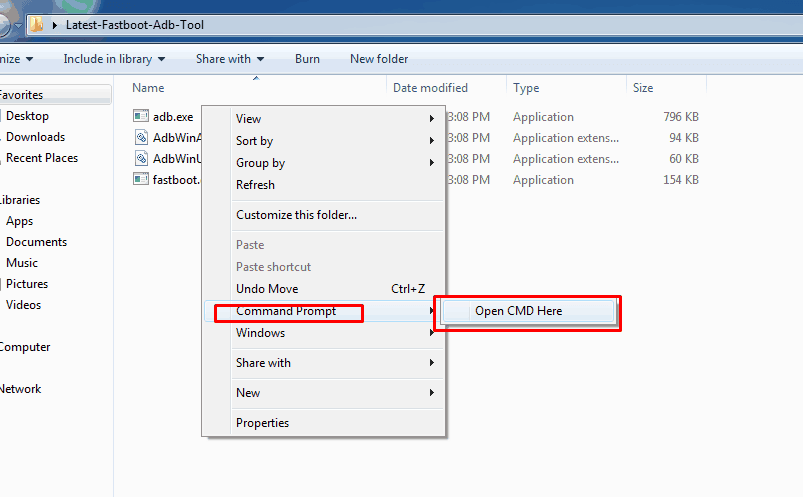
4.) Open cmd windows in adb-fastboot-tool-2016 folder by Shift + Mouse Right click.
5.) Connect your phone to PC.
6.) Now paste this command on command window and hit enter to reboot your phone into bootloader (fastboot) mode.
adb reboot bootloader
7.) Flash TWRP recovery by this command.
fastboot flash recovery recovery.img
8.) Reboot the device to recovery.
fastboot reboot
- Now go to the root step.
Guide To Root Honor 8 EMUI 5.0:-
- Download “SuperSu_2.82.Zip” copy it to the phone.
- Turn off your phone and turn into recovery mode By Volume Down + Power.
- Now Allow Modifications “Swipe to Allow Modifications” allow it.
- Go to Install Navigate to SuperSu_2.82.Zip Swipe to install.
- Reboot your phone.
Install Gapps In Chinese Version Honor 8:-
Method 1 ->
Open Hi App and search for Google Play and install it .
Method 2 ->
- Download and Copy “gapps-601-20160709_signed.zip” to your phone Storage or sd card .
- Turn on your phone into recovery mode by (Volume Up + Power ) .
- Flash The gapps zip with twrp recovery .
- Reboot your device
- Now set allow permission of this apps
Google Account Manager
Google Backup Transport
GoogleServicesFramework
Google Play Store
Google play services
- Go to settings > apps >all > find the following apps and once selected scroll to the bottom and give the apps all available permissions .
- Reboot and enjoy 🙂
Back to Stock Recovery :-
Simply run “STOCK-HONOR-8.bat” and turn on your phone into fastboot mode and same twrp follow the steps .
Like Huawei Dev Page For More Huawei Updates https://www.facebook.com/HuaweiDev