
gizdevlogo
  • NEWS
  • DEALS
  • TECH
    • HOW TO
  • DOWNLOADS
    • Stock Wallpapers
    • Stock Ringtones
    • THEMES
    • Firmwares
  • ANDROID
    • Rooting
    • TWRP Recovery
    • Unlock Bootloader
    • Custom Roms
    • Google Camera
No Result
View All Result
gizdevlogo
No Result
View All Result

How to Unlock Huawei Bootloader Official Method

by nitya
April 13, 2023
in How To, Unlock Bootloader
Unlock huawei bootloader

huawei bootloader

This post is about How to Unlock Huawei bootloader Huawei P20, Huawei Mate 10, Huawei Nova and Honor 10, Honor V10, and Honor Note 10 for Rooting and installing TWRP recovery and other customization we created an easy guide you can easily do it.

Content List
      • Preparation:-
      • Download Huawei Unlock Bootloader Tool
  • Guide To Unlock Huawei Bootloader:-

Huawei Phones are now 3 rd largest phone brand in the world, Huawei phones always come with the locked bootloader so you have to unlock them first so you can customize root the phone. This year Huawei launched Huawei P20, Huawei Mate 10, Huawei Nova 2 and Honor V10, Honor 10, and Honor series phones all with the locked bootloader. This device can’t be rootable until you unlock the Bootloader Unlock Bootloader also Unlock Bootloader can’t void the warranty until you root.

Note:- The app only works with EMUI 5.0 Android 7.0 Version. beware from other paid service who claimed they can provide unlock code for Android 8.0 (BEWARE FROM FUNKYHUAWEI They are a big scammer)

Preparation:-

  • Take an app, and contacts backup.
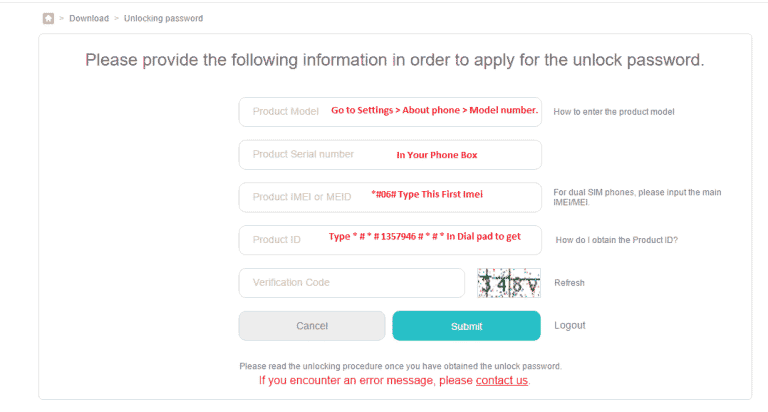
  • Note the device imei *#06# to get the Product Id  # * # 1357946 # * # * .
  • Register On Huawei Emui Page To Get The Unlock Code – > Link.
  • Enable Developer options.

Go To Settings -> About Phone -> Tap On “Build Number” 7 Times To Enable Developer Options.

  • Enable USB Debugging.

Go To Settings -> About Phone -> Tap On “Build Number” 7 Times To Enable Developer Options.

  • Enable OEM Unlock.

Go To Your Settings -> Developer Options -> Tick The“Oem Unlock” Check box .

  • Install Huawei ADB Fastboot Driver From Here ->
  • Download the Unlock Bootloader Tool Read Guide.

Download Huawei Unlock Bootloader Tool

Official-Unlock-Bootloader-tool.zip

New method:- Get Instant Bootloader Unlock Code of Huawei Unofficial Method

Guide To Unlock Huawei Bootloader:-

1. First Note Down Your Device IMEI and Product Id Getting #06# for IMEI  # * # 1357946 # * # * To Get Product Id.

2. Go to The Emui Unlock Page  Link 1 /Link 2

(Now there is no official method to get Bootloader to unlock code of Huawei device but you can request Huawei support for unlock code with IMEI no Product Id and SN no to support centre or email them at [email protected] & [email protected])

3. Login with Huawei id.

4. Once more time go to the Unlock Huawei Bootloader page.

5. Accept the unlocking agreement.

6. Enter device information.
Unlock-bootloader-huawei

7. If get any error click Contact Us and send an email with your phone details they will send unlock code 1 2 days.

8. Save The Unlock Code in Notepad.

9. Now Download and unzip “Huawei Unlock Booloader.zip“.

10. Run “Unlock-Bootloader.bat” Select Language and Hit Enter 2 Time.

11. Turn Off Your Phone

12. Turn On It FASTBOOT Mode by (Volume Down + Power ).

13. Connect Your Phone To Pc.

14. Paste The Code In Code In Cmd Window Hit Enter.

  • Share This Post With Your Friends And Comment Here if You Facing Any Problem While Doing This  🙂
  • That’s It Phone Data Will Full Erased After Do This And Your Phone Unlocked and Ready For Rooting Twrp.
  • Like Huawei Dev – https://www.facebook.com/HuaweiDev 
Summarize With AI:
chatgptChatGPTgoogleaiGoogle AIgrokGrokperplexityPerplexity
nitya

nitya

Nitya is a co-founder of gizdev.com, who really wants to help people. Learned almost everything by himself, started blogging at an early age. He likes to try out every Custom ROM, Mods On His Device

Related Posts

How to Convert Huawei Smartphones to CN Region

How to Convert Huawei Smartphones to CN Region For Free

Download Official Honor 600 Stock Wallpapers

Download Official Honor 600 Stock Wallpapers in FHD

Comments 8

  1. Alessandro says:
    10 years ago

    Great! This method worked and it is very easy to understand. Thank you

    Reply
  2. LiTz97 says:
    10 years ago

    Hmmm…Just keeps saying “waiting for device”?

    Reply
  3. Faheem Khan says:
    10 years ago

    I am getting the “need to use the phone for more than 14 days” error

    Reply

Leave a Reply Cancel reply

Your email address will not be published. Required fields are marked *

This site uses Akismet to reduce spam. Learn how your comment data is processed.

LATEST ON GIZDEV

Official Redmi K90 Ultra Stock Wallpapers from Xiaomi

How To Install SUSFS Module – Root Hiding Service for KernelSU

How to Efficiently Recover Deleted Photos on an Android Mobile Phone?

Official Lenovo Legion Y70 Stock Wallpapers in FHD

Download Latest ReSukiSU v4.1.0 Kernel-based Root Solution

Leaked Samsung Galaxy Z Fold 8 Stock Wallpapers in FHD

Official Vivo X300 FE Stock Wallpapers Download in FHD

Download Latest SukiSU-Ultra v4.1.3 Kernel-based Root Solution

  • About Us
  • Contact Us
  • Privacy Policy
  • Editorial Policy
© 2026 GizDev. Made with ❤️ in India
chatgptChatGPTgoogleaiGoogle AIgrokGrokperplexityPerplexity
No Result
View All Result
  • NEWS
  • DEALS
  • APPS
  • THEMES
  • WALLPAPERS
  • STOCK RINGTONES
  • GOOGLE CAMERA

© 2026 GizDev. Made with ❤️ in India