

LG K9 is the is the low end phone by LG in budget category. So here is the new for thier users you can install and root LG K9 with by just following the simple steps. After install TWRP you can easily root your device with magisk also, install various types of mods and many others module. So here’s how to root LG K9 with TWRP recovery.
TWRP Recovery On LG K9 and Root
Before doing all those processes first, need to unlock the bootloader of your LG device. Without unlocking the bootloader you can’t install TWRP in your device. First, unlock the bootloader of your device then follow the guide below to install TWRP on LG K9. and Root LG K9 with the help of TWRP custom Recovery.
After installing TWRP you can tweak the system settings to increase device performance or customize. In this post, we will root with the help of Magisk. After root your device you can easily use root-enabled apps, mods, for additional features. Already lots of mods, custom ROMs is available for this device so don’t waste time if you want to customize.
Preparation:
- Charge your device, minimum 70%.
- Backup your important data, in case remove all data.
- Install the LG Drivers.
- Enable Developer Options and USB Debugging on LG device.
Go to settings ⇒ About phone ⇒ Tap on “build number” 7 times to enable developer options.
Go to your settings ⇒ Developer options ⇒ tick the “ USB debugging ” checkbox.
- This installation guide is exclusively for LG K9. Don’t use it on other devices.
Download LG K9 TWRP Recovery
Download other required files:
- ADB Tool: ADBFASTBOOT TOOL
- Download Magisk from Here.
TWRP Install Guide/Steps:
1. First Read Preparation Unlock Bootloader Download Required Files.
2. Download “adb-fastboot-tool.zip” extract it in a desktop.
- Download TWRP img and all files from above. Then copy all those files in your device and do keep a copy of TWRP in the computer.
3. Rename TWRP recovery file to “recovery.img” and copy to adb-fastboot-tool folder.
4. Open CMD windows in adb-fastboot-tool folder by Shift + Mouse Right click.
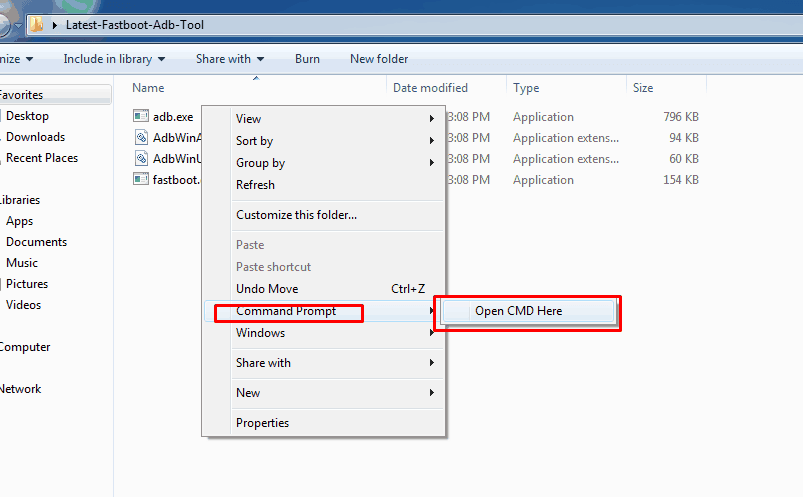
5. Connect your device to the PC, make sure USB Debugging is enabled.
6. Now Reboot your LG K9 in Bootloader Mode, using this command.
adb reboot bootloader
› If you get Permission popup in your device then Allow it.
7. Once your device in fastboot mode, Now paste this command on command window and hit enter to install TWRP recovery temporarily.
fastboot flash recovery.img
8. This will install the TWRP.
11. Once done click on Reboot system button to restart the device.
12. That’s it to install TWRP. If you want to Root LG K9 then follow the guide below.
Steps to Root LG K9 with TWRP
- Turn off your phone and turn into recovery mode By Volume UP + Power.
- Go to Install Navigate to Magisk.zip Swipe to install.
- Reboot your phone.
If you have any problems do comment below. Also, for more updates on stuff like flashing, wallpapers, themes etc like our Facebook page.
Other Device Recoveries
- Recovery and Root Galaxy M30
- Install TWRP Recovery and Root Elephone A6
- Root Vivo Y15 2019 And Install TWRP Recovery
- Root Redmi K20 Pro And Install TWRP Recovery





It doesn’t work. My lg k9 don’t have a bootloader.