![Download Ubuntu Font For Android Devices [Magisk Module]](https://www.gizdev.com/wp-content/uploads/2021/01/Download-Ubuntu-Font-For-Android-Devices-Magisk-Module.webp)
The open-source environment of Android is the best thing. You can try various things on your devices developed by a number of developers. You can install fonts, ROMs, and all easily. Here is another good font available for Android. The Ubuntu font for Android devices is now available.
You may all know the Ubuntu operating system. Recently, one of the developers successfully ran the Ubuntu Touch operating system on Redmi devices. If you love the Ubuntu font for Android, don’t miss this font.
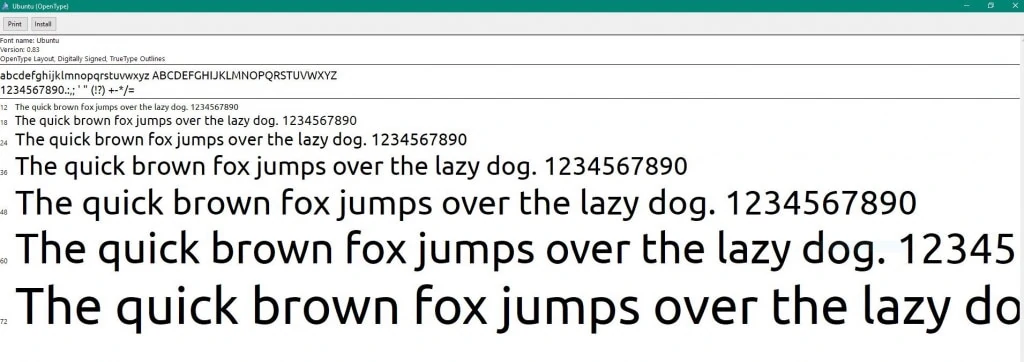
Ubuntu Font For Android
This is a Magisk module, so obviously, you need a rooted device to install the font. Also, this font may not work with all Android devices but it’s working with most of devices easily. As it’s a Magisk module you can just uninstall it if something doesn’t feel right.
Thanks to the DOOMKOPF developer for making this font available in the Magisk module. If you don’t know how to install the Magisk modules, no worries just follow the steps below.
Screenshots
Downloads Section
How to Install Ubuntu Font For Android
1) Make sure your phone is rooted and the latest Magisk manager is installed. You can get the latest Magisk here.
2) Download the Ubuntu Font ZIP file from the above downloads section.
3) Open the Magisk Manager, and go to modules.
4) Click on Add a Module, and select the Font ZIP file you downloaded earlier.
5) The file will be flashed automatically.
Now all you have to do is restart your smartphone. You can now enjoy Ubuntu font for Android devices. If you want this type of update, you can join our Telegram channel. If you like the post, don’t forget to share it, also like our official Social handle for more instant updates and some best memes!!
More stuff
- iOS 13.2 Emojis For Android Devices Magisk Module
- Install DTS:X Ultra & DTS Headphone:X on Any Android Device