

Nowadays, every OEM provides a PC suite for their devices. So here is the latest Vivo Assistant or you can call it as Vivo Pc Suite 2020 version. It’s now available to download on the Vivo support website. The PC suite is useful software when you want to transfer files, update devices, or do other things like synching photos it’s really useful software. The pc suite also helps you to install Vivo phone drivers with simple installation. This is where you can Download Vivo Pc Suite for pc and laptop. You can take backups and restore backups from this PC Suite. Vivo keeps updating its pc suites to support them in their newly launched phones. We will share the new updates of this Pc Suite on these pages.
The newer version of the Vivo Pc Suite is available now. If you are still running on the older versions, you can download this new one. This new one is come up with new bug fixes and some improvements and obviously supports some new Vivo devices like vivo NEX 3 and Vivo NEX 2. You can install the PC suite if you want to install the vivo driver. Let’s check out some of the features of Vivo Assistant.
Supported Device:
- This Pc suite (Vivo Assistant) supports all old and new Vivo Android devices.
- One thing to note down here is as the Vivo mobiles are MediaTek as well as Snapdragon-based devices. This Vivo Mobile PC Suite will support both variants. So you don’t need to search for another version for different chipsets phones.
Vivo Pc Suite Features:
- Manage your Android Phone.
- Manage Apps, Music, Photos, Videos, Contact, and Sms.
- Backup & Restore Phone data to your pc, or laptop.
- File Management.
- Copy the Phone clipboard to your pc.
Requirements:
There are no special requirements for this suite to run on a PC. But you should be running Windows.
- Windows 7
- Windows 8, 8.1, and Windows 10
Download Vivo PC Suite (Vivo Assistant)
Here are the official links of Vivo Assistant, if a new version is available for download, you can find the latest version on this link.
The Latest Vivo Assistant v3.0.2.5 support Windows 10 and the pc suite includes MTP, ADB, FASTBOOT, and Flash driver.
Download Link ⇒
How To Use:
1. Firstly, obviously you need to download and install the pc suite.
2. After that, You need to enable developer options and USB debugging.
3. Now after doing the above steps, connect your Vivo phone to your PC by using the USB cable.
4. After you connect to the PC open the Vivo Assistant, you just installed earlier.
5. It will auto-detect your phone, and it will automatically connect your device to your PC. Note that you may receive a USB debugging notification on the phone so allow it.
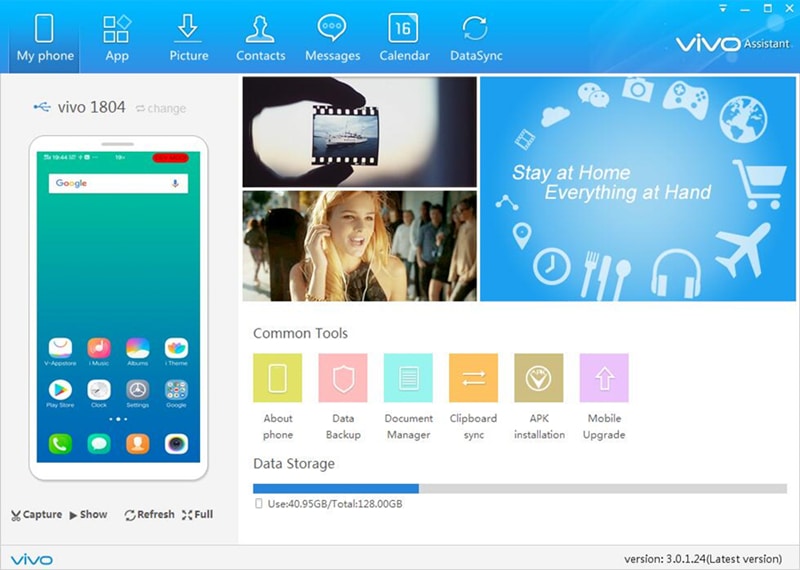
6. Now the PC suite is yours. You can see lots of options available for you to do some stuff with it. Like File Management, Back & Restore Managing Photos, contacts, and messages, and much more.
So here is the screenshot of the pc suite. If you like the post share it with other communities and forums, Follow our social pages to get all updates as soon as possible. Follow here. Don’t forget to join our telegram group for more wallpapers, Themes, and Ringtones updates – https://getdev.me/telegramdev.
Other Pc Suite’s