

Are you tired of downloading videos from Bilibili video network websites? If you are a daily visitor of Bilibili.tv or Bilibili.com then this article will help you. In this article, we will guide you on how to download videos from Bilibili.com or Bilibili.tv. We will show all the methods to download videos from Bilibili. In this article, we will share with you a working Bilibili video downloader App and a Bilibili video downloader Chrome Extension that will help you download videos.
There are many Bilibili video downloaders available on the internet, but many of them are outdated and no longer work in 2025. That’s why we are here to find working websites and tools that still function. We have already published the Baidu video downloader on our website. This time we will share the Bilibili video downloader App and Chrome Extension that is still working till 2025.
Key Notes
- This article explains how to download videos from Bilibili.com and Bilibili.tv using a Bilibili video downloader App and Chrome Extension.
- Many outdated tools exist, but this guide provides updated options for 2025, including JiJiDown and a dedicated Chrome extension.
- To access Bilibili, users often need a VPN to connect to a nearby server in Asia.
- JiJiDown supports high-quality downloads and allows users to paste links or search within the app.
- The Bilibili Download Helper Chrome extension offers a direct way to download videos without relying on other websites.
video network websites
Bilibili is a Chinese video-sharing website situated in Shanghai, China. It is mostly used to watch and distribute anime, manga, and gaming-related content. The portal also offers a vast selection of additional content, including music, movies, and television shows. Bilibili boasts a sizable and vibrant user base that can interact with and comment on the platform’s content. It has been called “culturally significant” and is well-liked by young people in China.
How to Download Videos
As you know, many Chinese websites are not accessible outside of China. You have to use a VPN service to access websites. So to access Chinese video network websites like haokan.baidu.com or Chinese Bilibili.com you have to connect to a server that is near China like Singapore or Thailand. After that, you can use the listed Bilibili video downloader App or Chrome Extension to download videos from Bilibili.
List of video downloader apps 2025 Update
Here is the working Bilibili Video downloader that still works for Bilibili.com and Bilibili.tv. You can download Bilibili videos by simply pasting the video link or you can search for videos on the app.
1. JiJiDown

JiJiDown video downloader supports Bilibili video sharing websites bilibili.com and bilibili.tv. The app is available for Windows PC and supports Dolby Vision/Dolby Atmos, True Color HDR, Ultra HD 8K, Ultra HD 4K, AVC / HEVC / AV1 encoding, and interactive videos. The App requires .NET Framework 4.0. Before using the PC, make sure you have installed the latest .NET Framework on your Windows PC.
Download JiJiDown video downloader 1.234.0 Beta –
How to use the JiJiDown video downloader
1. First, visit and download the JiJiDown App zip file and unzip it on your PC.
2. Now, open the JJDown folder and run “JiJiDownForWPF.exe“
3. Now search for Bilibili videos on the app or paste the Bilibili video link on the app.
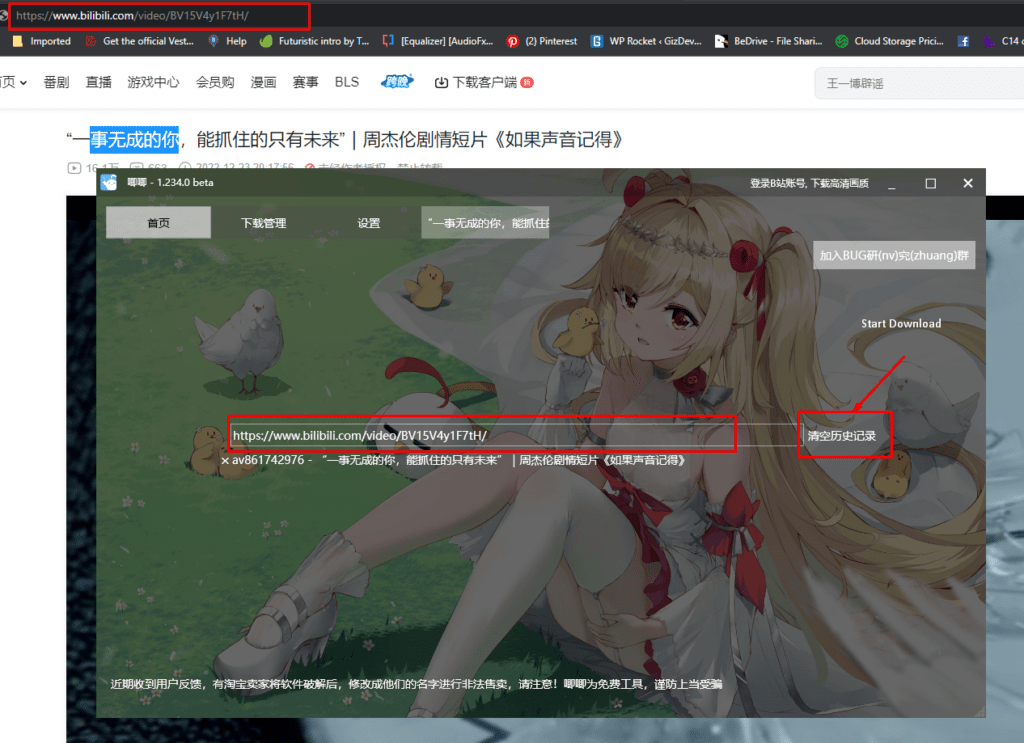
4. Now, click on the Download button or hit Enter, then move to the Video tab.
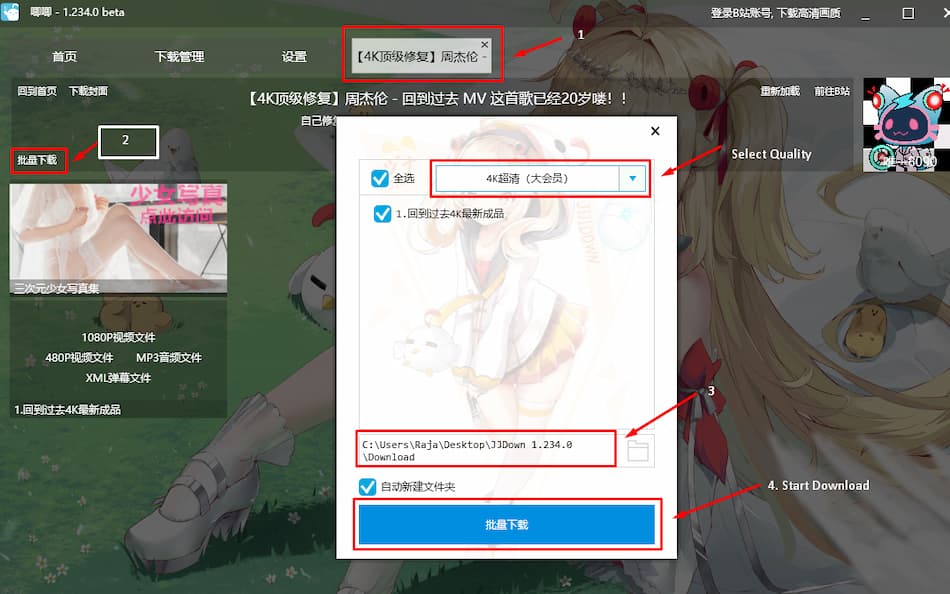
5. After moving to the Video tab, click on the 2nd Option Batch Download. In the new Windows, Select Video Quality in the 3rd Option, select the download location, and finally, in the 4th option, start the download.
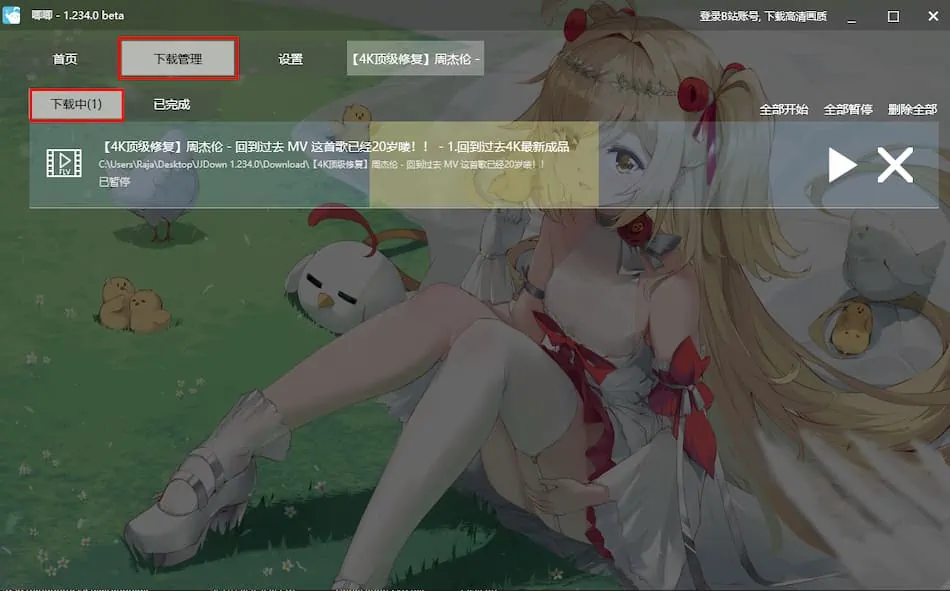
6. Go to the Download Management tab to view the download progress. You can also pause and resume the download from here.
7. To watch the downloaded video, go to the JiJiDown\Download folder (Default location) or the folder where you have saved the video.
Download Videos using Chrome Extension
We have shared the Video downloader that supports Bilibili, but this time we are going to share a Chrome extension that will extract the direct video link from Bilibili.com or Bilibili.tv website. So you don’t have to depend on other Online video downloader websites, you can download on your browser without any limit.
1. Download and install the Bilibili Download Helper by pictureknow on your Chrome Browser – Chrome Webstore Link | Devdrive zip Link
2. After adding the extension to the browser. Now, Pin the extension on the Top bar by clicking the Extension icon and Pin the Bilibili Download Helper.
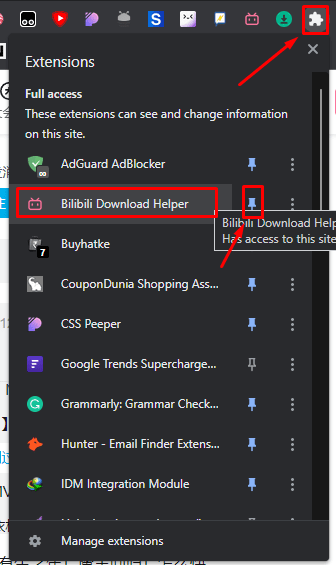
3. Visit bilibili.com or bilibili.tv and search for the video.
4. Click on the video and play. Then, click the Pink Download button and select the desired Video size from the list.
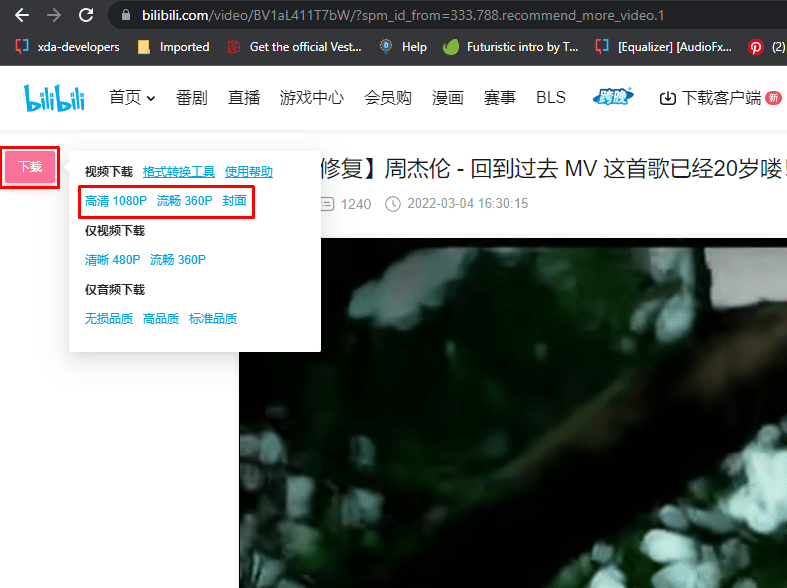
5. Select the download location to start downloading the video.
Other video downloaders and extensions
There are other JiJiDown online video downloaders available on the internet jijidown.com. You can try this website to Download Videos from bilibili.






You cannot get 1080p vid on JiJiDown