

Google developed the Android Auto navigation mobile app for cars, bikes, and other vehicles. Android Auto was publicly launched in 2015 and in 2016 Google pre-implemented the app in new vehicles and tabs. The app is available for Android-based cars, vehicles, and tablets, as well as many smartphones. But if your device does not support the Android Auto app and you want to install Android Auto on your Android device, this guide is for you. This guide will also help you install Android Auto on Chinese Xiaomi MIUI, OnePlus, Nubia, and Huawei devices.
In this guide, we will tell you how to install Android Auto on Chinese MIUI, Nubia UI, Oneplus, and All Android Devices that don’t have official support for Android Auto. A GitHub developer has developed a Magisk Module that will let you enable and install Android Auto as a system app. The following is a Magisk module, so you need to root and then install the Magisk Manager app on your smartphone to install this module in the Magisk app.
Key Takeaways
- Android Auto allows seamless connection between Android devices and car infotainment systems, enhancing safety and convenience.
- If your device lacks official support, you can still Install Android Auto using a Magisk Module after rooting your device.
- Ensure your device runs Android 11 or higher, and follow the pre-requisites carefully before installation.
- For Chinese devices, download the cn2global module to translate Android Auto into English during the installation process.
- Use the Activity Launcher app to create a shortcut for launching Android Auto after installation.
About
Android Auto is a game-changing technology that brings the power of Android to your car dashboard. It seamlessly connects your Android device with your car’s infotainment system, providing a safe and convenient way to access your favorite apps and features on the road.
Android Auto enables hands-free calling, sending and receiving messages, navigation with Google Maps, listening to music with popular streaming apps like Spotify or Pandora, and even controlling select smart home devices—without taking your eyes off the road or your hands off the wheel.
How To Install Android Auto on All Android Device
You can install the latest Android Auto from the Play Store if the device is officially supported. But if the device is not supported officially then you have to root the device to install and enable Android Auto. Before following the guide, First Read the prerequisites and go through the steps.


Pre-requisite:-
- Your device must be running on Android 11 + Device.
- Make sure you have rooted the device with Magisk If you have not Then Follow this Guide – The latest Magisk Manager
- Uninstall Android Auto Updates.
- Charge the device to install the module
- Download the Android Auto Magisk Module and cn2global module if you have a Chinese Android device to translate the app into English.
- Download and Install the Activity Launcher App from the Play Store.
How to Enable Android Auto on Chinese Android Devices and Rom’s
- First, read the Prerequisites and then Uninstall Android Auto Updates from Settings – Apps.
- Root the device with Magisk if you have not then follow the guide.
- Uninstall Android Auto Updates Before installing the Magisk module.
- Then Install the Cn2global translation module as per your device.
- Install the androidauto Magisk module from Magisk Manager after following the below steps.
- Reboot The device.
- Update the Android Auto from the Play Store.
- Now provide all permissions to Android Auto from Setting – Apps.
- Next, Install Activity Launcher from the Google Play Store.

- Open Activity Launcher, Find Android Auto then create a shortcut and launch by tapping on ”.companion.AndroidAutoActivity”.
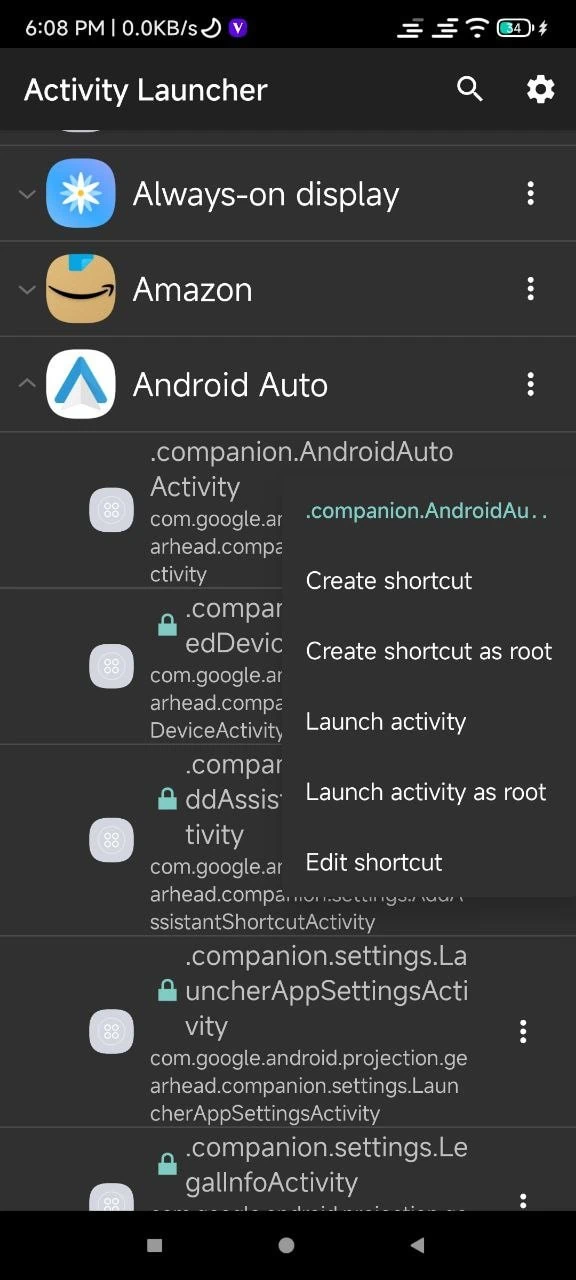
- Now connect your Android Auto cars or vehicle with a USB Cable or Wi-Fi.






Hi
Will this work for HyperOs?
I tried.. too pro for me for my realme x2 rmx1991 china rom.. doesn’t work for me.
Can’t even find on YouTube for step by step.
On magisk app, home: I tried select install, select and patch V1 files and select install.
It come out fail and process error.
Stuck with this stupid phone.
My carplay android auto is going to be useless 😭