Here is the latest Sony USB Drivers for all new and old Sony Android devices, Xperia XZ2, Xperia XZ2 Premium, Xperia XZ2 Compact, Xperia J1 Compact, Xperia X Compact, Xperia XZ Premium, Xperia XZ1, Xperia XA1, Etc. We have uploaded all the Sony drivers, Sony Mobile drivers, and fastboot drivers, including the Sony Flash driver for flashing with the Sony Flash Tool.
This driver is required to connect your device with pc to transfer files, update device firmware, and install TWRP recovery via fastboot mode. Sony launched many new Phones in 2017, and 2025and some new Sony Android devices don’t support Windows 11. But here is the new Sony Android USB Driver that supports Windows 10, Windows 8, and Windows 7. We will show you how to install Sony USB Drivers on your pc manually via the Device Manager.
The Latest Sony USB Drivers support Windows 11. These drivers include MTP, ADB, FASTBOOT, and Sony Flash drivers.
Supported Device
The Sony Android Driver supports almost all old and new Sony Android Phones, Xperia XZ2, Xperia XZ2 Premium, Xperia XZ2 Compact, Xperia J1 Compact, Xperia X Compact, Xperia XZ Premium, Xperia XZ1, Xperia XA1, Etc.
Download Sony USB Drivers
Sony PC Suite (Xperia companion) ⇒ Windows / MAC
ADB, fastboot Driver ⇒ Latest Google USB Driver
Sony FLASH Driver ⇒ Sony Flash Driver 2022.zip
Sony Mobile Drivers Zip
| Model No | Download Link |
|---|---|
| Xperia Z3+ | XPERIA_Z3_PLUS_DRIVER.ZIP |
| Xperia XZ Series | XPERIA_XZ_PREMIUM_DRIVER.ZIP |
| Xperia XZ2 Series | XPERIA_XZ2_DRIVER.ZIP |
| Xperia XZ1 Series | XPERIA_XZ1_COMPACT_DRIVER.ZIP |
| Xperia XA1 Ultra | XPERIA_XA1_ULTRA_DRIVER.ZIP |
| Xperia X Series | XPERIA_X_COMPACT_DRIVER.ZIP |
| Xperia Touch | XPERIA_TOUCH_DRIVER.ZIP |
| Xperia J1 Series | XPERIA_A2_SO-04F_DRIVER.ZIP |
How To Install Sony USB Drivers on Windows
1. Before we start the guide, make sure you have enabled USB Debugging on the Sony device because the ADB driver does not detect until you enable USB Debugging. Go to the anchor text and read the guide.
2. There are two ways you can install the drivers automatically on your Windows Pc; one is by installing the latest Sony Driver.
3. Method 2: manually via the device manager. Download the Sony Mobile Drivers Zip file and unzip the driver folder on your pc now. Open Device Manager by running “devmgmt.msc.”
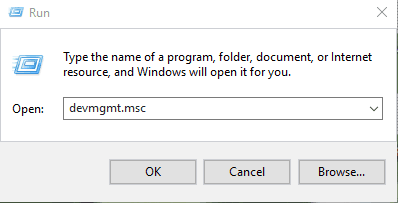
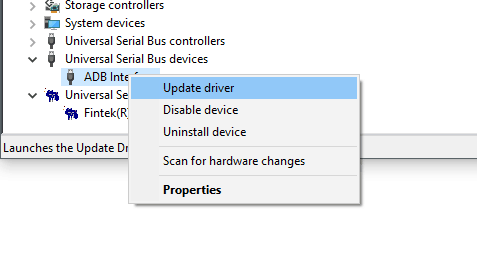
4. Now connect your device and select Unknown, ADB, fastboot device by right click ⇒ Update driver
- Select Browse my computer for driver software
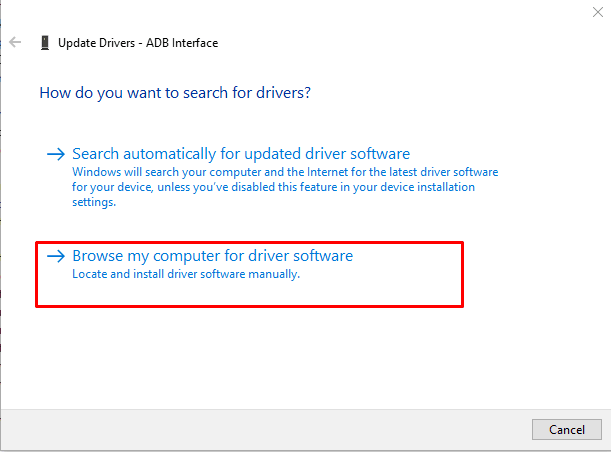
5. Browse the driver folder and install it.
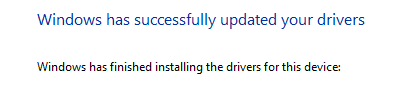
6. Once the Sony USB drivers installation is done, reboot your pc and connect your device.
More Drivers ⇒
We hope you like the guide we have written with complete instructions and screenshots. If you still don’t understand how to install, comment below, and we will surely help you 🙂