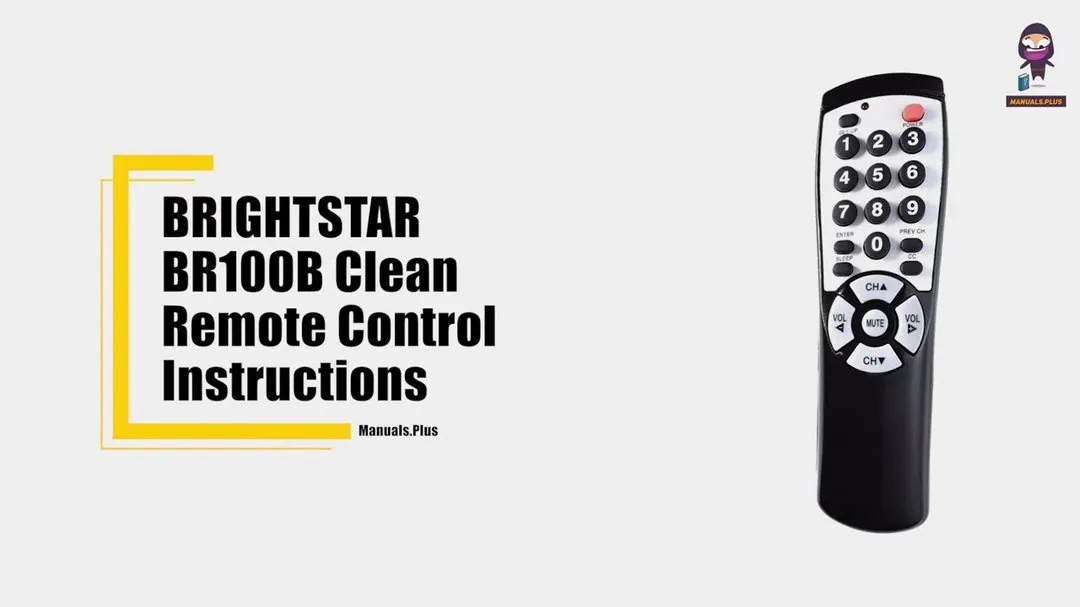
Do you need a remote that doesn’t cost much? Brightstar universal remote is a solid choice. Its best feature? Simplicity. Brightstar TV remote codes are short and easy to enter; three digits each. Codes you might memorize if you lose the manual. Brightstar Universal Remote Codes and programming methods are all explained in detail here.
Brightstar produces several models: BR100L, BR100P, BR100Q, BR100R, and BR100Z. In certain places, these are sold as Clean Remote, but the buttons and Brightstar remote codes library are exactly the same, so this guide applies to both. The remote uses standard infrared for interaction with the TV; no app, no pairing menu needed.
Brightstar Universal Remote Codes List (TV)
Find your TV brand from the table and write down the first code. Most brands have several codes but usually the first one works fine for most models. If you can’t find your brand or if codes don’t work then don’t panic. The automatic search method below will go through all codes in the library until your TV reacts. That way the remote can pair with most sets made in last two decades.
| Brand | Brightstar Universal Remote Codes |
|---|---|
| Admiral | 500, 614, 902, 615, 610, 501 |
| Advent | 911, 932, 933, 614, 303, 201, 301, 909, 919, 920, 924, 082, 109 |
| Aiko | 900 |
| Akai | 601, 903, 922, 027, 038, 039, 041, 117 |
| AOC | 079, 601, 617, 103, 076, 077, 078, 080 |
| Apex | 000, 618, 604 |
| Aspect | 606 |
| Audiovoxx | 100, 901, 900, 101 |
| Belcor | 617 |
| Bell&Howell | 620, 611 |
| Bradford | 901 |
| Brockwood | 617 |
| Broksonic | 902, 614 |
| Candle | 601, 619 |
| Celebrity | 605 |
| Celera | 092, 094 |
| Changhong | 618 |
| Citizen | 903, 601, 619, 900, 614 |
| Clairtone | 103 |
| Concerto | 619 |
| Contec | 901, 103 |
| Craig | 901 |
| Crosley | 303, 301 |
| Crown | 901 |
| Curtis Mathes | 400, 301, 620, 100, 500, 903, 044, 621, 606, 619, 611, 603, 102, 402, 401, 405 |
| CXC | 901 |
| Daewoo | 100, 617, 900, 101 |
| Daytron | 617 |
| Dumont | 700, 617 |
| Durabrand | 902, 901, 201, 614, 615, 914, 918 |
| Dynex | 614, 085, 086, 109, 110, 112, 620, 903, 619, 910 |
| Electroband | 605, 103 |
| Electrohome | 614 |
| Element | 112, 113, 114, 115, 116 |
| Emerson | 620, 902, 022, 614, 901, 200, 201, 607, 617, 615, 602, 103, 101 |
| Envision | 079, 601, 076, 077, 078, 080 |
| ESA | 901, 201, 601, 903 |
| Fisher | 620, 801 |
| Fujitsu | 615, 300 |
| Funai | 901, 615, 022, 201 |
| Futuretec | 901 |
| GE | 400, 202, 100, 200, 607, 608, 802, 402, 401, 405, 042 |
| GFM | 201, 022 |
| Gibralter | 700, 601, 617 |
| GoldStar | 601, 607, 617, 619 |
| Grundy | 901, 615 |
| Haier | 914, 918, 043, 045, 092, 093, 094, 095, 096, 097 |
| Hallmark | 607 |
| Harvard | 901 |
| HCI | 020, 021 |
| Hitachi | 606, 619, 611, 005, 916, 060 |
| HP | 075 |
| ILO | 921, 925, 609, 201, 059 |
| Infinity | 301 |
| Infocus | 400 |
| Insignia | 614, 303, 201, 301, 909, 919, 920, 934, 081, 082, 083, 084, 085, 086, 108, 109, 110, 111, 112, 117, 620, 903, 619, 910 |
| Intel | 700 |
| JBL | 301, 000, 604, 618 |
| JC Penny | 400, 609, 202, 903, 601, 607, 608, 617, 800, 402, 405 |
| JCB | 605 |
| JVC | 701 |
| KEC | 901 |
| Kenwood | 601, 617 |
| KLH | 618 |
| Kolin | 023, 024, 025, 026 |
| Konka | 904, 001, 304, 002, 003, 041, 083, 117 |
| KTV | 901, 601, 103 |
| LG | 619, 910, 700 |
| Logik | 611 |
| Luxman | 619 |
| LXI | 400, 301, 620, 609, 607, 402 |
| Magnavox | 301, 302, 303, 601, 615, 617, 803, 078, 905, 906, 907, 908, 909, 011, 034, 035, 036, 037, 040, 046, 047, 048 |
| Majestic | 611 |
| Marantz | 301, 601 |
| Matsushita | 004 |
| Megatron | 607, 606 |
| MEI | 103 |
| Mermorex | 620, 004, 614, 104, 095, 607, 615, 611, 700, 303, 201, 301, 909, 919, 920, 934, 006, 012 |
| MGA | 104, 601, 607, 617, 500 |
| Midland | 400, 700, 202, 402 |
| Millrock | 018 |
| Minutz | 608 |
| Misakai | 201 |
| Mitsubishi | 500, 104, 607, 617, 601 |
| Motorola | 500, 802 |
| MTC | 903, 601, 617, 619, 103 |
| Multitech | 901 |
| NAD | 609, 607, 603 |
| NEC | 601, 617, 619 |
| Nikko | 601, 607, 900 |
| Norcent | 078, 079 |
| Noshi | 800 |
| NTC | 900 |
| Olevia | 923, 023, 024, 025, 026 |
| Onwa | 901 |
| Optimus | 620, 004, 603 |
| Optonica | 500, 610 |
| Orion | 902, 614, 615, 109 |
| Panasonic | 004, 202, 802, 610, 301, 302, 303, 055, 056 |
| PDI | 007, 008, 009, 010 |
| Philco | 301, 614, 601, 606, 617 |
| Philips | 301, 302, 303, 601, 615, 617, 803, 078, 905, 906, 907, 908, 909, 011, 034, 035, 036, 037, 040, 046, 047, 048 |
| Pilot | 601, 617 |
| Pioneer | 603, 600 |
| Polaroid | 400, 910, 913, 915, 917, 920, 012, 013, 028, 029, 030, 031, 032, 033, 041, 083, 084, 109, 113, 117 |
| Portland | 617, 900 |
| Prima | 085 |
| Prism | 202 |
| Proscan | 400, 402, 074, 085, 112 |
| Proton | 607, 102 |
| Proview | 112, 113, 114, 115, 116 |
| Pulsar | 700, 617 |
| Quasar | 004, 202, 610, 802 |
| RadioShack | 400, 620, 610, 901, 621, 607, 617, 619, 402 |
| RCA | 400, 617, 800, 612, 600, 402, 403, 401, 404, 405, 623, 042 |
| Realistic | 620, 610, 901, 601, 607, 617, 619 |
| Rhapsody | 103 |
| Roomconx | 614, 615, 902, 924 |
| Runco | 700, 601, 616 |
| Sampo | 601 |
| Samsung | 930, 903, 601, 607, 617, 619, 614, 902, 615, 109 |
| Sansui | 614, 902, 615, 109 |
| Sanyo | 620, 801, 931 |
| Scotch | 607 |
| Scott | 902, 901, 607, 617, 615 |
| Sears | 400, 301, 620, 609, 607, 615, 622, 801, 201, 402 |
| Sharp (LCD) | 912, 929 |
| Sharp | 500, 610, 501, 929 |
| Shogun | 617 |
| Signature | 611 |
| Simpson | 803 |
| Sony | 605, 901, 607, 615 |
| Soundesign | 901, 607, 615 |
| Soyo | 061, 062, 063, 064, 065, 066, 067, 068, 069, 070, 071, 072, 073 |
| Squareview | 201 |
| SSS | 901, 617 |
| Starlite | 901, 201, 500, 912, 929 |
| Superscan | 201, 500, 912, 929 |
| Supreme | 605 |
| Sylvania | 301, 601, 022, 201, 901 |
| Symphonic | 901, 201, 022 |
| Syntax | 023, 024, 025, 026 |
| Tandy | 500 |
| Tatung | 802 |
| Technics | 004, 202 |
| Techwood | 202, 619 |
| Teknika | 301, 901, 104, 605, 617, 615, 619, 611, 900 |
| TMK | 607, 619, 602 |
| Toshiba | 609, 903, 613, 910, 619, 058, 620 |
| Trutech | 101, 201, 617, 900, 015, 016, 017 |
| Victor | 701 |
| Vidtech | 607, 617 |
| Viewsonic | 087, 088, 089, 090, 091, 098, 099, 105, 106, 107, 019 |
| Viore | 903 |
| Vivitek | 058 |
| Vizio | 927, 011, 013, 014 |
| Wards | 301, 610, 601, 607, 608, 617, 615, 619, 611 |
| Westinghouse | 926, 928, 049, 050, 051, 052, 053, 054 |
| White Westinghouse | 614, 101, 605 |
| X2-GEN | 057 |
| Yamaha | 601, 617 |
| Zenith | 700, 614, 611, 900, 619, 910, 078 |
Quick pick: Samsung — 930, 903, 601 · LG — 619, 910, 700 · Sony — 605, 901, 607 · Vizio — 927, 011, 013 · RCA — 400, 617, 800 · Insignia — 614, 303, 201. If the first code on your list only powers the TV on, step through the rest of the numbers until volume and channel keys respond.
How to Program Brightstar Universal Remote
Method 1 with Brightstar Remote Codes: Direct Code Entry
First, note down the Universal Brightstar remote codes, then take the remote in your hand. Press the Setup button and the remote goes into programming mode. Red LED confirms this. Enter the code which is three digits. As soon as volume or channel buttons work, you’re through. That same LED displays code stored there, flashes when doing auto search and also shows a confirmation of a sleep timer. Learning to read it will save you much guessing.
- Switch on the TV you want to pair.
- Hold the Setup button until the red LED blinks once and stays lit, then release it.
- Enter the three digit code from the table for your brand.
- Press volume or channel to test. If the TV responds, the code is saved.
- If the LED blinks while you type, the code is wrong — try the next one from the list.
Method 2: Auto Code Search
If none of the codes work or your brand is not listed, try using auto search. Remote cycles through all codes it knows. Just watch the screen of your TV. As soon as the channel changes hit OK to lock the match. This usually takes less than a minute and gets you a working remote. This is a good backup for older or rare brands.
- Turn on the TV and hold Setup until the LED blinks once and stays on.
- Press Channel Up. The remote starts cycling through its whole code library.
- Watch the TV screen. The moment the channel changes, press OK to lock the code in.
Troubleshooting
Never Lose Code: Identify the Stored Code
These remotes have a special extra feature that sets them apart from cheaper models: the Never Lose Code feature. If you forget your TV remote code, you can recover it. Press the Setup button and watch for the blinking pattern. A factory reset is also very easy; pressing it twice will revert everything to its defaults. Instructions for both features, along with instructions for setting up the sleep timer, are given below.
- Hold Setup until the LED blinks once and stays on.
- Press Setup again quickly and release it.
- Press each number from 0 to 9. Run through all ten keys three times, watching the LED after every press.
- Each time the LED blinks, note the digit. The blink count reveals the stored channel code for your TV.
Factory Reset
To reset and clear all programming, you just have to push a few buttons. Hold Setup button until LED stays lit. Then press CC. That’s all. Your remote will revert to factory settings and can easily pair to another TV or start programming from the beginning.
Sleep Mode
If your TV has a sleep timer you just hit the Sleep button. A timer pops up on screen and you can keep pressing to change time. No timer built in? No worries. Remote does it. Just hold Sleep until LED flashes and stays on and then use number buttons to enter a time from 01 to 99 minutes. The LED blinks one time to confirm. Keep remote aimed at TV and it will turn off when count down is done.
That’s what Brightstar remote does: full code list of every brand direct entry auto search code recovery reset and timer. Find your brand and try first code if that fails use auto search.