

Finally, TWRP recovery for Vivo V7 is available now. We will use the ADB Flash tool. That means you can Root Vivo V7 with TWRP Recovery and Magisk. This method is working just follow the steps carefully. If any questions comment below in the comment box. Now we will show rooting guide for Vivo V7 with Magisk and ADB Flash Tool.
TWRP stands for Team-Win Recover Project. We all know that, TWRP recovery and rooting your smartphone is useful for in many scenarios, Still for those who are new let’s check it out some cool things TWRP and rooting features can do. Thanks to the 4PDA Forum and other members for the TWRP.
Benefits of install TWRP recovery And Root Vivo V7:
- By rooting you can easily delete bloatware that is built-in in the smartphones. Free up some space by deleting some unnecessary bloatware.
- Get some real backups by using apps like Titanium backup etc. You can also modify some system settings like build.prop files. Rooting has much more advantages; you will get to know.
- TWRP enables us for easy rooting and unrooting device. Just by flashing SuperSu we can root the smartphone.
- The most important and loved feature that CUSTOM ROMs. This is a very important feature, or we can say it as a big advantage of TWRP recovery.
- You can turn your phone to its full speed by overclocking and also you can do some underclocking.
- Xposed features are also an advantage of TWRP. Let’s you customize your phone’s stock ROM easy and simple. There are much more features but let’s go to our topic.
Now let’s go to the guide, first, we will guide you how to install Twrp on Root Vivo V7 with ADB flash tool. Then we will guide how to root the device with Magisk.
Supported Device:-
- Vivo V7
Preparation:-
- Enable OEM Unlock, USB Debugging from this LINK.
- Unlock Bootloader: – How to unlock Vivo Phones Bootloader
- Install Vivo Driver from
- UNLOCK BOOTLOADER
- Copy MagiskFILE TO YOUR PHONE STORAGE
Requirements & Downloads:-
- Install MTK USB Driver.
- Download Latest ADB Flash Tool.
- Download TWRP Recovery for Vivo V7.
- Magisk.Zip
- Read Guide.
Install TWRP Recovery:
1. First Read Preparation Unlock Bootloader Download Required Files.
2. Download “adb-fastboot-tool-2018.zip” extract it in a desktop.
- Download TWRP img and all files from above. Then copy all those files in your device and do keep a copy of TWRP in the computer.
3. Rename TWRP recovery IMG file “recovery.img” and copy to adb-fastboot-tool-2018 folder.
4. Open CMD windows in adb-fastboot-tool-2018 folder by Shift + Mouse Right click.
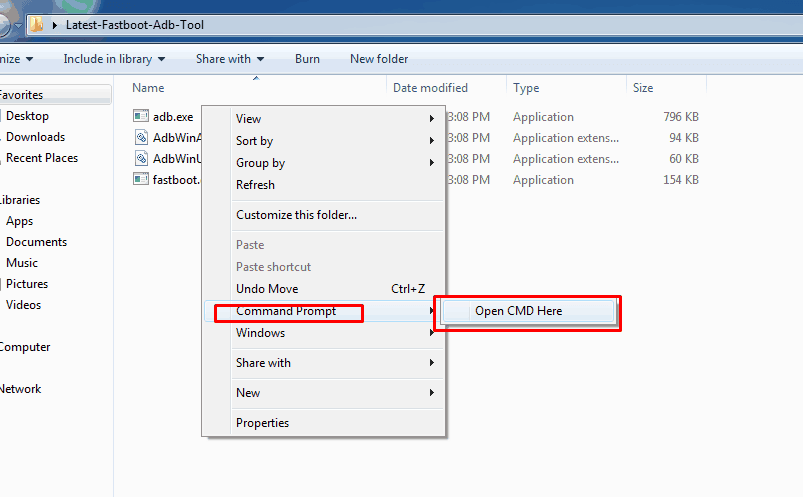
5. Connect your device to the PC, make sure USB Debugging is enabled. Now Reboot your Vivo V7 in Bootloader Mode, using this command.
adb reboot bootloader
› If you get Permission popup in your device then Allow it.
6. Once your device in fastboot mode, Now paste this command on command window and hit enter to install TWRP recovery temporarily.
fastboot boot recovery.img
7. now hit the following command to flash the TWRP recovery.
fastboot flash recovery.img
8. Reboot your phone to recovery mode by entering the following command.
9. Then reboot your device to Recovery Mode, When asked to “Allow for modifications. By Swipe to Allow Modifications.
10. Once done click on Reboot system button to restart the device.
11. That’s it to install TWRP. If you want to Root Vivo V7 then follow the guide below.
Guide To Root Vivo V7:-
- Download Magisk copies it to the Internal Storage or USB-OTG.
- Turn off your phone and turn into recovery mode By Volume UP + Power.
- Go to Install Navigate to Magisk zip Swipe to install.
- Reboot your phone.
If you have any problems do comment below. Also, for more updates on stuff like flashing, wallpapers, themes etc like our Facebook.
Other Device Recoveries
- Xiaomi Black Shark Root And Recovery
- Install TWRP Recovery Redmi Note 6 Pro
- Panasonic Eluga Arc 2 TWRP Recovery
- Oukitel C8 Install TWRP and Root






It is Failed to install Twrp beacuse it is not official and vivo phones allow any custom recovery to be install and vivo phones not support to unlock Bootloader when you try to install Twrp the CMD says the phone is locked