Do you like Apple’s iOS 26 fonts? But maybe you are using an Android device and want to test iOS 26 on it. Now you can apply iOS 26 Wallpapers, ringtones, and iOS iPhone fonts on your Android device. iOS 26 was released this September at the Apple WWDC 2025 event. You can enjoy this premium iOS 26 design with this font and experience the new iOS on your Android device.
In this post, we have extracted all fonts from Apple iOS, including SFCompact, SFPro, and more, from an Apple iPhone. You can use them on your Android Phone. Apple released iOS 26 in September at the Worldwide Developers Conference (WWDC). iOS 26 brings a multitude of new capabilities and further optimization. IOS 26 makes your smartphone beautiful and elegant. Here is the font from Apple iOS 26. You can practice it on your Android device. We have uploaded the iPhone Font for you. Moreover, we have shared the guide with you on how to set it up on your Android phone.
OS 26 Features
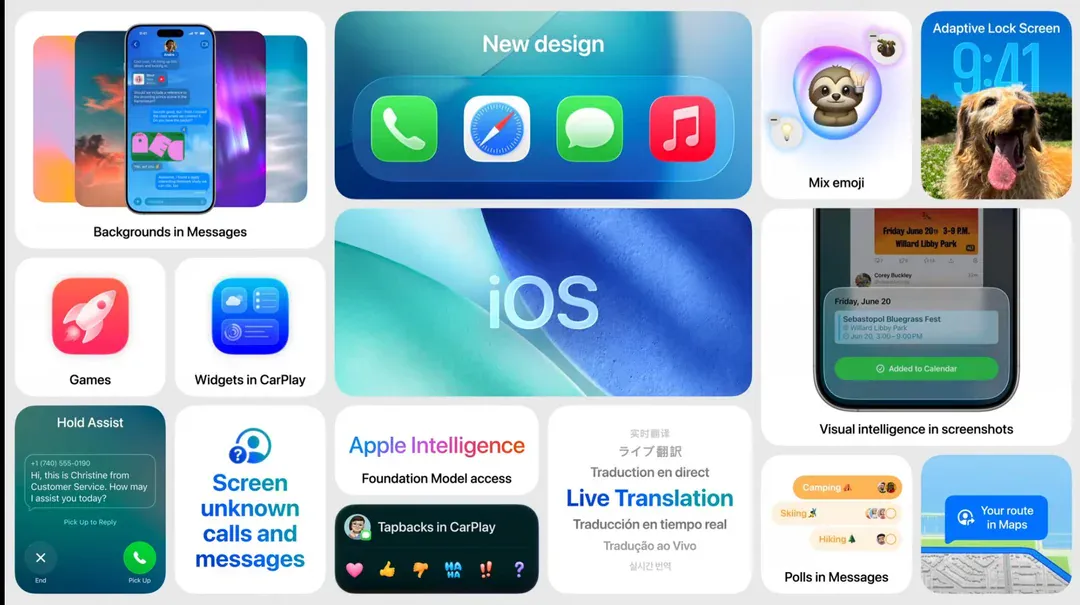
iOS 26 on the iPhone will bring a more personalized, smarter iPhone experience. This makes the iPhone a more functional addition to your daily routine. Some of the changes made to make this a more personalized experience for you include additional customization options. These allow for further personalization through customizable smart widgets. More importantly, iOS 26 also offers even more AI-driven recommendations. Additionally, it provides a much smoother transition between apps.
Some other enhancements in iOS 26 include more customization options for the lock screen and the home screen. Also, there are battery-saving features and assistive technologies to help you access your iPhone. Overall, the intent behind all of the improvements made to the cameras, productivity, and security was to create a faster, safer, and more personalized user experience on the iPhone.
Apple iOS fonts for Android Phones
Are you an Android user and in love with the elegant look of Apple’s iOS 26 font? Good news for you: you can actually download the popular font onto your Android device. In just a few easy steps, you can enjoy the same modern and sophisticated font that iOS 26 users do. Just go to the download section, and follow the guide. Alternatively, get a third-party font app that may have a similar font. After downloading iPhone Font, install it and enjoy your new and improved Android interface!
Android users can apply iOS 26 Theme, Wallpapers, and Ringtones on their devices by installing the Launcher, Theme, Stock Wallpapers, and Ringtones apps. We have already shared all the latest iOS 26 Wallpapers and Ringtones. In this post, we will share the Apple iOS 26 font so you can apply it to your Android device. This font is compatible with the Latest Android 15 stock UI. Furthermore, it has also been tested on HyperOS, OneUI, and Nothing OS. You can apply it with ifont or using the Font or Zfont.
Fonts List
AcademyEngraved.ttf ,AppleSymbols.ttf ,Arial.ttf ,ArialBold.ttf ,ArialBoldItalic.ttf ,ArialItalic.ttf ,ArialRoundedMTBold.ttf ,Bodoni-Ornaments.ttf ,Bodoni72-Book-SmallCaps.ttf ,BradleyHand-Bold.ttf ,Chalkduster.ttf ,CourierNew.ttf ,CourierNewBold.ttf ,CourierNewBoldItalic.ttf ,CourierNewItalic.ttf ,DB_LCD_Temp-Black.ttf ,DearJoe-small-semibold.ttf ,DINAlternate-bold.ttf ,DINCondensed-bold.ttf ,Fallback.ttf ,filelist.txt ,Georgia.ttf ,GeorgiaBold.ttf ,GeorgiaBoldItalic.ttf ,GeorgiaItalic.ttf ,HYCuSong-CAICT.ttf ,Impact.ttf ,invisible_glyphs.ttf ,KefaIII.ttf ,KhmerSangamMN.ttf ,LaoSangamMN.ttf ,LockClock.ttf ,MarkerFeltThin.ttf ,MarkerFeltWide.ttf ,Mishafi.ttf ,NewYork.ttf ,NewYorkItalic.ttf ,NotoSansAdlam-Regular.ttf ,NotoSansAvestan-Regular.ttf ,NotoSansBamum-Regular.ttf ,NotoSansBassaVah-Regular.ttf ,NotoSansBatak-Regular.ttf ,NotoSansBhaiksuki-Regular.ttf ,NotoSansBrahmi-Regular.ttf ,NotoSansBuginese-Regular.ttf ,NotoSansBuhid-Regular.ttf ,NotoSansCarian-Regular.ttf ,NotoSansCaucasianAlbanian-Regular.ttf ,NotoSansChakma-Regular.ttf ,NotoSansCham-Regular.ttf ,NotoSansCoptic-Regular.ttf ,NotoSansCuneiform-Regular.ttf ,NotoSansCypriot-Regular.ttf ,NotoSansDuployan-Regular.ttf ,NotoSansEgyptianHieroglyphs-Regular.ttf ,NotoSansElbasan-Regular.ttf ,NotoSansGlagolitic-Regular.ttf ,NotoSansGothic-Regular.ttf ,NotoSansHanifiRohingya-Regular.ttf ,NotoSansHanunoo-Regular.ttf ,NotoSansHatran-Regular.ttf ,NotoSansImperialAramaic-Regular.ttf ,NotoSansInscriptionalPahlavi-Regular.ttf ,NotoSansInscriptionalParthian-Regular.ttf ,NotoSansKaithi-Regular.ttf ,NotoSansKayahLi-Regular.ttf ,NotoSansKharoshthi-Regular.ttf ,NotoSansKhojki-Regular.ttf ,NotoSansKhudawadi-Regular.ttf ,NotoSansLepcha-Regular.ttf ,NotoSansLimbu-Regular.ttf ,NotoSansLinearA-Regular.ttf ,NotoSansLinearB-Regular.ttf ,NotoSansLisu-Regular.ttf ,NotoSansLycian-Regular.ttf ,NotoSansLydian-Regular.ttf ,NotoSansMahajani-Regular.ttf ,NotoSansMandaic-Regular.ttf ,NotoSansManichaean-Regular.ttf ,NotoSansMarchen-Regular.ttf ,NotoSansMeeteiMayek-Regular.ttf ,NotoSansMendeKikakui-Regular.ttf ,NotoSansMeroitic-Regular.ttf ,NotoSansMiao-Regular.ttf ,NotoSansModi-Regular.ttf ,NotoSansMongolian-Regular.ttf ,NotoSansMro-Regular.ttf ,NotoSansMultani-Regular.ttf ,NotoSansNabataean-Regular.ttf ,NotoSansNagMundari-Regular.ttf ,NotoSansNewa-Regular.ttf ,NotoSansNewTaiLue-Regular.ttf ,NotoSansNKo-Regular.ttf ,NotoSansOlChiki-Regular.ttf ,NotoSansOldHungarian-Regular.ttf ,NotoSansOldItalic-Regular.ttf ,NotoSansOldNorthArabian-Regular.ttf ,NotoSansOldPermic-Regular.ttf ,NotoSansOldPersian-Regular.ttf ,NotoSansOldSouthArabian-Regular.ttf ,NotoSansOldTurkic-Regular.ttf ,NotoSansOsage-Regular.ttf ,NotoSansOsmanya-Regular.ttf ,NotoSansPahawhHmong-Regular.ttf ,NotoSansPalmyrene-Regular.ttf ,NotoSansPauCinHau-Regular.ttf ,NotoSansPhagsPa-Regular.ttf ,NotoSansPhoenician-Regular.ttf ,NotoSansPsalterPahlavi-Regular.ttf ,NotoSansRejang-Regular.ttf ,NotoSansSamaritan-Regular.ttf ,NotoSansSaurashtra-Regular.ttf ,NotoSansSharada-Regular.ttf ,NotoSansSoraSompeng-Regular.ttf ,NotoSansSundanese-Regular.ttf ,NotoSansSylotiNagri-Regular.ttf ,NotoSansSyriac-Regular.ttf ,NotoSansTagalog-Regular.ttf ,NotoSansTagbanwa-Regular.ttf ,NotoSansTaiLe-Regular.ttf ,NotoSansTaiTham-Regular.ttf ,NotoSansTaiViet-Regular.ttf ,NotoSansTakri-Regular.ttf ,NotoSansThaana-Regular.ttf ,NotoSansTirhuta-Regular.ttf ,NotoSansUgaritic-Regular.ttf ,NotoSansVai-Regular.ttf ,NotoSansWancho-Regular.ttf ,NotoSansWarangCiti-Regular.ttf ,NotoSansYi-Regular.ttf ,NotoSerifAhom-Regular.ttf ,NotoSerifBalinese-Regular.ttf ,NotoSerifNyiakengPuachueHmong-Regular.ttf ,PartyLET.ttf ,PhoneKeyCaps.ttf ,PhonepadTwo.ttf ,Scancardium_2.0.ttf ,SFArabic.ttf ,SFArabicRounded.ttf ,SFArmenian.ttf ,SFArmenianRounded.ttf ,SFCamera.ttf ,SFCompact.ttf ,SFCompactItalic.ttf ,SFCompactNumeric.ttf ,SFCompactNumericOutline.ttf ,SFCompactRounded.ttf ,SFCompactRoundedNumeric.ttf ,SFCompactSoft.ttf ,SFGeorgian.ttf ,SFGeorgianRounded.ttf ,SFHebrew.ttf ,SFHebrewRounded.ttf ,SFUI.ttf ,SFUIItalic.ttf ,SFUIMono.ttf ,SFUIMonoItalic.ttf ,SFUIRounded.ttf ,SourceSans3-Italic.ttf ,Spendcardium.ttf ,STIXTwoText-Italic.ttf ,STIXTwoText.ttf ,Symbol.ttf ,TimesNewRoman.ttf ,TimesNewRomanBold.ttf ,TimesNewRomanBoldItalic.ttf ,TimesNewRomanItalic.ttf ,TrebuchetMS.ttf ,TrebuchetMSBold.ttf ,TrebuchetMSBoldItalic.ttf ,TrebuchetMSItalic.ttf ,Verdana.ttf ,VerdanaBold.ttf ,VerdanaBoldItalic.ttf ,VerdanaItalic.ttf ,WorkflowGlyphs.ttf ,ZapfDingbats.ttf ,Zapfino.ttfiOS 26 Fonts Download link
The latest iOS fonts, including SFCompact, SF-Pro, SF-Mono, SF-Hebrew, SF-Georgian, SF-Armenian, SF-Arabic, and NYFonts, are compatible with your Android device and will also work with Windows devices. You can find all the SFCompact and SF-Pro fonts, from Regular to bold, thin, light, heavy, and Italic, in the zip file.
iOS 26 font ⇒ SFCompact | SFPro.zip
All Fonts in Zip File ⇒ iOS_26_Fonts_Collection.zip
| Font Name | Download Links |
|---|---|
| SF-Pro | SF-Pro.zip |
| SF-Compact | SF-Compact.zip |
| SF-Mono | SF-Mono.zip |
| SF-Hebrew | SF-Hebrew.zip |
| SF-Georgian | SF-Georgian.zip |
| NYFonts | NYFonts.zip |
| SF-Armenian | SF-Armenian.zip |
| SF-Arabic | SF-Arabic.zip |
How to Apply iOS Fonts on Your Android Devices
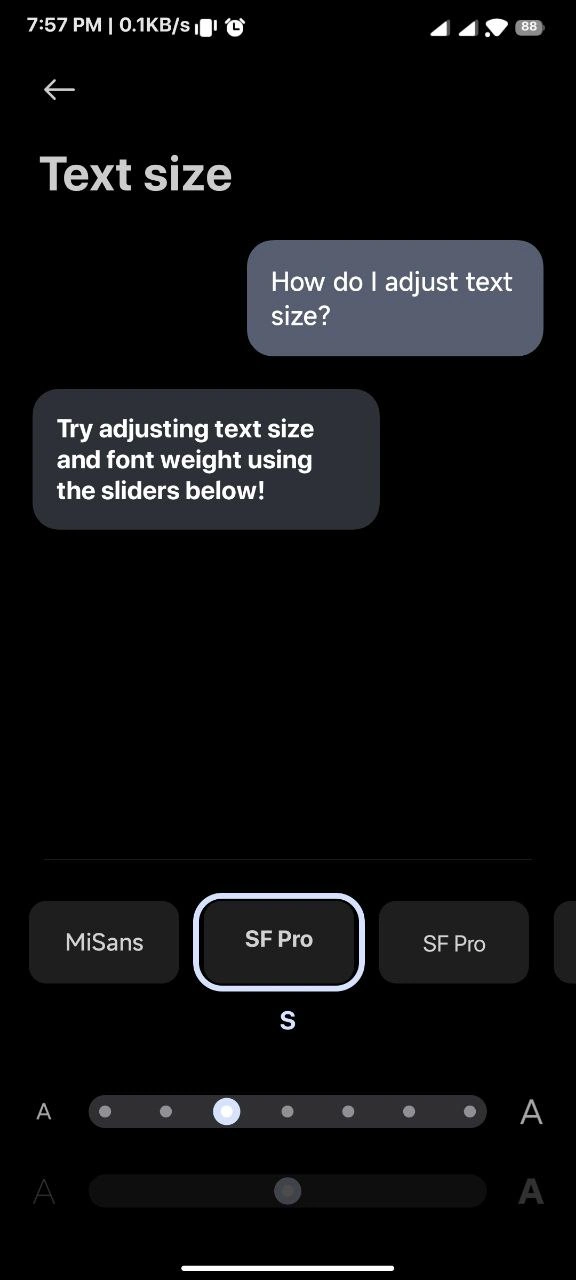
To apply an iOS font on an Android device. Simply, you can use the phone theme option or use third-party tools like iFont, zfont, and MIUI Custom Font Installer. Here is the Zfont non-root and root guide to apply the font on an Android device.


1. Download the zfont app on your Android device, and download the font (.ttf) file on your device.
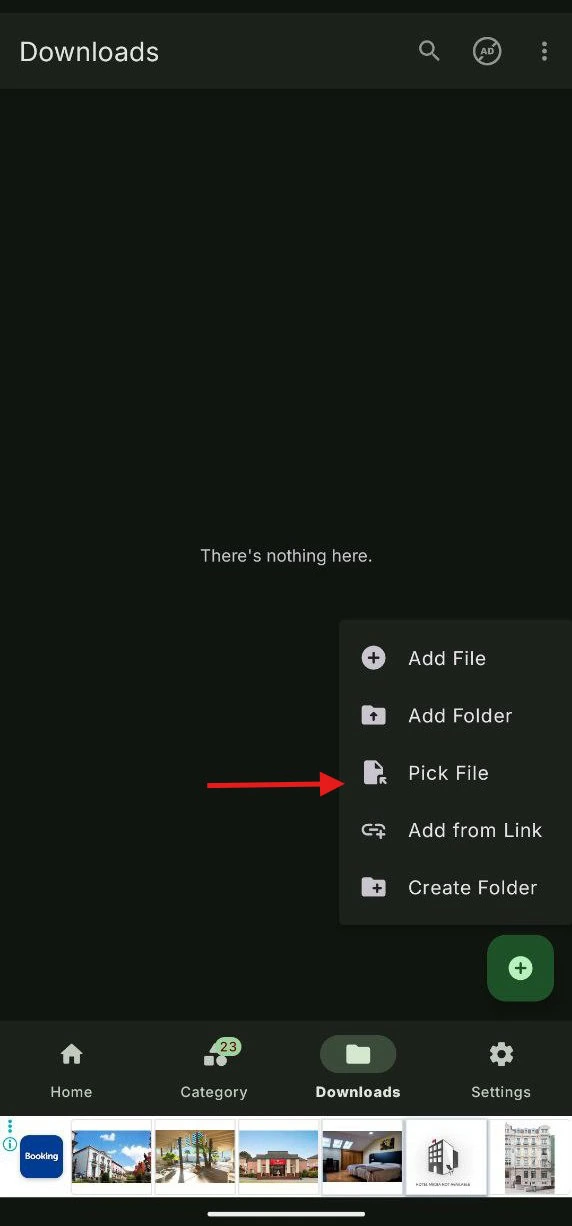
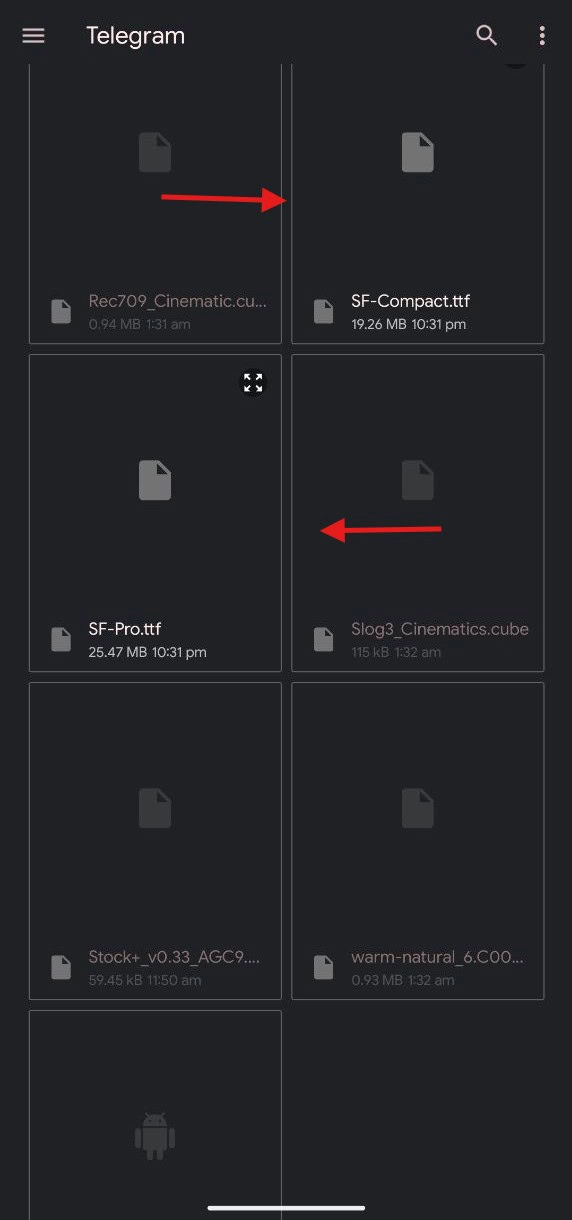
2. Open the Zfont app and go to the download tab. Tap on the “plus” icon. Then, tap on the “pic file“. Next, browse the iOS 26 font from the list. After that, tap on apply.
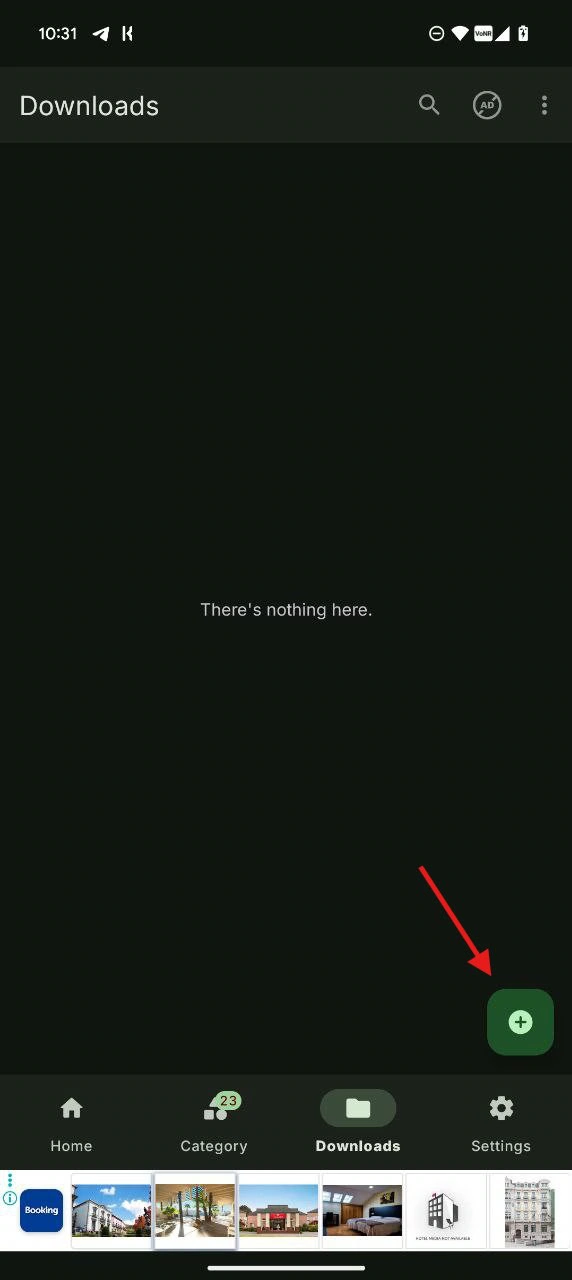
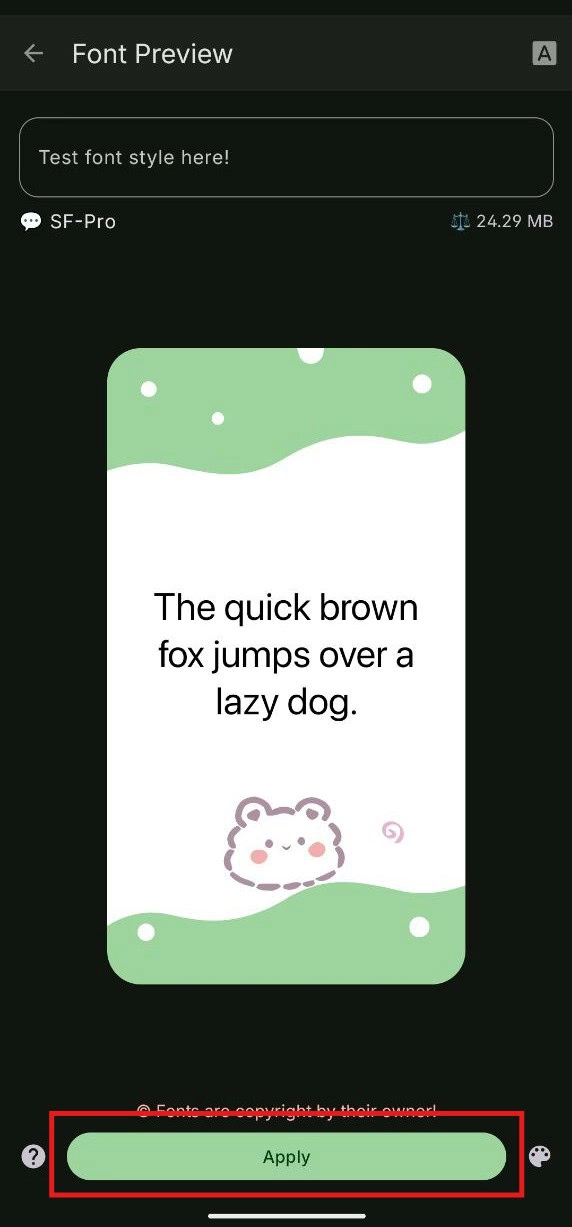
3. After applying the font, reboot the device.
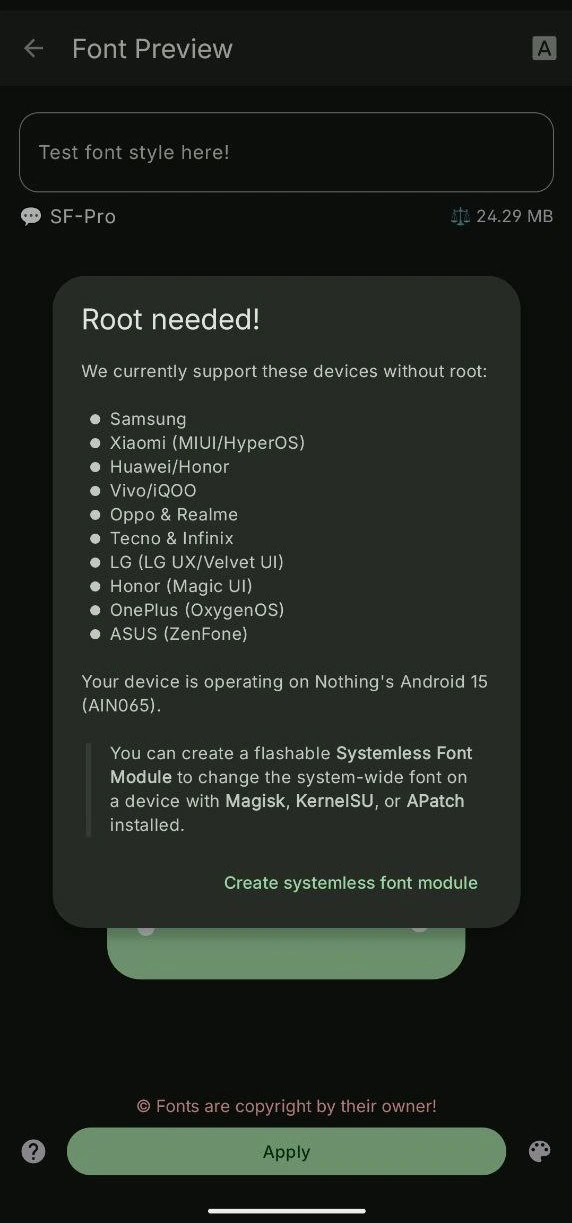
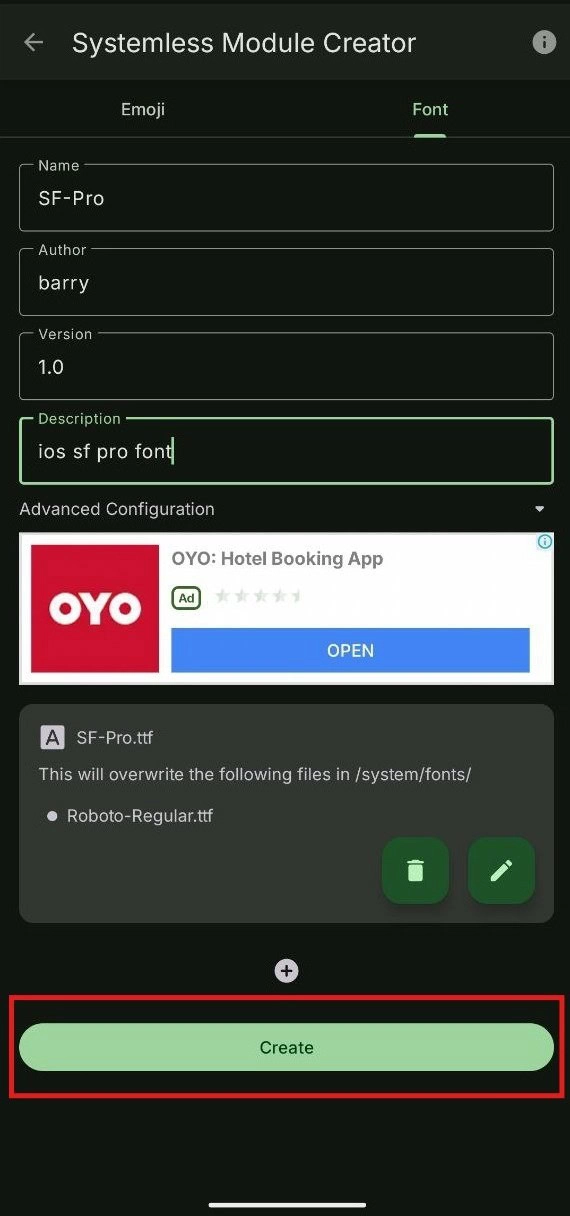
4. For a rooted device, follow all the steps above and tap the “systemless font module” -> File font name, author, version, and description. Then, create.
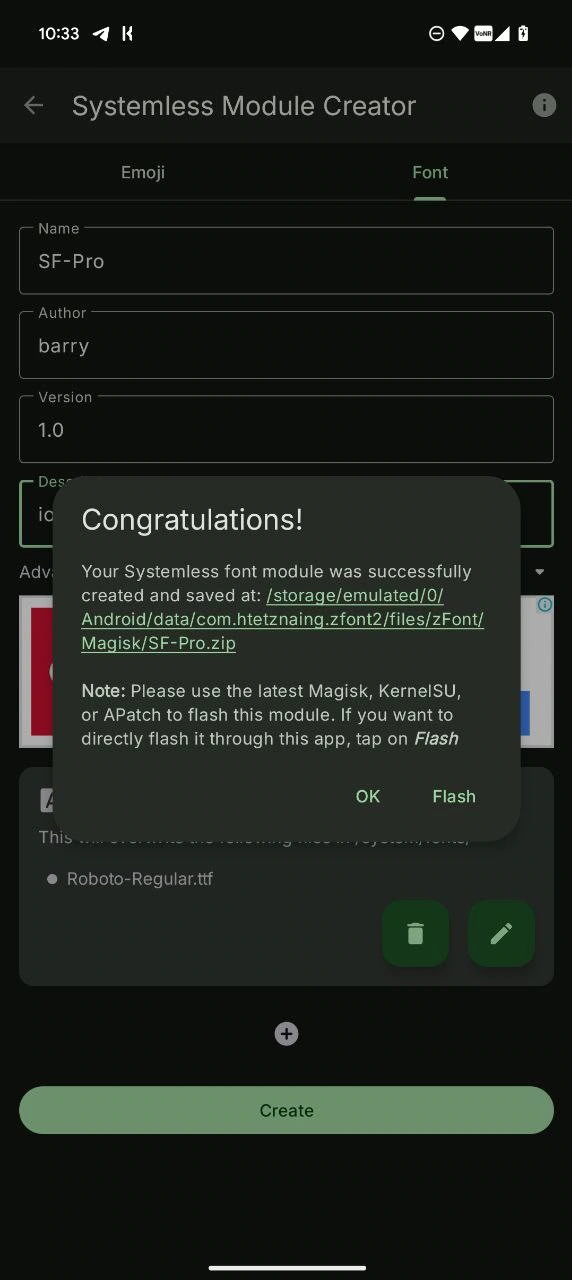
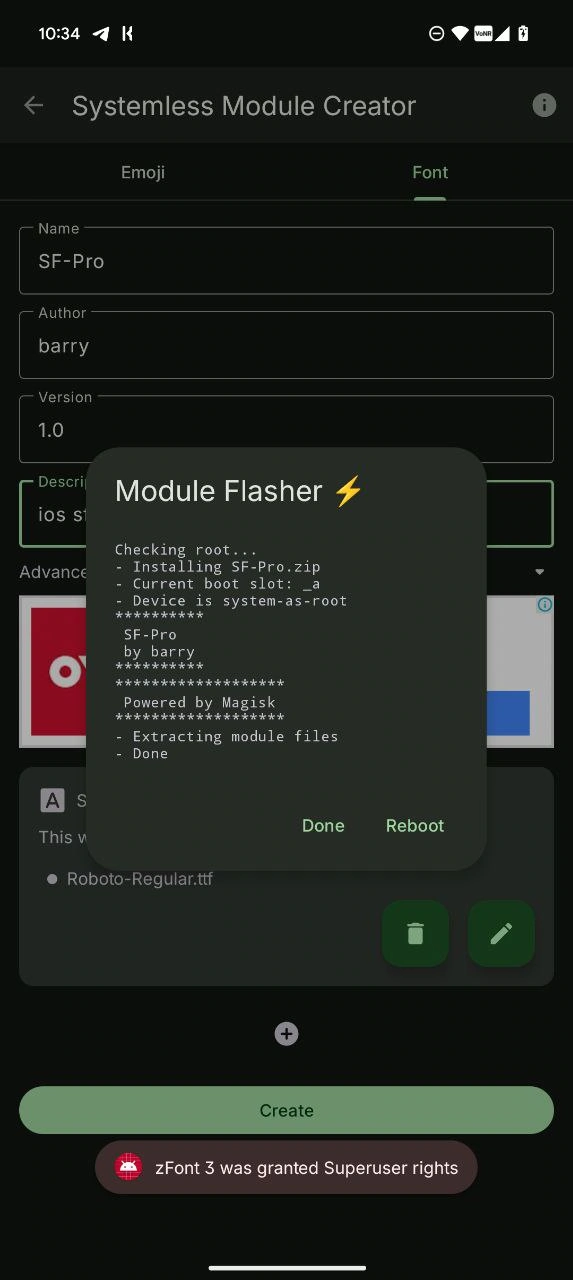
5. Now, after creating the module, tap on Flash and reboot the phone. After that, the module will replace the stock font.
- You can also use the stock theme settings to change the font.
- Open the theme app on your phone, go to the font option, locate it, and apply it.
- For third-party apps like ifont and MIUI Custom Font Installer.
- Or read our font change guides in our blog – How To Install Custom Fonts On Galaxy | Install Any Font In Samsung Galaxy | Change Font On LG Android Phones