Good news for HOMTOM HT70 user unofficial Twrp recovery is now available for your device created by 4PDA forum member it means you can root the device. The TWRP recovery is available with scatter file because HT70 is a Mediatek Chipset phone so we will use MTK Flash Tool. The twrp recovery is posted by the member of 4PDA Forum, you can flash magisk with it and root the device. We will show you How To install TWRP Recovery on HOMTOM HT70 and How to Root HOMTOM HT70 with magisk.
TWRP stands for Team-Win Recover Project. We all know that, TWRP recovery and rooting your smartphone is useful for in many scenarios, Still for those who are new let’s check it out some cool things TWRP and rooting features can do. Thanks to the 4PDA Forum and other members for the TWRP.
Benefits of install TWRP recovery And Root HOMTOM HT70:
- By rooting you can easily delete bloatware that is built-in in the smartphones. Free up some space by deleting some unnecessary bloatware.
- Get some real backups by using apps like Titanium backup etc. You can also modify some system settings like build.prop files. Rooting has much more advantages; you will get to know.
- TWRP enables us for easy rooting and unrooting device. Just by flashing SuperSu we can root the smartphone.
- The most important and loved feature that CUSTOM ROMs. This is the very important feature, or we can say it as a big advantage of TWRP recovery.
- You can turn your phone to its full speed by overclocking and also you can do some underclocking.
- Xposed features are also an advantage of TWRP. Let’s you customize your phone’s stock ROM easy and simple. There are much more features but let’s go to our topic.
Now let’s go to the guide, first, we will guide you how to install Twrp on HOMTOM HT70 with MTK flash tool. Then we will guide how to root the device with Magisk.
Pre-requisites:
- Before starting the rooting process do a complete backup, your device includes Apps, Contacts, Messages, Gallery file, Internal Storage Files.
- Charge the device for interrupt installing.
- Install MTK Driver.
- Enable Developer Options, USB Debugging, OEM Unlock to connect your device in ADB, fastboot mode.
- Download TWRP file Latest Magisk or SuperSu and MTK Flash Tool Read Guide.
Download TWRP for HOMTOM HT70 and Root Files, Flash Tool:
MTK SP Flash Tool ⇒ Latest Mtk Smart Phone Flash Tool
Scatter + TWRP for HOMTOM HT70 ⇒ TWRP HT70.zip
Root Files ⇒ Latest Magisk
How To Install TWRP Recovery On HOMTOM HT70:
1. First, read Pre-requisites Download and unzip MTK SP Flash Tool, and TWRP Recovery + Scatter file.
2. Completely Switch off the device and run flash_tool.exe from SP Flash Tool folder.
3. Browse Scatter-loading file “MT6737M_Android_scatter.txt” scatter file from the TWRP folder and Click the download button.
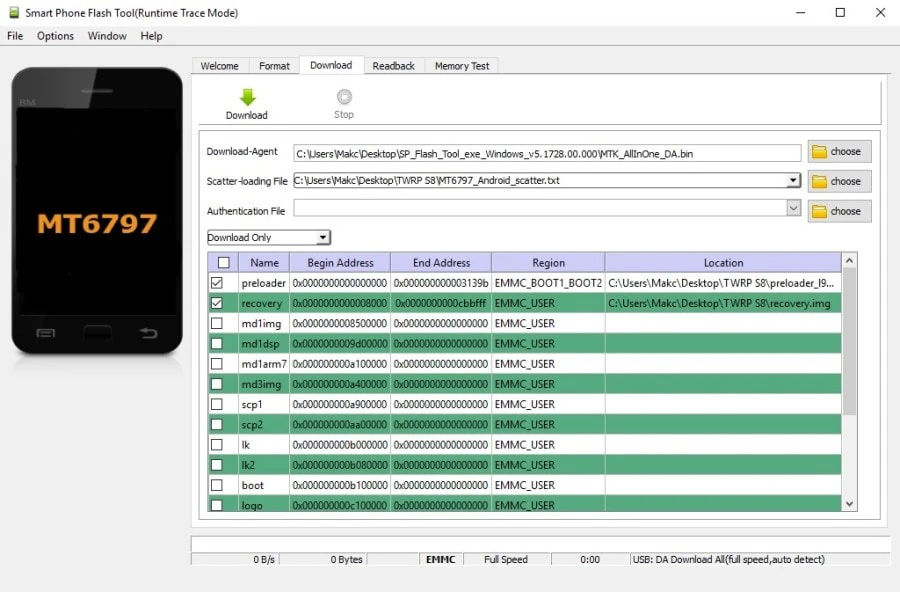
4. Now connect your device and wait for complete flash then disconnect the USB cable and go for rooting step. Read our MTK Sp Flash Tool guide if you still did not understand how to flash twrp file.
[bs-white-space]How To Root HOMTOM HT70 With Magisk:
1. Once you complete the twrp installation now, you can root the device by flash (Latest Magisk) Download latest Magisik from the download section.
2. Download Magsik zip Copy files to internal storage or SD Card and switches off the device.
3. Hold Volume Up + Power to turn into recovery mode.
4. In TWRP, Tap cancels if TWRP asks for a password to decrypt.
5. Go To install and navigate to Magisk zip ⇒ Swipe To Install.
6. Back and reboot the device.
7. Open Magisk app and verify root access and safety net check (Install MagiskManager Apk if magisk app is missing).
If you have any problems do comment below. Also, for more updates on stuff like flashing, wallpapers, themes etc like our Facebook page.