


What’s Is Audio mod? Audio Mod will help your device optimize the device audio to give you maximum sound experience; there are many Audio Mod available for Android devices Like Viper4android, Dolby Atmos, Beats Audio, Sony Audio, and many others. Here you can enjoy all of this audio mods in your Stock Android Lollipop, Marshmallow, Nougat, Oreo or custom ROMs users can install this most support both Android Nougat and Android Oreo so let’s go to the download and guide how to install V4A + DOLBY ATMOS + SONY AUDIO + BEATS AUDIO Audio Mod.
Features:-
- Compatible with DIRAC AUDIO.
- The latest ViPER4Android.
- Works in Permissive and Enforcing SELinux.
- Preinstalled 2.4.0.1 Driver.
- Sony™ and Beats™ libraries and effects.
- Library & Effect entries.
- DOLBY ATMOS.
- BEATS AUDIO.
Supported Devices:-
Any Android Lollipop, Android Marshmallow, Android Nougat, Android Oreo Phones With Custom Recovery Root
Custom Roms: – Support LineageOS 12.1, LineageOS 14.1, LineageOS 15, MIUI 8, MIUI 9, MIUI 10, EMUI 4.1, EMUI 5.1, Oxygen Os, Vibe UI, Nubia UI.
Screenshots
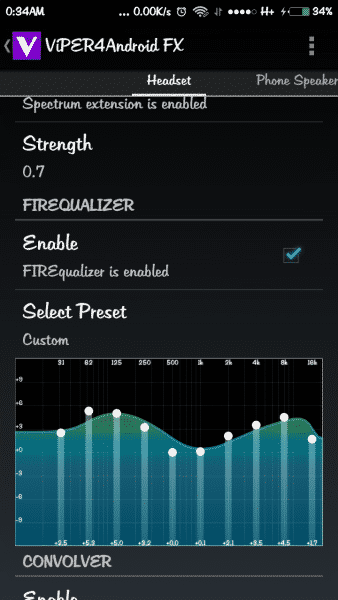
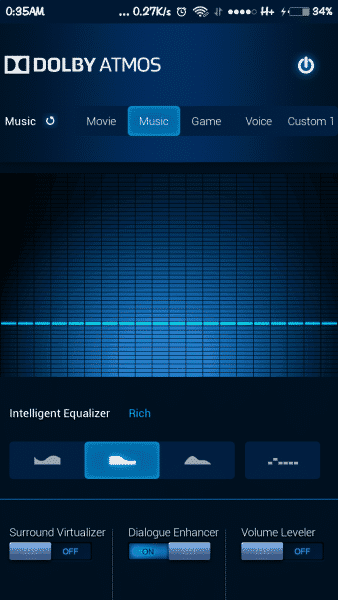
Requirements:-
- A Rooted Device Find Rooting Method For Your Device Here.
- Need Cwm Or Twrp Custom Recovery.
- Busy box Must Install Busy box Play store.
- SELinuxModeChanger Selinux Mode To Permissive SELinuxModeChanger-v3.2-release.apk .
Downloads
- [MOD][SOUND][CM,AOSP,LOS][6.0-7.1.2]SonyMusic_with_SSE&ViperAudioSE-final
- [SoundMod][CM,AOSP,LOS][6.0-7.1.2]SonyMusicSSE_ViPER_2505_DolbyAtmos_Sony_Beats-final
- [SoundMod][CM,AOSP,LOS][6.0-7.1.2]SonyMusic&ViperFX_2505_SonyBeats-final
- [SoundMod][CM,AOSP,LOS][6.0-7.1.2]SonyMusic&ViperFX_2505_SonyBeats[Magisk_v.12.0]
- [6.0-7.1.2][CM_AOSP_LOS]SonyMusic _v.9.3.6.A.0.0 _FULL
- [6.0-7.1.2][CM_AOSP_LOS,7.0stock]SonyMusic _v.9.3.6.A.0.0 _FULL
- [6.0-7.1.2][CM_AOSP_LOS,Stock]SonyMusic_v.9.3.6.A.0.0_FULL&ViPER_2505_DolbyAtmos _Sony_Beats_7.0_enforcing
- [6.0-7.1.2][AE][CM_AOSP_LOS_Stock]SonyMusicFULL&ViPER_2505_DolbyAtmos_Sony_Beats-07-10-2018
How To Install Sony Audio MOD :-
- Download Zip What You Like.
- Copy To Sd Card.
- Turn On Your Phone Recovery Mode.
- Install The Zip.
- Wipe Dalvik Cache and Cache.
- Reboot.
Open ViPER4Android
Menu > Show Notification (block if desired by long-pressing notification)
UI Setting > Expert
Menu > Save Effect Profile > New Effect Profile > “Stock” (this will help you find your working v4a directory)
Begin playing an audio file
Open ViPER4Android
Uncheck Enable ViPER4Android
Check Enable ViPER4Android
Some Configuration To Get Best Sound
Audiophile™ ViPER|Audio™ Active Settings
- ViPER4Android™ > Enabled
- ExtremeBeats™ Perfection EQ Preset > 3.5, 4.5, 5.0, 3.5, 1.5, 1.0, 3.5, 4.5, 5.0, 3.5 (Enabled when needed)
- Convolver > Enabled
Impulse Response > DFX Hip Hop Modern.irs or DFX Metal Rap Big Bass.irs
Cross-Channel > 0% - Dynamic System > Enabled (Headset only, when needed)
Listening Device > Common Earphone v2
Dynamic Bass > 14% - ViPER Bass > Enabled
Bass Mode > Natural
Bass Boost > 10db - ViPER Clarity > Enabled
Clarity Mode > Natural
Clarity > 6db
Experience ViPER|Atmos™ & ViPER|DD+™
ViPER4Android & Dolby Atmos™ – Enforcing and Permissive SELinux
ViPER4Android & Dolby Digital Plus™ – Permissive SELinux
When combined with ViPER running my Audiophile™ profile, optimal results can be achieved using the following settings in Dolby Atmos™ or Dolby Digital Plus™:
- Music profile
- EQ Preset > Open (Flat to tame bass if needed)
- Surround Virtualizer > Off
- Dialogue Enhancer > On
- Volume Leveler > Off or On
Also, you can try my effects and kernels Link
More Mod’s:-







will it work on my zenfone 5 lollipop
Can it be flashed in CM 14 (android V.Nougat)??
you can try but take a backup first
did it work?
yes its working i am using also in cm 14
please provide a recovery script if something goes wrong.Or if someone wants to roll back
first take a rom back up with twrp recovery if anything goes wrong just restore the backup rom
I have Yu Yureka Note. There is no any custom recovery available for this phone. But i have root, Busybox and SeLinux permission set to permissive. Can i flash with stock recovery? If not than any way to manually add all the files with root explorer?
work
thx 😀
Very nice job, i will try on my android phone yet.
Thank’s
it’s worked
thanks ?
Plz give me uninstaller