XperiFirm is a Firmware Downloader tool for Sony devices, allowing users to download the latest firmware for Sony Xperia Android phones. The XperiFirm Firmware tool is used to download the latest Sony firmware (FTF) file and the full firmware. All Sony Xperia Devices require firmware to flash and update the device firmware. This tool will help you find the latest firmware, which you can download directly from the official server without any speed limit. In this guide, we will show you How To find the latest firmware using the XperiFirm Firmware Downloader tool.
If you are an Android enthusiast, you’ve likely tried customizing your device with Custom ROMs, Rooting, and other Mods. Most youngsters often customize their devices by rooting, installing custom ROMs, and other modified apps, and as a result, some devices get bricked. That’s why we need firmware to recover the device and the back-to-stock ROM. The firmware also helps you to update your Android Smartphone to the latest Android version. If you did not receive the latest update via OTA, then you can install the update by flashing the firmware.
XperiFirm Firmware Finder Tool
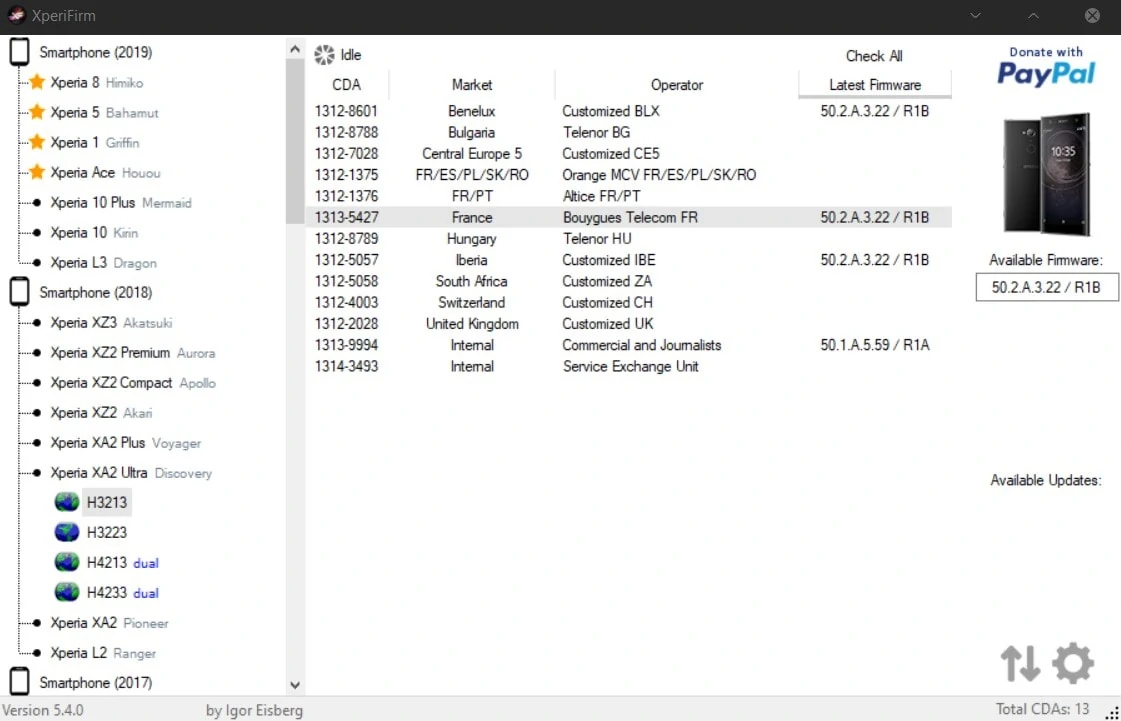
XperiFirm Firmware Downloader tool for Windows, developed by Igor Eisberg, a member of the XDA-Developers forum who utilizes the official Sony server to retrieve the latest Sony firmware list. You can obtain the firmware by selecting your phone model and region. The tool will list the firmware version and market, region, and operator. You can download all the files in a folder by clicking the Download button.
CHANGELOG:-
v5.8.1 [November 4, 2025]
- NEW: Added build for Windows ARM64.
- TWEAK: Some improvements on the server-side database format for future extensibility.
- FIX: Visual glitches fixed via custom components and some mouse events corrected.
- MINOR: The format of Downloads.xml has been further optimized.
* Due to this change, XperiFirm 5.8.0 can no longer read the database and is not supported.
v5.7.0 [January 25, 2024]:
- FIX: Replaced old ZipArchive library to fix unpacking firmware over 4 GiB in size.
v5.6.5 [December 21, 2021]:
- FIX: Fixed connection error when trying to request a customizations list from Sony's server due to API change.
- MINOR: Model tags (like "dual" and "Wi-Fi") will no longer be included in the full device name, as it's no longer used in official device naming.
- MINOR: The "Wi-Fi" tag is now colored dark-red ("dual" tag is still colored blue). Implementation has been added for additional tags that may appear in the future, with different colors, without having to update the application.
NOTES:
* Due to this API change on Sony's side, XperiFirm 5.6.2 is no longer able to fetch firmware from Sony and is not supported.
v5.4.0 [June 25, 2019]:
Fixed unpacking while using Mono for Linux.
v5.3.8 [January 11, 2019]:
Fixed "firmware is not available" error for certain firmware that are now hosted on a new Sony server.
v5.3.7 [July 28, 2018]:
Workaround for broken version naming for certain Xperia XZ2 firmware.
Download the latest XperiFirm
Here are the old to latest XperiFirm version XperiFirm 5.7.0 Firmware Downloader download links XperiFirm v5.6.5, v5.4.0, v5.3.8, and v5.3.7
| Version | Download Link |
|---|---|
| Latest XperiFirm 5.8.1 | XperiFirm_5.8.1.zip |
| XperiFirm 5.7.0 | XperiFirm_5.7.0.zip |
| XperiFirm 5.6.5 | XperiFirm_5.6.5.zip |
| XperiFirm 5.4.0 | XperiFirm_V5.4.0.zip |
| XperiFirm 5.3.8 | XperiFirm_v5.3.8.zip |
| XperiFirm 5.3.7 | XperiFirm_v5.3.7.zip |
| XperiFirm 5.2.0 | XperiFirm_v5.2.0.zip |
Tool Requirements:-
- Windows 7/8/10 OS
- Broadband connection or 4G, 5G
- Microsoft Visual C++ Redistributable
- Microsoft .NET Framework
- Latest Sony Driver.
How To Download the Latest Sony Firmware
XperiFirm is a simple tool to download Sony Firmware directly. You just need to select the model number and region, and the Latest version.
- Download the latest version of the XperiFirm Firmware Downloader XperiFirm Tool and unzip it.
- Navigate to the unzipped folder and run “XperiFirm.exe“. and make sure your pc is connected to the internet
- If the app can’t run or gets an error, then install the Visual C++ Redistributable and the Microsoft .NET Framework.
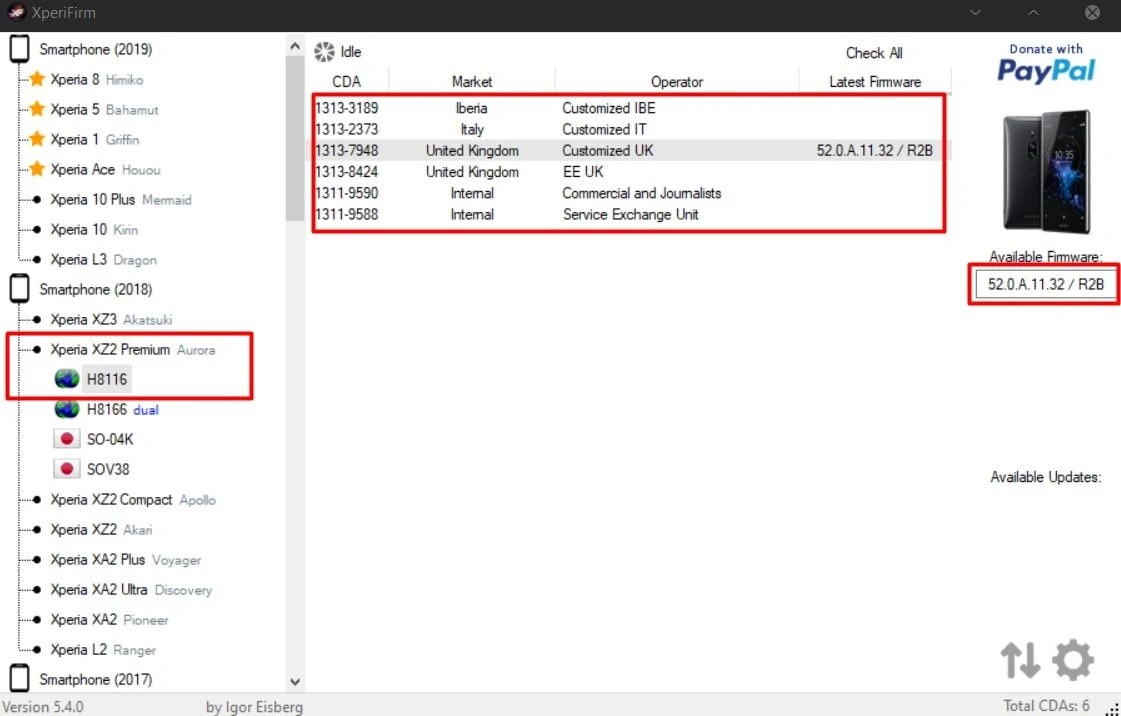
- Now Select Model No from the tab and Region and then click the firmware version below “Available Firmware“.

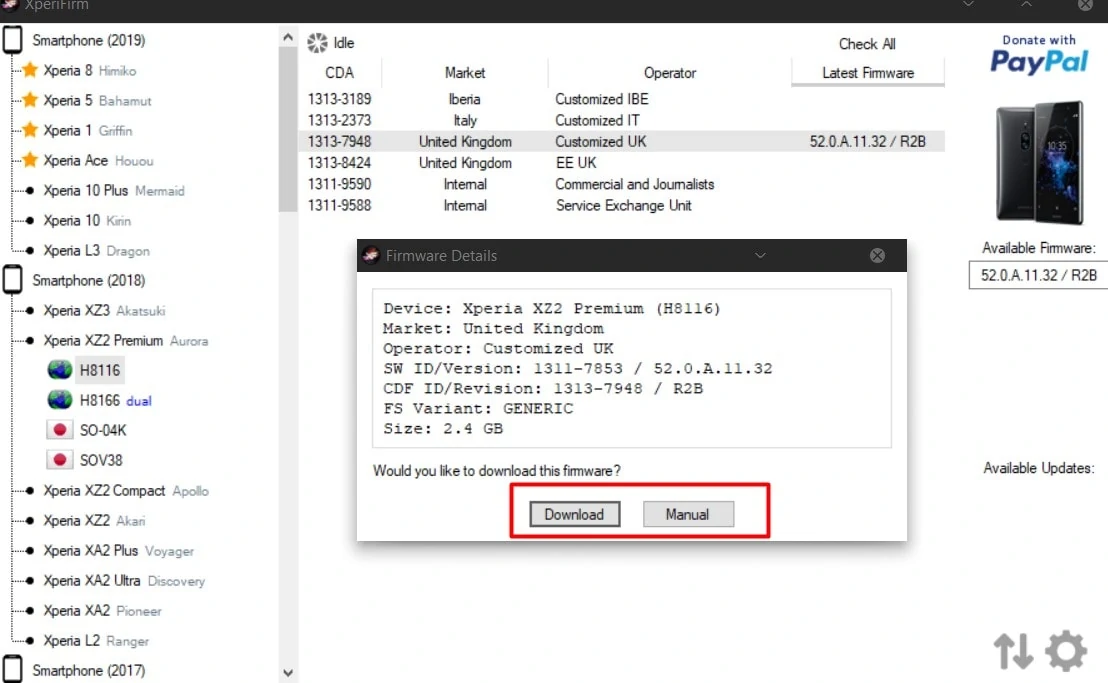
- Now the app will display Firmware information with download options.

- Click Download to download the full file on your pc, or you can download it manually with any download manager. Click Manual and copy the download links.

- You can pause the download by clicking the stop and start buttons.
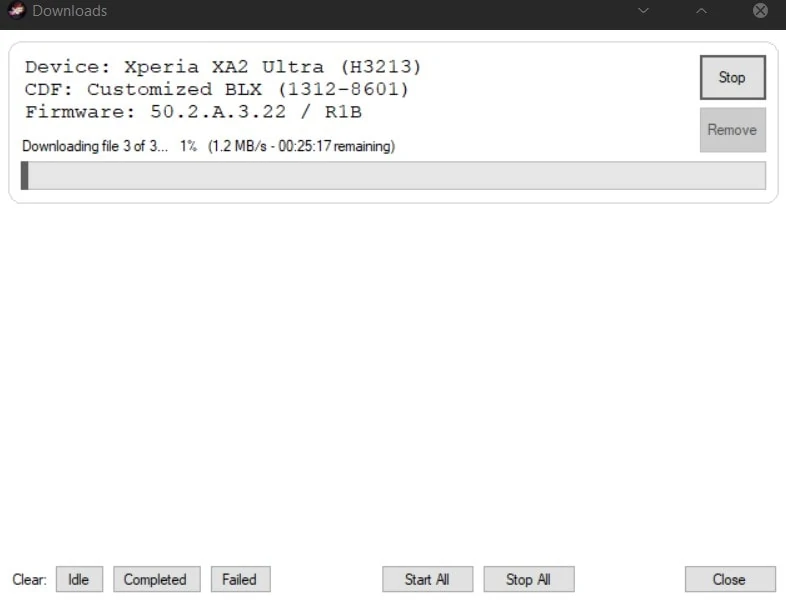
After completing flashing the download, you can use the Sony Flash Tool to flash a Sony Xperia device. You can read our Sony Flash Tool guide for more information.
- To decrypt the firmware in Flash tool, open Flash tool, go to tools>bundles>FILESET decrypt.
FAQ
XperiFirm Firmware Downloader is an application developed to download the official Sony Xperia firmware directly from the Sony server. This application provides the opportunity to download the stock ROM file easy for your Sony Xperia device without any complicated installation or understanding.
Yes, XperiFirm will support many models of Sony Xperia Devices. Use the programs interface to select your Xperia device model and then your region. Download the firmware compatible for that exact Xperia device.
XperiFirm is deemed safe since it retrieves unmodified official firmware from the company’s servers. However, users must check that they are downloading the correct firmware concerning their device and that they follow the flashing instructions to the letter to minimize any risk.
No, you do not necessarily need a rooted bootloader to flash official stock firmware. But some advanced features regarding the flashing utility used together with XperiFirm (Flashtool for example) may require an unlocked bootloader.
More Firmware Download Tools:-
If the tool is working for you, please share it with other communities and forums :). Don’t forget to join our Telegram group for more wallpapers, Themes, and Ringtones updates – https://getdev.me/telegramdev.