
Call Forwarding On Android is just a basic need right now. Cause on any phone it can be enabled and its the most feature which saves from lots of troubles. Like when your anyone mobile sim card got lots then you can use Android Call Forwarding which will forward your calls to the number you want. Another instance like when you are traveling then you can forward calls to Android to save the roaming charges by calling forward on Android to a local sim. So if you want to know how to set up or start to call forwarding on Android follow just simple steps so here you go.
There are lots of Android smartphones from different manufacturers and with different UI skins. So there will be a change of option or just an alternate way to forward calls to Android. Like Samsung, OnePlus, and Xiaomi, Huawei has its own UI over Android. Other Nokia, Google, and Essential are having stock Android so they have the same options. So you can just dig up some to enable call forwarding on Android. You can set the Android call forwarding as per the sim accordingly.
Start Call forwarding On android:
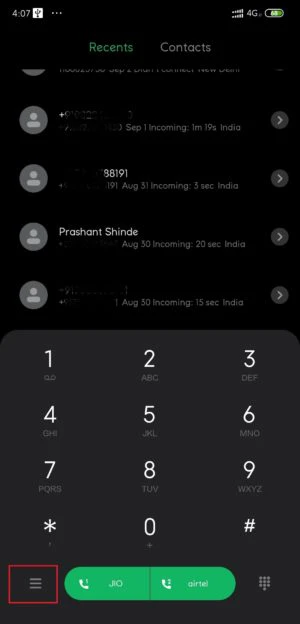

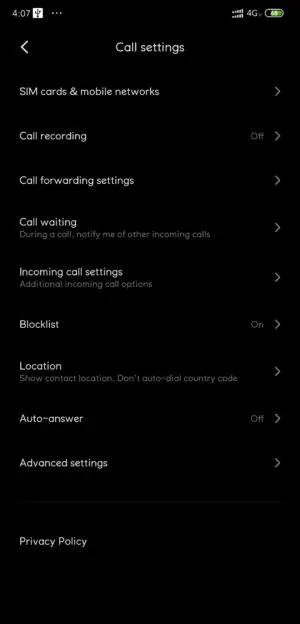
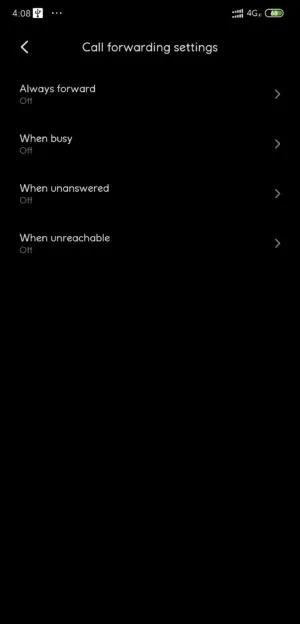
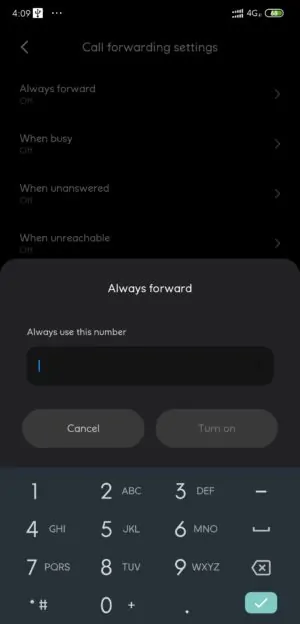
Start to Call forward From USSD Codes:
You can start the call forward by using the USSD codes.
In the phone dialer app, dial *67*# the call forward will open. There are lots of USSD codes for different operations.
you can try the below codes for call forwards. Dial the code and at the end just enter the # code.
for always forward –> *21*
Forward When,
- Not Picked Up –> *61*
- Out Of Range –> *62*
- The line is Busy –> *67*
- Doesn’t Pick Up or Out Of Range –> *004*
Done, you have now started the Android call forwarding. If you want to turn it off just go through the same steps and turn it off. If you like the post, don’t forget to share it!! Also, like our official Facebook page for more updates!! Join our telegram channel for updates directly to your phone!!
More How-to Guides
- Get Google Assistant 2.0 On Android Device
- Create And Insert Watermark In Google Docs
- Enable ZOOM Gallery On Google Meet
- Get More Watch Faces In Honor band 5