

The MTK flash tool (SmartPhone Flash Tool) is an official flashing tool for MediaTek devices, including Micromax, Coolpad, Doogee, Elephone, and others with MTK chipsets. Anyone can use it. The tool will only work in Windows OS 7, 8,10, and 11. You can download the latest version or the old version of the MTK flash tool. We have zipped all the flash tool versions with the Direct Download link.
The Smartphone Flash Tool is another tool, similar to Samsung Odin and Qualcomm QPST Flash tool, used to flash MediaTek chipset-based Android Phones. The latest MTK SP Flash Tool v6.2404 helps you to unbrick your MTK Android phone and also has some features like a hard reset and flashing the entire firmware. Flash custom ROMs. Flash a custom recovery such as CWM, TWRP. MTK SP Flash Tool can also help you root your device by flashing the boot and recovery files.
MTK flash tool is a MediaTek Android Phone flashing tool that can flash the complete Scatter file structure firmware. Usually, this tool is Available in service centers. But we uploaded the leaked version of the Smartphone Flash Tool, and we will guide you on how you can utilize this application. Download the Tool now and start unbricking your MTK device.
Key Takeaways
- The SmartPhone Flash Tool is a MediaTek chipset flashing tool for Android phones, similar to Samsung Odin.
- It helps unbrick devices, flash firmware, and install custom ROMs and recoveries.
- Users need Windows OS (7, 8, 10, 11) and the MTK Preloader Driver to operate the tool effectively.
- Key features include flashing stock firmware, formatting, and memory testing capabilities.
- Instructions are provided for downloading, installing, and using the SmartPhone Flash Tool.
MTK Flash Tool Features
- Flash Stock Firmware/ROM
- Install Custom ROMs.
- Flash Custom / Stock Recovery.
- Format / Hard Reset.
- Format Full Memory.
- Memory Testing.
Requirements
- Windows PC XP/ 7 / 8 / 10.
- USB Cable.
- MTK Preloader Driver Must Be Installed On Your PC to Flash MTK phones.
Download MTK SmartPhone Flash Tool All Versions
| Version | Download Link |
|---|---|
| (new)SP_Flash_Tool_V6.2404 | SP_Flash_Tool_V6.2404_Win.zip |
| (new) SP_Flash_Tool_V5.2404 | SP_Flash_Tool_V5.2404_Win.zip |
| SP_Flash_Tool_v6.2316 | SP_Flash_Tool_v6.2316 |
| SP_Flash_Tool_v6.2216 | SP_Flash_Tool_v6.2216.zip |
| SP_Flash_Tool_v6.2208 | SP_Flash_Tool_v6.2208_Win.zip |
| SP Flash Tool v5.2208 | SP_Flash_Tool_v5.2208_Win.zip |
| SP Flash Tool v5.2020 | SP_Flash_Tool_v5.2020.zip |
| SP Flash Tool v5.1916 | SP Flash Tool v5.1916.zip |
| SP Flash Tool v5.1912 | SP Flash Tool v5.1912.zip |
| SP Flash Tool v5.1904 | SP Flash Tool v5.1904.zip |
| SP Flash Tool v5.1844 | SP Flash Tool v5.1844.zip |
| SP Flash Tool v5.1836 | SP Flash Tool v5.1836.zip |
| SP Flash Tool v5.1824 | SP Flash Tool v5.1824.zip |
| SP Flash Tool v5.1820 | SP Flash Tool v5.1820.zip |
| SP Flash Tool v3.1344 (old) | SP_Flash_Tool_v3.1344.zip |
How To Update MTK Device Using MTK Flash Tool
1. First, read the Requirements and install the driver. Download the latest firmware for your Device, and Turn Off Your MTK Android Phone.
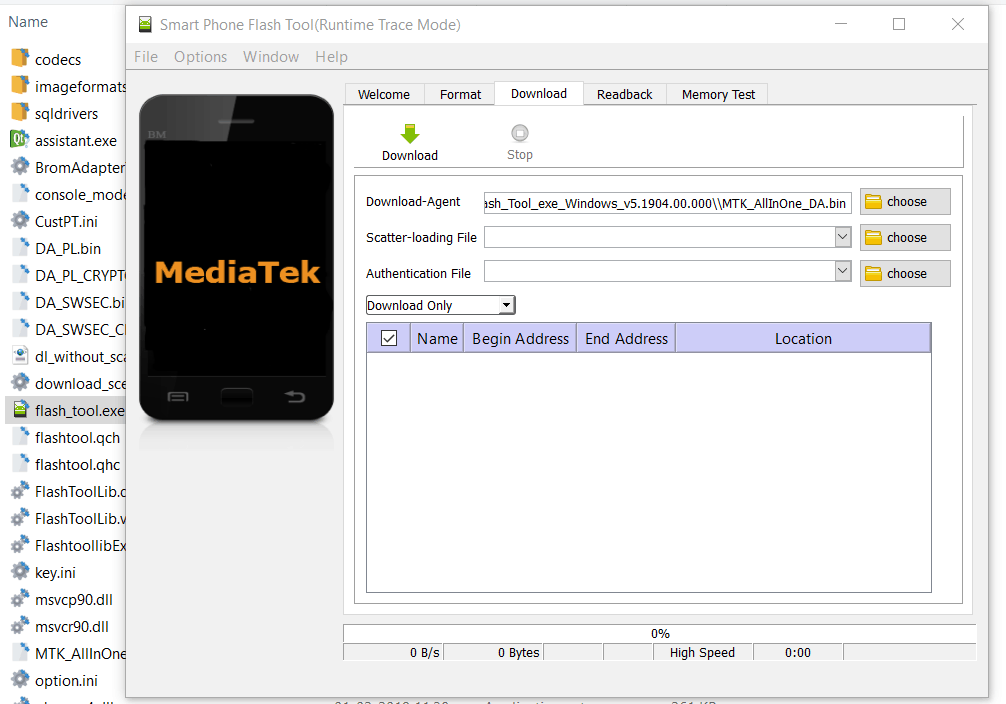
2. Download the latest SmartPhone Flash Tool “SP_Flash_Tool.zip” and unzip it.
3. Go to “SP_Flash_Tool” folder Run “flash_tool.exe“.
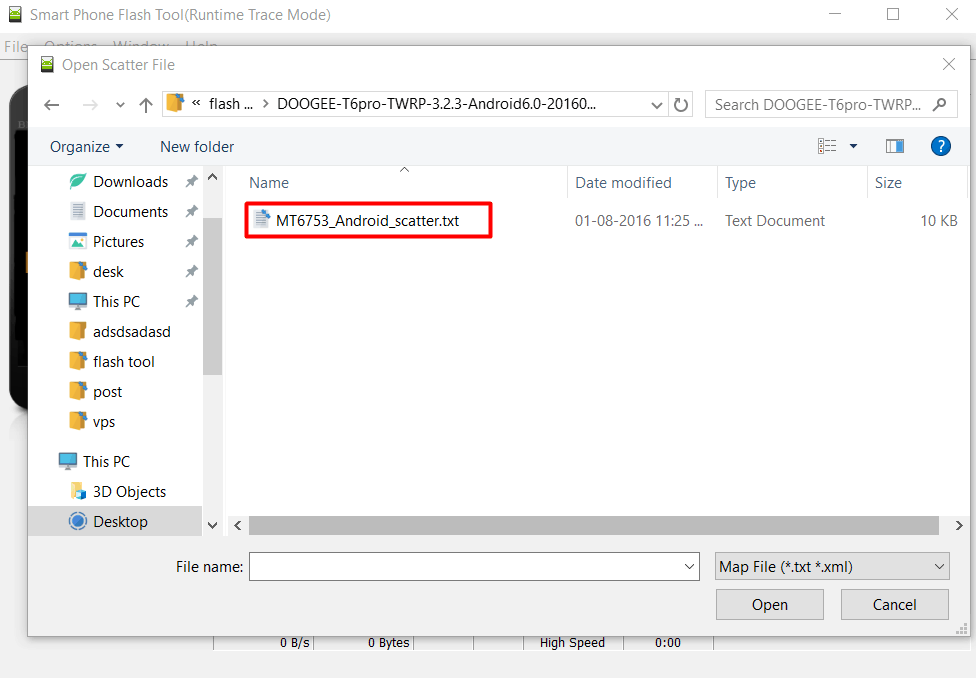
4. Click on the “Scatter-Loading” icon and go to the firmware folder > select the scatter file.
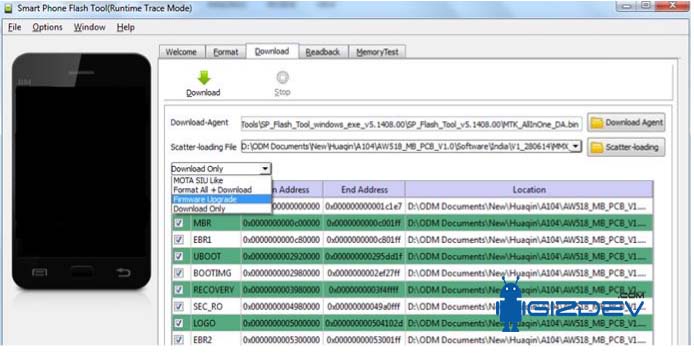
5. Select “Firmware upgrade” only to update the latest firmware, and Download Only for flash custom ROM and recovery, or full hard reset the device.
6. Turn Off Your Phone. Re-insert the phone battery (Non-Removal Battery Devices Don’t Need To Remove The Battery).
7. Click Download In Flash Tool.
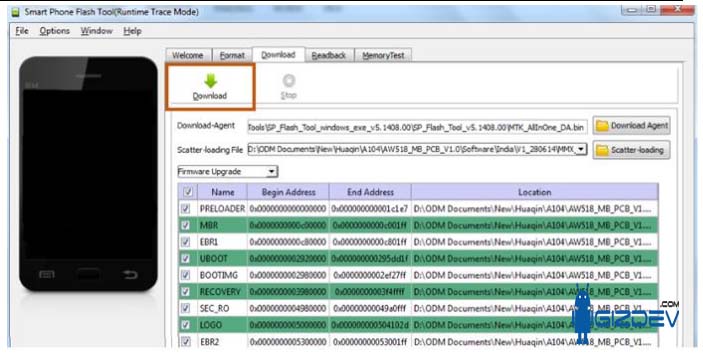
8. Connect your phone to your PC using the USB cable. After completing, the flashing Green light will appear.
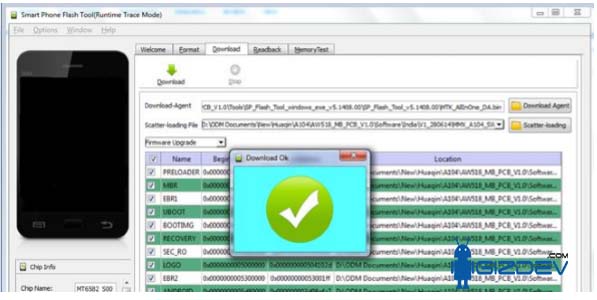
9. Once Flashing is Done, Disconnect The USB Cable and Turn On Your Phone. Check the IMEI number. If the IMEI is wrong, then write the IMEI with the SN IMEI Write Tool.
FAQ on Smartphone Flash Tool
The SP Flash tool is a windows application that is used to flash stock roms, custom recoverys and other firmwares into MEDIATEK android smart-phones/tablets. It is often used to unbrick devices, fix boot-loops and perform complete firmware clean installs.
In order to utilize the SP Flash tool properly you will require a MEDIATEK smartphone/tablet that utilizes MEDIATEK chipset, as well as a compatible MEDIATEK scatter firmware package for your exact phone model to prevent potential damage from using the SP Flash tool.
To run the SP Flash tool you will require a windows pc, MediaTek VCOM/USB drivers installed properly, a MediaTek scatter firmware package that has been formatted correctly for your specific MediaTek smartphone/model, and the SP Flash tool executable itself.
Yes, The SP Flash tool is very common in attempting to revive MEDIATEK phones that have become bricked/boot-looped, however, please be aware that flashing an incorrect/damaged ROM, particularly the pre-loader can cause permanent damage to the MEDIATEK phone.
As long as you follow all instructions, and select the correct firmware/settings (usually download only) and do not attempt to interrupt the flashing process while the SP Flash tool is active, the SP Flash tool should be completely safe. Risks exist when utilizing the SP Flash tool, such as potential loss of data and/or potentially causing a hard-brick of your MEDIATEK phone if you were to flash incorrect/incompatible files (such as an incompatible pre-loader).
More Tools:-
- ANDROID Complete List Of The USB Driver For Windows And Mac
- Samsung Odin Flash Tool All Versions Download Link with Guide
- Micromax Unite 2 Firmware IMEI Write Tool Download
- Latest SN Write Tool and Guide on How to Repair MediaTek IMEI
Comment below if you faced any problems durning using SmartPhone Flash Tool, we will help you and provide solution







Dear Sir,
Because of you and only you I just restart my mobile Karbonn titanium mach five again thanks a lot for that brilliant
software and images for technical support.
My mobile become stug on boot screen . Now it is working fine just as new .
Thanks buddy for saving my mobile, money and time.
God Bless you………..
sir my micromax canvas xpress2 e313 is not showing the ip address,mac address, fm radio and i’m unable to access wifi, hotspot. please give a solution for this problem..
I love the app