Are you a PUBG lover and also an Android modder? Want to play PUBG on your rooted device? then this article will help you to play PUBG on rooted devices. In the new PUBG update, PUBG will not run on your rooted device if you rooted the device Pubg will Automatically close after launch. If you rooted the device via Magisk then you can hide the root on PUBG, this way you can play Pubg on your rooted device. In this post, we will guide you on how To Fix Pubg Automatically close in Rooted Phones.
Many users are facing Automatically close problems in PUBG Mobile after the latest update, they don’t know if the problem is from the rooted device. If you rooted your device using Magisk and Pubg Automatically closing after launching the app then here is the simple solution to fix the problem in the Rooted Android device. The simple solution is hiding rooting on the PUBG app and you can do it simply from magisk app.
Magisk Hide
The Magisk Hide is a feature of Magisk that allows you to cloak root permissions for specific applications. Any application that not running on your device because of rooting. This feature only works if magisk passed the SafetyNet check on your device we have a guide on how to fix SafetyNet on magisk. The magisk hide option is available on the Magisk Manager app.
How to Hide Root & Fix Pubg Automatically close in Rooted devices
If you already updated the Pubg app and the app Automatically closes then follow the guide to fix it.
1. First, update the PUBG app from play store and don’t launch the app, if you already launched the app then clear data from App Manager.
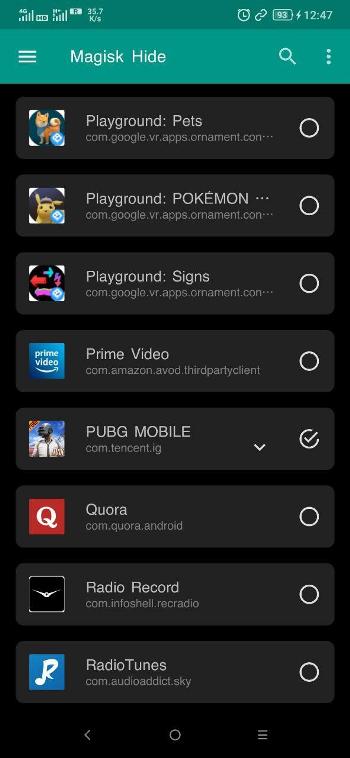
2. Open Magisk Manager app and tap on 3 – dot menu and click on Magisk Hide.
3. Find PUBG Mobile tick to hide PUBG Mobile from the root.
4. Now run PUBG Mobile and sign in with your account to play.

Related –
- How To Use Google Pay, Phonepe On Rooted Devices (Banking Apps)
- Pubg Mobile Lite For Android Is Now Available, Download Now
- Install Latest Call Of Duty Mobile On Any Android (Global Update)