

The latest version of Xiaomi PC Suite is available for all Xiaomi devices i.e. Mi, Redmi, and Poco phones. The new Xiaomi PC Suite v4.2 beta is available only in the Chinese language, but thanks to “TomHenson” for translating the app into the English version. Xiaomi is continuously updating its lineup of Android support with this tool. The Mi Phone Assistant (Mi PC Suite) directly connects with your device and it allows for multiple tasks. Let’s check some details and download Xiaomi PC Suite v4.2 for Windows 10, 8, and 7.
This is the official Mi Phone Assistant application, developed by Xiaomi, for Xiaomi Android MIUI users who also use the Windows OS. The Mi PC Suite software offers several functions, including music management, reading and sending SMS messages, and installing/uninstalling APK applications directly from your PC desktop. Also, you can upgrade, downgrade or flash stock ROM on your MIUI device.
Before using Mi PC Suite on the computer, you need to first download Xiaomi ADB Driver. The Mi Phone Assistant is currently only available for Windows PCs. You can use it on Windows 10, 8, and 7. The New Xiaomi PC Suite v4.2 features a slightly redesigned interface with additional features and mobile support. To know more details about this tool, continue reading.
Key Notes
- Xiaomi PC Suite v4.2 beta is now available for Mi, Redmi, and Poco devices, translated into English.
- This official Mi Phone Assistant provides functions like music management, SMS handling, and APK installation.
- You must download Xiaomi ADB Driver before using Xiaomi PC Suite on Windows 10, 8, and 7.
- The suite features a revamped interface, backup options for WeChat, and improved bug fixes.
- To use it, connect your phone via USB after enabling Developer Options and USB Debugging on your device.
Xiaomi Mi PC Suite – Features:
- Support any device running on above Android 5+.
- Update, downgrade, and Flash stock ROM.
- Slightly revamped all of the interfaces.
- Remove File Manager from the tool.
- Bug fixes during backup creation and restoration.
- Added backup for WeChat.
- And much more.
Requirements:
There are no special requirements for this suite to run on a PC. But you should be running Windows.
- Xiaomi ADB USB Driver.
- Windows 7
- Windows 10, 8.1, and Windows 11.
Download the Xiaomi PC Suite
Xiaomi PC Suite – How to Use
1. First, you need to download and extract the MiPhoneAssistant tool on your PC and open it.
2. Now install Xiaomi ADB USB Driver using this guide. Once installed now go to the setting option in the phone then open System ⇒ About the phone.
3. Scroll down and tap the Build number seven times. This will enable Developer options on your device.
4. In the Developer Options, scroll down and enable USB Debugging. Now enable USB Debugging on your phone.
5. Now, after doing the above steps, connect your MIUI-running phone to the PC by using the USB cable.
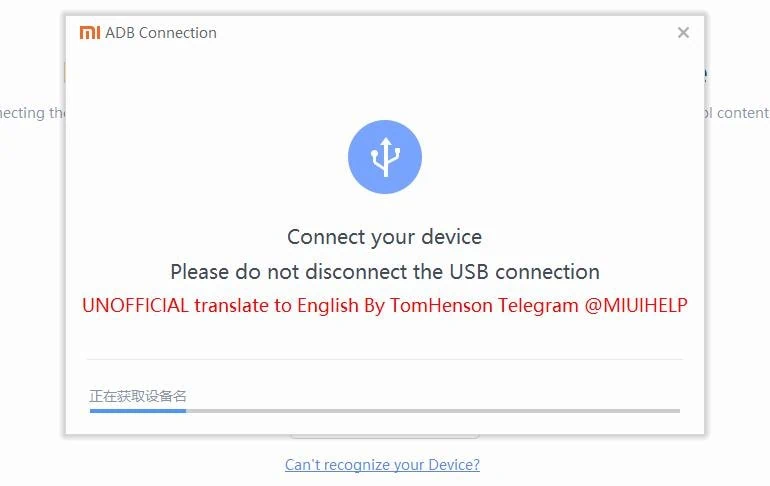
6. Once connected, open the MiPhoneAssistant Tool on your desktop.
7. The tool will automatically detect the phone and prompt you for USB debugging access. Note that you may receive a USB debugging notification on the phon,e so allow it.
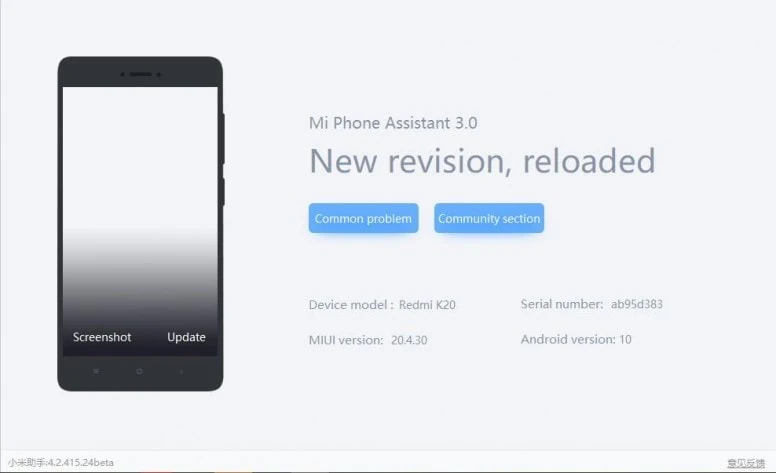
8. Now the PC suite is yours. You can see lots of options available is available for you.
Here is the screenshot of the PC Suite. If you like the post, share it with other communities and forums. Follow our social media pages to stay up-to-date with the latest news all updates as soon as they become available. Follow here. Don’t forget to join our Telegram group for more wallpapers, Themes, and Ringtones updates –






Sir I’m not being able to connect to Mi Pc Suite from my device Mi Max. When try to connect, message appears like this “You need to update your device to use Mi Pc Suite, Update your device before connecting”. I’ve installed Mi PC Suite version of 3.2.1.3111 on my Windows 10. Can you please help me out, how can i connect to Mi PC Suite from my device? I appreciate much for your assistance.
I’m trying to connect a Redmi Note 11 with PC suite 4.2 beta, but unfortunately it is only in chinese language.
Is there any chance to get it in an englisch version?
The phone has a bootloop-issue and I hope I can backup my files with pc suite 4.2 because version 3.2 does not connect to the phone