In this guide, we will share the bootloader unlock, rooting, and OrangeFox Recovery installation guides for the Nothing Phone 3a and 3a Pro. We will show you how to root Nothing Phone 3a Pro with Magisk and KernelSU and OrangeFox Recovery installation guide with the fastboot tool. Nothing Phone’s new flagship Android smartphone, the Nothing Phone 3a Pro, launched this year with a Snapdragon 7s Gen 3 processor. We have already posted news and updates in our Telegram group and the official Nothing Phone 3a Pro wallpapers on our blog, and this time we will share the rooting guide.
You can root the device with Magisk or the KernelSU app by patching the boot image. The custom recovery OrangeFox is also available for the device; you can install the unofficial OrangeFox recovery for the device. After rooting the device, make sure the safety net test passes so you can use banking security apps. We have also written how to pass strong integrity on the Nothing Phone 3a Pro smartphone after rooting.
Rooting Nothing Phone 3a Pro with Magisk / KernelSU
The only way to root the Nothing Phone 3a Pro is via Magisk, KernelSU, or APatch that supports up to Android 16. So you need the latest stock boot, init_boot.img from the current OTA Firmware. After that, you can patch the init_boot.img Kernel using the Magisk, KernelSU APP and flash on your device.
Rooting Pros and Cons
After rooting the Nothing Phone 3a Pro phone, you can mod your device, but before starting the guide, do a complete backup. One thing to note is that the warranty will be void after rooting the device. Here are some Rooting benefits: you can remove stock bloatware and System Apps after rooting the device. Changing the fonts and themes, customising the phone by installing root apps, modding the device with Magisk module, and more. Also, you can hide root access on specified apps with the help of the Magisk systemless App. Let’s start the guide.
Pre-requisites
- Before starting the rooting process, do a complete backup; your device includes Apps, Contacts, Messages, Gallery files, and Internal Storage Files.
- Charge the device for interrupt installing.
- Make sure you have disabled fingerprint and lockscreen before rooting or installing OrangeFox.
- Install the Google Android Driver ⇒ Google USB Drivers for Windows
- Enable Developer Options, USB Debugging, and OEM Unlock to connect your device in ADB and fastboot mode.
- Bootloader Unlock Guide ⇒ Nothing Phone Bootloader guide
- Download the OrangeFox file, the Latest Magisk, and the ADB-Fastboot Tool. Read the Guide.
Download OrangeFox for Nothing Phone 3a / 3a Pro, Root Files
- ADB & fastboot tool ⇒ LATEST MINIMAL ADB AND FASTBOOT TOOLS
- OrangeFox for Nothing Phone 3a /pro ⇒ of_asteroids.img
- Root Files ⇒ Latest Magisk or KernelSU
- Extract init_boot.img from OTA Firmware using Payload.bin extractor| Or download from nothing_archive ⇒ Asteroids Ota Archive
Root Nothing Phone 3a and Nothing Phone 3a Pro with Magisk
- Download the latest Magsik or KernelSU Copy files to internal storage or SD Card and install on your device.
- Extract the Nothing Phone 3a / Pro init_boot.img file from your device’s Asteroids firmware archive.
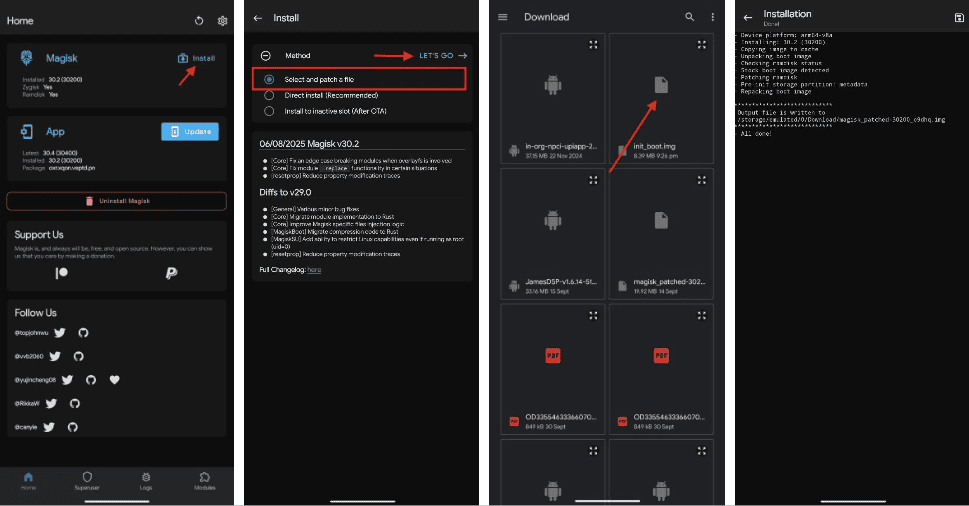
- Copy init_boot.img to your device download folder and open the Magisk app or KernelSU, any of the rooting apps.
- Tap on the Install button at the top, select init_boot.img, and the app will patch and enable SU on the boot file.

- Rename the patched image to magisk_patched.img for magisk and ksu_patched.img for KernelSU.
- The patched boot will be located at /storage/emulated/0/Download/magisk_patched.img.
- Download the latest ADB & fastboot tool and unzip it on your PC C:\ Drive.
- Copy the magisk_patched.img or ksu_patched.img to your pc platform-tools folder
- Open CMD on your PC and type cd C:\platform-tools and hit enter.
- Turn your device into fastboot Mode with the “adb reboot bootloader” command, or switch off your phone and Hold Volume Up + Down and insert the USB.
- You can flash the patched file to both slots or find the active slots with this command.
- fastboot getvar current-slot
- Output will be current-slot: b or current-slot: a
- Flash the patched boot image on both slots by using the command.
- fastboot flash init_boot magisk_patched.img
- for KernelSU
- fastboot flash init_boot ksu_patched.img
- To flash the patched image on the active slot, use this command.
- fastboot flash init_boot_b magisk_patched.img
- add “fastboot flash init_boot_b “ or “fastboot flash init_boot_a “ after checking which slow is currently active.
- Reboot the device manually or type “fastboot reboot” to reboot the device.
- Open the Magisk app and verify root access and Play Integrity.
After rooting the Nothing Phone 3a, make sure Play Integrity is passed on your device, or follow the guide to Play Integrity PASS and Fix Banking App Root Detection for – MAGISK Play Integrity PASS | Play Integrity PASS on KernelSU.
How To Install OrangeFox Recovery On Nothing Phone 3a / 3a Pro
1. First, read the Prerequisites, unlock the bootloader, download ADB & fastboot, and OrangeFox Recovery.
2. Download the OrangeFox and rename it to recovery.img.
3. Connect your device to the pc and copy the OrangeFox file to the ADB & fastboot folder.
4. Now open the command prompt and navigate to the ADB & fastboot folder by typing cd C:\platform-tools and hitting enter.
5. Turn off your phone, hold the Volume Down button, insert the USB cable, and connect to the PC, or use the adb command to reboot into fastboot.
adb reboot bootloader6. This command will install recovery on the Nothing Phone 3a phone permanently.
fastboot flash recovery recovery.img7. Use this command to install the recovery in both slots for OTA updates.
fastboot flash recovery_a recovery.img
fastboot flash recovery_b recovery.img
8. You can boot OrangeFox Recovery with this command.
fastboot boot recovery.img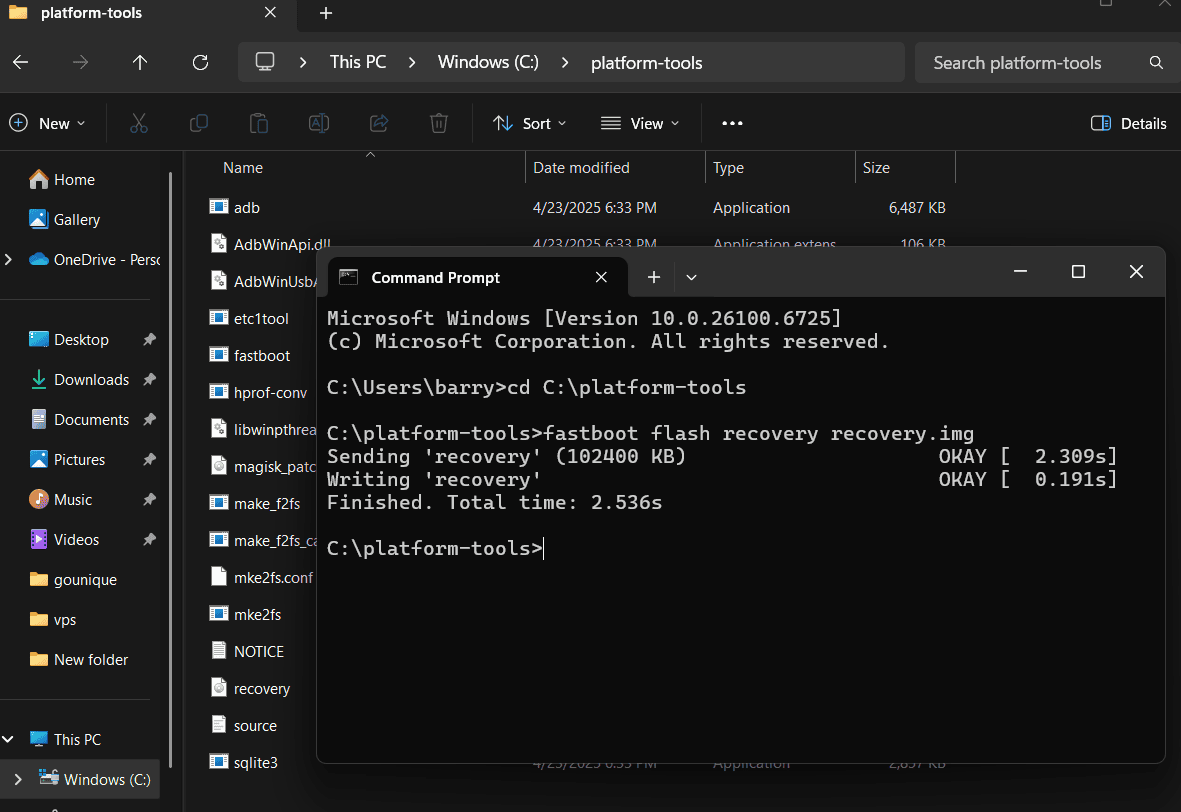
Here are Some Mods you can install after rooting your device ➞ Dolby Atmos Module |Google Camera | HyperOS Camera | Cloudflare 1.1.1.1 DNS | Top Magisk Modules
Final Thoughts
Rooting your Nothing Phone 3a / 3a Pro with either Magisk or KernelSU and adding in the OrangeFox Recovery allows access to all areas of your phone. From completely removing bloatware to being able to install custom ROMs and powerful modules. But also be aware that this process (unlocking the bootloader) will void your warranty and could lead to other problems such as failed OTA updates or apps that do not work for banking if you have not properly enabled Pass Play Integrity.
As long as you follow all steps precisely, make sure to create a full backup of your data and use the correct init_boot.img file from your current firmware you should be able to install a very highly customizable and extremely stable setup on your Nothing Phone 3a series.